A single faulty battery cell can affect the performance, reliability, and safety of an entire battery pack. Whether you use a lithium-ion or lithium polymer battery pack, one weak cell may cause reduced runtime, charging problems, unexpected shutdowns, or even overheating.
So, what should you do if one battery cell goes bad? Can you repair it, replace just that cell, or do you need an entirely new battery pack? The answer depends on the type of failure, battery configuration, and condition of the remaining cells.
Key takeaways
-
One bad battery cell can reduce the capacity and performance of an entire battery pack.
-
The effects depend on whether the cells are connected in series or parallel.
-
Common warning signs include shorter runtime, abnormal voltage readings, overheating, and unexpected shutdowns.
-
A faulty cell should be diagnosed before considering any repair or replacement.
-
Replacing one cell is not always safe because differences in capacity, internal resistance, and age can affect battery performance.
-
If a cell is swollen, leaking, overheating, or suspected of having an internal short circuit, stop using the battery pack and seek professional assistance.
Part 1. What happens when one battery cell goes bad?
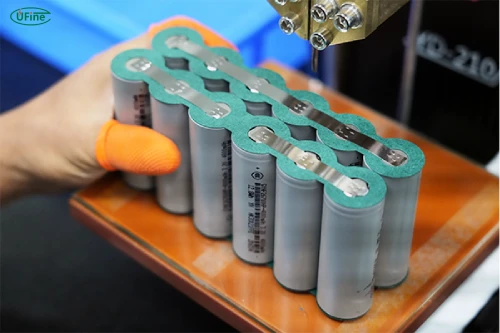
A battery pack is made up of individual battery cells connected to provide the voltage and capacity required by an electronic device. In a lithium polymer battery pack, for example, several pouch cells may be connected in series, parallel, or a combination of both.
When one cell starts to fail, the entire pack may no longer perform as expected. However, the exact impact depends on how the cells are connected and what kind of failure has occurred.
Reduced battery pack capacity
Imagine a battery pack containing four cells with similar capacities. If one cell degrades significantly faster than the others, it may become the limiting factor during charging and discharging.
In a series-connected battery pack, the same current passes through every cell. A cell with lower capacity may reach its discharge limit earlier than the others, forcing the BMS to shut down the entire pack.
As a result, you may notice that your device runs out of power much sooner than it used to, even though the other cells still have usable capacity.
Voltage imbalance and overheating
A faulty cell may also develop a voltage difference compared with the other cells.
For example, if three cells maintain normal voltage while one cell has a significantly lower voltage, the battery pack may experience an imbalance. This can cause the BMS to activate its protection functions or prevent the battery from charging normally.
More seriously, an internally damaged cell may develop a short circuit and generate excessive heat. In severe cases, heat from one failing cell can trigger thermal runaway, potentially affecting neighboring cells.
This is particularly important in compact consumer electronics, where battery cells are installed close to other components and may have limited space for heat dissipation.
What are the signs of a bad battery cell?
You don’t always need specialized equipment to notice that something is wrong with a battery pack. Certain changes in everyday performance can indicate that one or more cells are deteriorating.
However, these symptoms are warning signs rather than proof that a specific cell has failed.
|
Common symptom |
Possible explanation |
|---|---|
|
Battery drains unusually fast |
Reduced capacity in one or more cells |
|
Battery cannot reach full charge |
Voltage imbalance or BMS protection |
|
Device shuts down unexpectedly |
A weak cell reaches its voltage limit |
|
Battery becomes unusually hot |
Abnormal resistance or internal damage |
|
Battery appears swollen |
Possible internal cell damage or gas generation |
|
Charging stops repeatedly |
Cell voltage or temperature protection is activated |
For example, if your wireless device used to operate for eight hours but now shuts down after only three, a degraded battery cell could be one possible reason.
Pay particular attention to physical changes. A swollen lithium polymer pouch cell should never be pressed, punctured, flattened, or forced back into its original shape.
If the battery becomes hot, emits an unusual odor, leaks, hisses, or produces smoke, stop using the device. If it is safe to do so, move away from the device and keep others away. Do not handle or transport a hot, smoking, or damaged battery. Follow local emergency guidance.
Part 2. How to identify a faulty cell in a battery pack?
Before deciding how to fix a bad cell in a battery, you need to establish whether the problem actually comes from an individual cell.
A battery pack can also experience charging circuit problems, loose connections, damaged wiring, or BMS malfunctions. Replacing a cell without identifying the real cause may not solve the problem.
Check individual cell voltages

For battery packs with accessible cell monitoring, technicians can examine individual cell voltage readings using appropriate diagnostic equipment.
A noticeably lower voltage than the other cells may indicate that a cell is discharged, degraded, or faulty. However, voltage differences alone do not confirm permanent cell damage. State of charge, temperature, and recent charging or discharging conditions also affect readings.
Never open a sealed consumer battery pack or probe exposed battery connections if you are not qualified to work with lithium batteries.
Test internal resistance and capacity
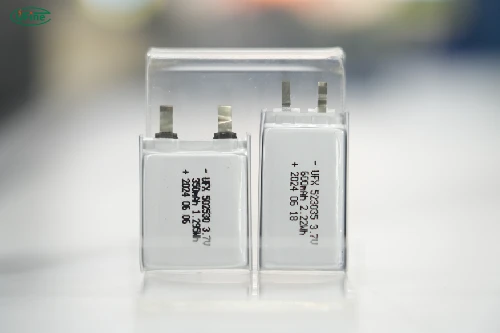
Voltage readings provide only part of the picture.
A professional battery technician may also measure internal resistance and test the capacity of individual cells using suitable equipment.
A cell with unusually high internal resistance may experience greater voltage drop and heat generation under load. Similarly, a cell that delivers substantially less capacity than expected may be approaching the end of its useful life.
Inspect the BMS
The Battery Management System (BMS) monitors important battery parameters, including cell voltage and temperature. Depending on its design, it may also track current, balancing activity, and protection events.
If the BMS repeatedly detects an abnormal cell voltage or temperature, it may interrupt charging or discharging to protect the battery pack.
Checking BMS fault records alongside cell measurements helps technicians distinguish between a cell problem and a protection circuit issue.
Part 3. How to replace a bad battery cell in a battery pack?
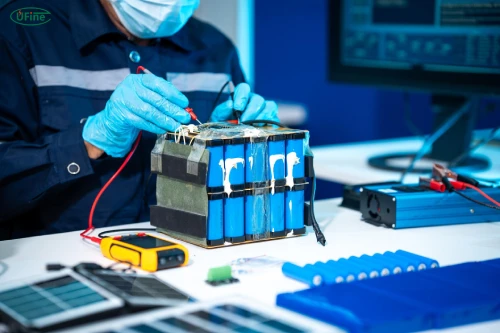
Step 1: Identify and isolate the faulty cell
Before replacing anything, a technician needs to identify which cell has failed.
This involves reviewing individual cell voltage readings, internal resistance, capacity measurements, and BMS fault records. The battery pack should also be inspected for physical damage, swelling, leakage, or signs of overheating.
Once the faulty cell is confirmed, the technician must safely isolate the battery pack and follow appropriate procedures for handling and removing the damaged cell.
Step 2: Check whether the battery pack supports cell replacement
Not every battery pack is designed for individual cell replacement.
Some battery packs have serviceable structures that allow technicians to access individual cells. Others use sealed enclosures, integrated pouch cells, or permanently connected components that make individual replacement impractical.
The technician should also evaluate the condition of the remaining cells. If several cells have already degraded, replacing just one may not provide a reliable long-term solution.
Step 3: Select a compatible replacement cell
Choosing the correct replacement cell is one of the most important parts of the process.
The replacement should match the original battery specifications as closely as possible, including:
-
Battery chemistry: Use a compatible chemistry with the same charging and discharging characteristics.
-
Nominal voltage: The replacement must have the correct nominal and operating voltage.
-
Capacity: Its rated capacity should be compatible with the remaining cells.
-
Internal resistance: Similar internal resistance helps maintain consistent electrical performance.
-
Physical dimensions: The replacement must fit the original battery compartment without compression or modification.
-
Discharge performance: Its continuous and peak discharge capabilities must meet the application requirements.
For example, when replacing a cell in a LiPo battery pack, selecting another LiPo cell with the correct voltage, capacity, dimensions, and discharge characteristics is essential. A cell that physically fits may still be electrically unsuitable.
Step 4: Install the replacement cell
After confirming compatibility, a qualified technician can proceed with the replacement according to the battery manufacturer’s approved repair procedures.
This stage involves handling electrical connections, insulation, mechanical support, and temperature-sensitive battery components. Incorrect connections or excessive heat during the process can damage the cell or create a short-circuit risk.
Special care is necessary with lithium polymer pouch cells because their flexible packaging can be damaged by punctures, bending, compression, or improper handling.
The replacement should also preserve the battery pack’s original protection and connection design. Bypassing safety components or making unauthorized modifications to the BMS is not an acceptable repair method.
Step 5: Test the repaired battery pack
Installing a replacement cell does not mean the repair is complete.
The entire battery pack must undergo appropriate verification before being returned to service. Depending on its design, this may include:
-
Checking individual cell voltage consistency.
-
Measuring internal resistance.
-
Verifying electrical connections and insulation.
-
Testing BMS monitoring and protection functions.
-
Evaluating charging and discharging performance.
-
Checking temperature behavior under approved test conditions.
If the repaired pack cannot meet its original electrical and safety requirements, replacing the entire battery pack is the better option.
When is replacing one cell not recommended?
Single-cell replacement may not be suitable when multiple cells have degraded, the battery pack is sealed and non-serviceable, or the remaining cells cannot be reliably matched with a replacement.
It is also inappropriate to attempt cell replacement on a swollen, leaking, overheated, or suspected internally shorted battery without specialized assessment and handling.
Remember: A successful battery cell replacement is about restoring the reliability of the entire battery pack, not simply making one cell work again.
When should you replace the entire battery pack?
Sometimes replacing one cell is not a practical or safe option.
|
Battery condition |
Recommended solution |
|---|---|
|
One degraded cell in a serviceable pack |
Professional evaluation for cell replacement |
|
Multiple weak or aging cells |
Consider replacing the entire pack |
|
Swollen or leaking cell |
Stop using the pack and arrange safe replacement |
|
Suspected internal short circuit |
Stop using the pack and seek professional handling |
|
Sealed pack with no approved repair procedure |
Replace the complete battery pack |
For consumer electronics such as Bluetooth devices, GPS trackers, portable medical equipment, and wireless accessories, replacing the complete battery pack is often the more practical solution.
This is especially true for compact LiPo battery packs, where the pouch cells, protection circuit, wiring, and insulation are designed as an integrated assembly.
Part 4. How to prevent battery cell failure?
Although battery cells naturally degrade over time, proper battery selection, design, and usage can help reduce premature failures.
For manufacturers of consumer electronics, prevention should start before the battery pack is installed in the final product.
Choose well-matched battery cells
Cells used in the same battery pack should have consistent capacity, internal resistance, voltage characteristics, and quality.
This is particularly important for series-connected packs, where differences between individual cells can affect the performance of the entire assembly.
Working with a reliable battery manufacturer helps ensure that cells are properly selected and tested before assembly.
Use a suitable BMS
A properly designed BMS helps protect battery cells against overcharging, over-discharging, excessive current, and abnormal temperatures.
For multi-cell battery packs, cell voltage monitoring and balancing are also important. A suitable BMS helps maintain more consistent cell conditions and reduces the risk of operating individual cells outside their recommended limits.
Maintain proper charging and operating conditions
Battery life is also affected by how the pack is used.
Using a compatible charger, avoiding excessive temperatures, and following the manufacturer’s recommended charging and discharging limits can help slow battery degradation.
For LiPo batteries used in portable electronics, proper temperature management is particularly important because compact product designs may restrict airflow and heat dissipation.
Work with an experienced battery manufacturer
A reliable battery pack starts with consistent cell quality and appropriate engineering.
For custom consumer electronics, manufacturers should consider battery chemistry, capacity, dimensions, discharge requirements, protection circuits, and operating temperatures during the design stage.
These factors help reduce the likelihood of premature cell failure and improve the reliability of the finished product.
FAQs
1. Can a battery pack still work with one bad cell?
Yes, a battery pack may continue operating with one degraded cell, depending on its configuration and BMS protection settings. However, its runtime, available capacity, and reliability may be reduced. Continued use is not recommended if cell damage is suspected.
2. Will a bad battery cell drain the other cells?
It depends on the type of failure and battery configuration. A cell with internal leakage or an internal short circuit may draw energy from other cells, particularly in a parallel configuration. This can accelerate discharge and create additional safety risks.
3. Does balancing a battery pack fix a bad cell?
No. Cell balancing helps correct differences in state of charge between cells, but it cannot restore lost capacity, repair internal damage, or reverse chemical aging. If a cell is physically or internally damaged, balancing will not make it healthy again.
4. Do all battery packs have a BMS?
No. Not every battery pack includes a separate BMS. Some single-cell battery products use simpler protection circuits, while multi-cell lithium battery packs commonly require more comprehensive monitoring and protection. The appropriate protection design depends on the battery configuration and application.
Related Tags:

More Articles

4S LiFePO4 BMS Wiring: Step-by-Step Connection Guide
Wiring a 4S LiFePO4 BMS for the first time? Discover the correct balance wire connections, terminal functions, and mistakes that could damage your BMS.
Learn 24V Battery Management System
Need a 24V battery management system? Explore wiring diagrams, BMS current ratings, charging compatibility, battery protection, and troubleshooting tips.
How a Series BMS Manages and Protects Lithium Battery Cells
Learn how Series BMS works in lithium battery packs, including cell balancing methods, wiring connections, protection features, and common mistakes.
20S BMS Wiring Diagram: A Step-by-Step Connection Guide
Building a 20S battery pack? Discover how to connect BMS terminals, check balance wires, calculate discharge current, and choose the right protection system.
Can Power Bank Charge an Action Camera Battery?
Find out which power banks work with action cameras, whether you can record while charging, and what to use when your camera runs out of power.