- Part 1. What is lithium polymer battery swelling?
- Part 2. Why do lithium polymer batteries swell?
- Part 3. Is a swollen LiPo battery dangerous?
- Part 4. Will a swollen battery explode?
- Part 5. Can you fix a swollen LiPo battery?
- Part 6. What should you do with a swollen battery?
- Part 7. Swelling in different battery applications
- Part 8. How to prevent lipo battery swelling
- Part 9. How manufacturers reduce swelling risk
- Part 10. How to check if your battery is starting to swell
- Part 11. Proper storage to avoid swelling
- Part 12. FAQs
Key takeaways
- A swollen LiPo battery is caused by internal gas buildup from chemical degradation, not just “ageing.”
- In most cases, it is not immediately explosive, but it is no longer safe to use or recharge.
- You cannot safely fix a swollen lithium polymer battery—replacement is always the correct action.
- Proper charging habits, temperature control, and storage voltage are the most effective ways to prevent swelling.
- Swelling is often a warning sign of deeper internal damage, not just a surface defect.
Part 1. What is lithium polymer battery swelling?
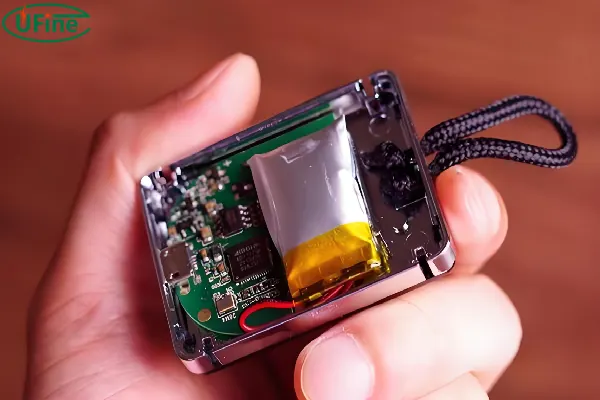
If you’ve ever seen a LiPo battery that looks puffed up or slightly inflated, you’re basically looking at gas buildup inside a sealed pouch cell. This is commonly referred to as lipo battery swelling, lipo battery bulging, or swollen lithium polymer battery.
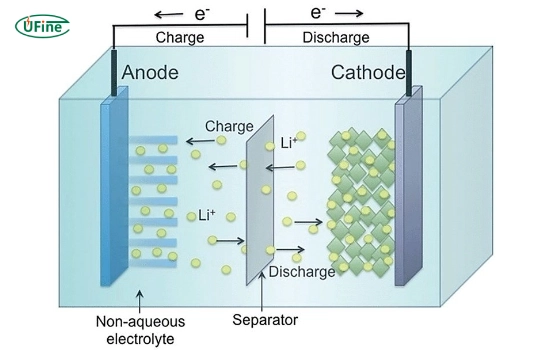
Inside a healthy battery, lithium ions move smoothly between electrodes. But once internal side reactions start, the electrolyte breaks down and produces gases like CO₂ and hydrocarbons. Since the pouch is sealed, there’s nowhere for the gas to escape—so the battery physically expands.
It’s important to understand this:
A swollen battery is not just “visually damaged.” It is chemically unstable.
Part 2. Why do lithium polymer batteries swell?
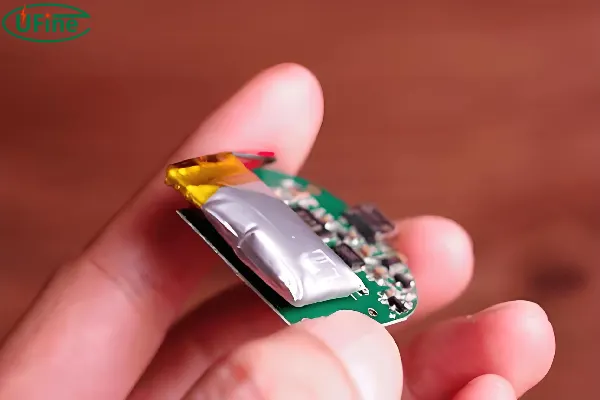
There isn’t just one reason. In reality, swelling is usually the result of multiple stress factors over time.
| Cause | What happens inside the battery |
|---|---|
| Overcharging | Voltage exceeds safe limit → electrolyte breakdown |
| Deep discharging | SEI layer destabilizes → side reactions increase |
| High temperature | Accelerates chemical decomposition |
| Aging cycles | Internal resistance increases → gas formation |
| Physical damage | Internal short pathways may form |
It’s a combination of electrical, thermal, and chemical stress.
Interestingly, many swelling cases don’t happen suddenly. Instead, they develop slowly—sometimes so gradually that you only notice when the casing starts to deform.
Part 3. Is a swollen LiPo battery dangerous?
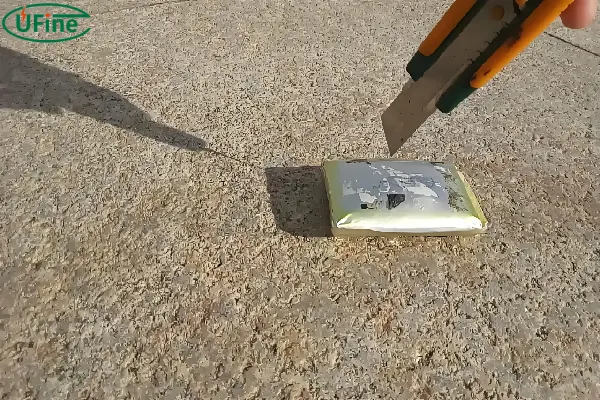
Short answer: yes—but the level of danger depends on how far the damage has progressed.
A mildly swollen battery might still power your device for a short time, but internally, it is already unstable. The biggest risks are:
- Thermal runaway (in extreme cases)
- Fire if punctured or shorted
- Toxic gas release when damaged
According to battery safety guidelines published by U.S. Consumer Product Safety Commission, damaged lithium batteries should never be reused or charged again once swelling is observed.
Risk levels of swollen batteries
| Condition | Appearance | Safety level |
|---|---|---|
| Mild swelling | Slight puff, soft case | Unsafe – replace immediately |
| Moderate swelling | Visible bulge, reduced performance | High risk |
| Severe swelling | Hard deformation, heat | Critical hazard |
Even if it “still works,” that doesn’t mean it’s safe. In fact, continued use is usually when accidents happen.
Part 4. Will a swollen battery explode?
A swollen battery does not usually explode on its own, but it can become dangerous under stress.
Explosion risk increases when:
- The battery is punctured
- It is charged again
- It overheats
- It experiences a short circuit
Think of swelling as a warning stage, not the explosion itself. The real danger happens when the damaged structure is forced to keep operating.
Part 5. Can you fix a swollen LiPo battery?
This is where a lot of misinformation exists online.
The reality is simple:
You cannot safely fix a swollen lithium polymer battery.
Some DIY “solutions” suggest releasing gas or pressing the battery flat, but these are extremely dangerous because:
- You may ignite flammable electrolyte
- Internal damage cannot be reversed
- Pressure release does not restore chemical stability
Once swelling occurs, the internal structure is permanently compromised. So instead of searching “how to fix swollen lipo battery”, the correct approach is safe disposal and replacement.
Part 6. What should you do with a swollen battery?
If you notice swelling, your priority is safety—not recovery.
Here’s what you should do:
- Stop using it immediately
- Disconnect from any device or charger
- Store it in a fire-resistant container
- Take it to a certified battery recycling center
Never throw it into regular trash or keep it indoors for long-term storage.
This applies not only to small electronics but also larger systems like EV packs, where swelling can indicate deeper module imbalance or thermal issues.
Part 7. Swelling in different battery applications
Not all swelling is the same. The context matters a lot.
| Application | Typical cause | Risk level |
|---|---|---|
| Smartphones & drones | Overcharge, aging | Medium |
| RC / hobby LiPo | High discharge stress | High |
| EV battery packs | Thermal imbalance, cell aging | Critical |
In EV systems, swelling is often managed by BMS (Battery Management System), but once it appears, it usually indicates that internal degradation has already progressed significantly.
Part 8. How to prevent lipo battery swelling
Prevention is really about how you treat the battery daily. Most swelling cases are avoidable.
Key habits include:
- Avoid overcharging above 4.2V per cell
- Keep storage voltage around 3.7–3.85V
- Don’t expose batteries to heat or direct sunlight
- Use proper balance chargers
- Avoid leaving fully charged batteries unused for long periods
These habits significantly reduce the risk of lipo battery swelling and extend cycle life.
Part 9. How manufacturers reduce swelling risk
Modern battery systems already include multiple safety layers:
- Battery Management System (BMS) for voltage and temperature control
- Cell balancing to prevent uneven degradation
- Thermal protection circuits
- Improved electrolyte formulations
For EV-grade systems, engineers also design redundant safety margins to reduce gas generation during stress cycles.
However, no system is completely immune—especially under abuse conditions.
Part 10. How to check if your battery is starting to swell
Early detection can prevent serious risks. You can usually spot issues by:
- Slight case deformation when placed on a flat surface
- Unexpected heat during charging
- Noticeable drop in runtime or efficiency
- Soft or uneven surface pressure
If you see even early signs, it’s already time to replace the battery.
Part 11. Proper storage to avoid swelling
Storage is one of the most overlooked factors in battery health.
If you’re not using your LiPo battery for a while, avoid leaving it:
- Fully charged
- Fully drained
- In a hot environment
Instead, store it at partial charge in a cool, dry place. This alone prevents a large percentage of lithium polymer battery swelling cases in real-world usage.
Part 12. FAQs
1. Can a swollen LiPo battery still hold a charge?
Yes, but capacity is usually reduced and unstable. Even if it charges normally, internal damage is already present.
2. Is it safe to transport a swollen lithium battery?
Generally no. Most carriers classify swollen batteries as hazardous material due to fire risk during pressure or impact.
3. What happens if you ignore a swollen battery?
The swelling can worsen over time, increasing the risk of leakage, overheating, or failure under load.
4. Why does a battery swell faster in hot weather?
High temperatures accelerate electrolyte breakdown, which increases gas formation inside the battery.
5. Can a swollen battery damage the device it is in?
Yes. Expansion can physically stress internal components, connectors, or casing of the device.
6. What is the difference between swelling and leakage?
Swelling is gas buildup inside the casing, while leakage means electrolyte has already escaped—both are dangerous but leakage is more severe.
Related Tags:

More Articles

JST vs Molex: The Right Battery Connector Choice
JST or Molex for your battery? Learn how connector selection affects current, voltage drop, reliability, and device performance.
Custom Battery Pricing: Costs Manufacturers Don’t Mention
A low battery quote may not be the final cost. Discover common hidden expenses that affect custom lithium battery projects.
Battery Wire Length: Hidden Cause of Power Loss
A longer battery wire can cause voltage drop, power loss, and unstable operation. Learn how wire length affects battery performance.
How Device Sleep Modes Affect Battery Life
Think sleep mode extends battery life? Learn why devices still drain power and how firmware, hardware, and batteries affect runtime.
LiPo Battery and PCB Design: Clearance, Insulation, and Placement
Learn how to optimize LiPo battery PCB clearance, insulation, placement, wiring, and thermal design—and avoid common integration mistakes.