- Key takeaways
- Part 1. How to check whether your action camera supports power bank charging
- Part 2. How to choose the right power bank
- Part 3. Can you record while charging?
- Part 4. What else can you use to charge an action camera battery?
- Part 5. How to extend recording time without buying a bigger power bank
- Conclusion
- FAQs
Action cameras are built for adventure, but their batteries do not always last as long as your plans. Whether you are hiking, traveling, vlogging, or recording a long cycling trip, running out of power at the wrong moment can be frustrating.
The demand for action cameras is also growing. A market report published in October 2026 estimates that the global action camera market will reach $4 billion in 2026, up from $3.6 billion in 2025. This estimate reflects the continued role of compact cameras in outdoor recreation and content creation, although market-size figures vary by research firm and methodology.
So, can you use a power bank to charge an action camera? Yes, many models support it, but charging behavior depends on your specific camera. Some can recharge their batteries while switched off, some can operate from external power while recording, and others may stop charging the battery during recording.
Here is how to choose the right power source, solve common charging problems, and keep your camera running for longer.
Key takeaways
- Most action cameras with supported USB charging can use a compatible power bank.
- Check your camera’s input requirements and charging protocol rather than choosing by wattage alone.
- External power may run the camera without actually charging its internal battery during recording.
- Wall chargers, computers, car chargers, dedicated battery chargers, and compatible external power accessories are other options.
- Heat, cable quality, and waterproofing can affect how safely and practically you charge your camera.
Part 1. How to check whether your action camera supports power bank charging
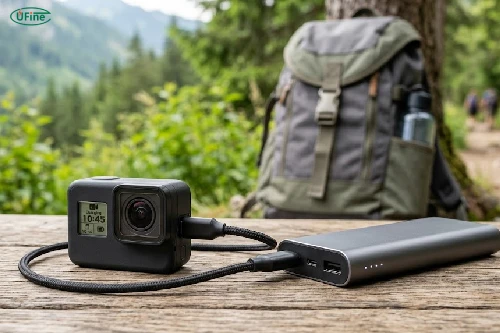
Before buying a power bank, check the camera’s manual. A USB port does not automatically mean every charger or power-delivery mode is supported.
Look for three things:
- Input requirements: the supported voltage and current, such as 5 V input or a specified USB Power Delivery profile.
- Charging behavior: whether the camera charges its battery while switched off, while powered on, or during recording.
- External power support: whether the camera can run directly from USB power, including with the battery removed, if the manufacturer permits it.
For example, GoPro’s official guidance for its MISSION 1 series says external power requires a source providing at least 5 V/2 A. It also explains that the battery does not gain charge while the camera is recording. This illustrates why you should check the exact model rather than assume all action cameras behave the same way.
Part 2. How to choose the right power bank
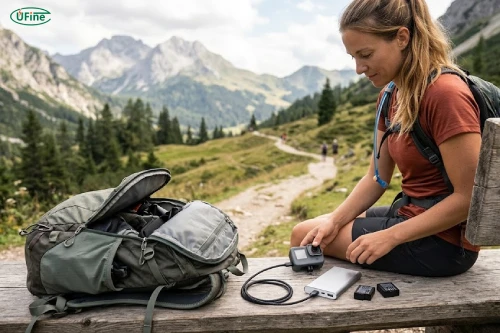
Check the output, not just the advertised wattage
A power bank with a high maximum wattage is not automatically the best choice. Your camera must support the output and charging protocol being used. A suitable USB cable matters too, especially when USB-C fast charging is involved.
If your camera specifies a particular input rating, choose a reputable power bank that supports it. USB Power Delivery (USB PD) can be useful when the camera supports it, but it will not make an incompatible device charge faster.
Estimate how much capacity you need
Power bank capacity is usually advertised in milliamp-hours (mAh), but that number alone can be misleading because batteries operate at different voltages. Watt-hours (Wh) provide a more useful energy comparison.
A simple estimate is:
Suppose a power bank stores 37 Wh and the overall conversion efficiency is an illustrative 80%. About 29.6 Wh may reach the device. The actual amount varies with the power bank, cable, voltage conversion, temperature, and charging behavior.
|
What to check |
Why it matters |
|---|---|
|
Wh capacity |
Helps estimate the energy available for charging |
|
Supported output |
Must match the camera’s input requirements |
|
USB-C or USB-A ports |
Must match the camera and cable setup |
|
Port sharing |
Output may change when charging multiple devices |
|
Size and weight |
Affects how practical it is to carry during activities |
Remember that energy supplied by a power bank does not translate directly into recording time. The camera consumes power while operating, and some models do not charge the battery during recording.
How battery design affects compact action cameras
For action camera manufacturers, battery design involves more than maximizing capacity. The battery must fit a compact enclosure while balancing weight, operating time, discharge performance, safety, and heat management.
Lithium polymer (LiPo) pouch cells can offer flexibility in battery shape and dimensions, which may help product developers working with limited internal space. However, a custom LiPo cell is not automatically a drop-in replacement for a branded camera battery. Voltage, dimensions, connectors, protection circuitry, discharge requirements, and charging compatibility all need to be considered.
Ufine Battery develops customized lithium battery solutions for consumer electronics manufacturers. If you’re developing a compact camera or another portable imaging device, the battery design can be tailored around the product’s electrical and mechanical requirements.
Why your action camera may not charge from a power bank
If your camera does not charge as expected, the problem may not be the battery itself.
The camera shows no charging indicator. Try a different compatible cable and check that both connectors are fully inserted. Confirm that the power bank is switched on and supports the camera’s required output.
The power bank keeps switching off. Some power banks automatically shut down when the connected device draws very little power. Try another supported output port or a power bank with a low-current mode, if available.
The battery percentage drops during recording. Your camera may be consuming power faster than the external source can supply it, or it may be running from USB power without charging its internal battery.
Charging is unusually slow. Check the cable, supported charging protocol, and whether other connected devices are sharing the power bank’s output.
The camera becomes hot. Stop recording and charging if the temperature seems abnormal. Let the camera cool in a safe environment before trying again.
For model-specific guidance, Sony provides an official explanation of how compatible power banks can supply power to supported cameras, including the limitations of powering and charging at the same time: Sony’s guide to using a mobile battery with a camera.
Part 3. Can you record while charging?
Sometimes, yes. But running from external power and charging the internal battery are two different things.
Depending on the model, your camera may:
- Charge the battery when recording is stopped.
- Continue recording while drawing power from the USB connection.
- Stop charging the internal battery while recording.
- Require the battery to remain installed, or support external power with the battery removed.
If you plan to record for hours, check the manufacturer’s instructions and test your setup before an important shoot.
Heat is another consideration. High-resolution recording, high frame rates, direct sunlight, and limited airflow can all contribute to rising temperatures. External power may add to the heat generated around the camera’s charging port or battery compartment. Stop using the setup if the camera becomes abnormally hot, and follow the manufacturer’s safety guidance.
Also consider waterproofing. Opening a battery door or leaving a port exposed can compromise water resistance. Do not assume a camera remains waterproof when a charging cable is connected.
Part 4. What else can you use to charge an action camera battery?
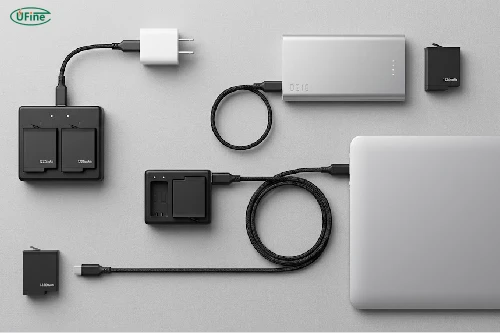
A power bank is convenient, but it is not your only option. The best alternative depends on whether you need a quick recharge, a spare battery ready to use, or power during a long recording session.
1. Wall charger
A compatible wall adapter is usually the easiest choice at home or in a hotel. It can provide a stable power source, and the camera may charge faster when switched off. Follow the manufacturer’s input specifications.
2. Dedicated external battery charger
If your camera uses removable batteries, a compatible charging dock lets you charge spare batteries separately while continuing to use the camera. This is particularly useful for travel, sports, and multi-day shoots.
3. Computer USB port
A laptop or desktop can be useful when no wall outlet is available. However, charging may be slower than with a suitable wall adapter, and some cameras require particular settings or do not support charging in every operating mode.
4. Car charger
A compatible USB car adapter is useful during road trips. Check its output specifications and avoid leaving batteries or electronics in an overheated parked vehicle.
5. Manufacturer-approved battery grips or external power accessories
Some camera systems offer battery grips, external power handles, or model-specific charging accessories. These can provide a more integrated setup than a loose power bank and cable, but compatibility is model-dependent.
One important distinction: a USB connection may power the camera without actually charging its battery. Always check which function your particular camera supports.
Part 5. How to extend recording time without buying a bigger power bank
Sometimes, a few changes to your shooting habits can make a bigger difference than upgrading your equipment.
Choose a resolution and frame rate that suit your project. Recording at the highest settings can increase power consumption, so use them when you actually need the extra detail or slow-motion footage.
Turn off Wi-Fi, Bluetooth, voice control, or bright displays when they are not needed. Keep the camera out of direct sunlight where possible, and avoid enclosing it in a setup that restricts airflow.
For long sessions, start with fully charged equipment and test your complete setup beforehand. If you’re filming action sports or moving through wet environments, spare batteries may be safer and more convenient than leaving a cable attached.
Conclusion
So, can you use a power bank to charge an action camera? In many cases, yes. The key is to confirm your camera’s charging requirements, choose a compatible power source, and understand whether the camera can charge its internal battery while recording.
A wall charger is convenient at home, a dedicated battery charger is useful for removable batteries, and a power bank or supported external power accessory can help when you’re away from an outlet. Choose the setup that suits your recording conditions, and test it before relying on it for a long shoot.
FAQs
Does charging an action camera frequently damage its battery?
Frequent charging does not automatically damage an action camera battery. Lithium-ion batteries can be recharged as needed, but high temperatures and prolonged exposure to extreme conditions can accelerate battery aging. Use compatible charging equipment and avoid letting the camera overheat during charging.
Should you fully drain an action camera battery before recharging it?
No. Modern lithium-ion batteries generally do not need to be fully discharged before recharging. In fact, repeatedly running the battery completely flat may contribute to additional wear. Recharging when convenient is usually more practical.
Can you charge an action camera with a solar power bank?
Yes, if the solar power bank provides a compatible output for your camera. However, solar charging speed depends heavily on sunlight, panel size, weather, and the power bank’s internal charging system. For reliable charging during a trip, charge the power bank in advance rather than depending entirely on real-time sunlight.
Does recording in 4K use more battery than recording in 1080p?
It often does, although the difference depends on the camera, frame rate, image processing, stabilization, and other active features. Higher-resolution or high-frame-rate recording can increase power consumption, so test your preferred settings to estimate realistic battery life.
What should you do if an action camera battery becomes swollen?
Stop using or charging the battery immediately. Do not press, puncture, or attempt to repair it. Keep it away from heat and combustible materials, and follow the manufacturer’s instructions and local guidance for safe battery disposal. Replace it with a compatible battery from a reliable source.
Related Tags:

More Articles

Compare DJI Osmo batteries by model, capacity, runtime, and compatibility. Find the right battery before you buy and avoid costly mistakes.
Are GoPro Batteries Interchangeable? A Model-by-Model Guide
Compare GoPro batteries by model, price, capacity, and runtime. Find compatible options, avoid costly mistakes, and choose the best battery for you.
How to Reduce Power Consumption in Battery-Powered Devices?
Discover practical ways to reduce power consumption, eliminate hidden energy waste, and extend battery life in portable electronic devices
Power Consumption Calculator: Calculate Watts & Battery Life
Find out how much power your electronic device consumes. Learn easy calculations, understand battery energy, and estimate runtime before choosing a battery.
Buck vs. Boost vs. Buck-Boost Converter: Which Is Best for Battery?
Not sure which converter your battery-powered device needs? Compare Buck, Boost, and Buck-Boost designs and discover what affects voltage stability and runtime.