For battery-powered products such as wireless earbuds, smartwatches, portable medical devices, and IoT sensors, efficient power use offers a more immediate benefit: longer operating time between charges without necessarily increasing battery size.
The good news is that you don’t always need a larger battery to improve runtime. By identifying energy waste, optimizing hardware and software, and selecting a battery that matches your device’s requirements, you can often achieve better results with the same battery capacity.
Key takeaways
- Measure actual power consumption before making design changes.
Optimize processors, displays, wireless modules, and voltage regulators.
- Reduce standby current by using sleep modes and disabling unnecessary functions.
- Choose a lithium polymer battery that matches your voltage, capacity, and discharge requirements.
- Test runtime under realistic operating conditions instead of relying solely on theoretical calculations.
Part 1. Identify what is consuming the most power
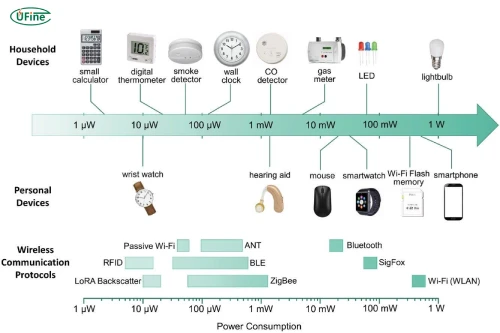
Before changing your design, find out where the energy goes. Otherwise, you may spend time optimizing a component that contributes very little to overall power consumption.
Start by measuring voltage and current during different operating conditions. A multimeter can help with basic measurements, while a power analyzer or current profiler is more useful for tracking small, rapidly changing currents.
Pay particular attention to active, idle, and sleep modes. A device might consume relatively little power when processing data but continue drawing current while waiting for its next command.
For example, if your wireless sensor consumes 80mA during transmission but only 2mA in sleep mode, reducing the time spent transmitting could significantly improve battery life.
Establish a baseline before making changes. Record the average current, operating duration, and power consumption for each mode. You can then compare the results after optimization to see which changes actually work.
Part 2. 5 Ways to reduce power consumption
1 Optimize hardware components for lower power consumption
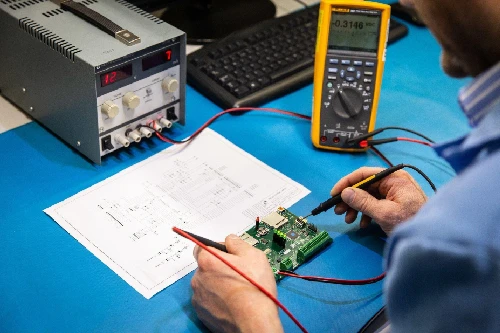
Hardware selection has a direct impact on how efficiently a device uses energy. Components that perform similar functions can have very different power requirements, so consider efficiency early in product development.
Choose components that match your application. A high-performance processor may be unnecessary for a simple temperature sensor. Similarly, a display with excessive brightness or resolution can increase power consumption without improving the user experience.
Use efficient voltage regulators. Batteries rarely supply exactly the voltage required by every component. Voltage regulators convert the battery output to suitable levels, but inefficient conversion wastes energy as heat. Select a regulator that performs well across your device’s expected load range, including very low standby currents.
Avoid unnecessary hardware. Extra indicator lights, sensors, and communication modules may consume power even when their main functions are not needed. If a component is not essential, consider removing it or making it independently switchable.
The goal is not simply to choose the lowest-power component available. You want components that deliver the required performance with the least practical energy consumption.
2 Reduce power consumption through software optimization
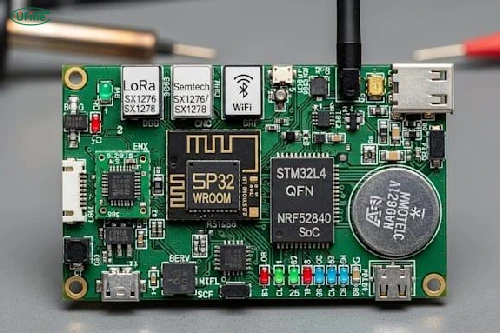
Software can influence battery life just as much as hardware. Even efficient components can waste energy if they remain active unnecessarily.
One useful approach is to let the processor enter a sleep state whenever it has no work to do. Instead of repeatedly checking for new data, use interrupts or event-driven operation to wake the processor only when necessary.
Wireless communication also deserves attention. Frequent Bluetooth or Wi-Fi transmissions can consume considerable energy, especially in devices that send small amounts of data throughout the day. Where the application allows it, group data into fewer transmissions, reduce unnecessary polling, and use suitable low-power communication modes.
Displays offer another opportunity. Automatic screen timeout, adaptive brightness, and reduced refresh rates can help extend runtime in products with screens.
However, optimization should not come at the expense of usability. Excessively long sleep intervals may delay notifications, while aggressive power-saving settings may cause users to miss important updates. Test the balance between responsiveness and efficiency using realistic usage patterns.
3 Reduce standby and idle power consumption
A device does not need to be performing its main function to consume energy. Background monitoring, wireless connections, indicator LEDs, and sensors can continue drawing current when the product appears inactive.
For battery-powered electronics, even a small standby current can accumulate over time.
Consider a device that continuously draws 2mA while idle. Over 24 hours, it consumes:
2mA × 24h = 48mAh
That is a meaningful amount for a compact device with a small battery, particularly if it spends most of its life waiting rather than actively operating.
To reduce standby consumption, disable unused peripherals, switch off unnecessary indicator lights, and select low-power states that retain only essential functions. Review the leakage current of individual components and check whether voltage regulators or protection circuits continue drawing power during sleep.
For a broader explanation of standby energy measurement, the U.S. Department of Energy provides guidance on measuring standby power.
4 Optimize battery charging and power management
An efficient device needs more than low-power components. Its power management system must also deliver energy efficiently and keep the battery operating within its specified limits.
Choose charging circuits and power management ICs that suit the battery chemistry, voltage range, and load requirements. Avoid unnecessary voltage conversions, and evaluate regulator efficiency at both typical and low-current operating points.
Battery protection is equally important. Appropriate protection circuitry helps prevent unsafe operating conditions, while battery monitoring can provide more reliable estimates of remaining charge.
Temperature also matters. Very low temperatures can reduce the energy available from a battery under load, while excessive heat can accelerate battery aging. Design the enclosure and charging system to support the battery manufacturer’s recommended operating conditions.
These measures do not eliminate the need for good hardware and software design, but they help ensure that the energy stored in the battery is used effectively and safely.
5 Choose the right battery for longer runtime
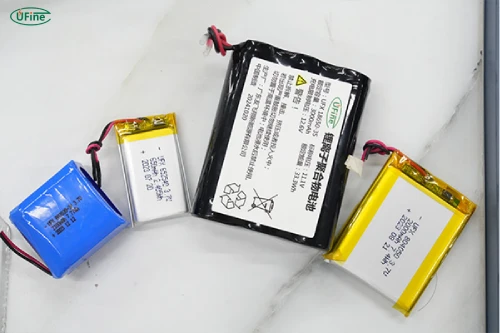
Reducing power consumption and selecting the right battery should be treated as complementary tasks. A larger battery can provide more stored energy, but it does not automatically make the device more efficient.
For compact consumer electronics, lithium polymer batteries can be useful because their dimensions and shapes can be customized to fit available space. The right choice depends on the application’s voltage, capacity, discharge requirements, and mechanical constraints.
When evaluating battery options, consider the following factors:
| Battery consideration | Why it matters |
|---|---|
| Voltage | Must be compatible with the device’s power circuit |
| Capacity (mAh) | Indicates how much charge the battery can deliver under specified conditions |
| Energy (Wh) | Helps estimate available energy and operating time |
| Discharge capability | Determines whether the battery can safely supply the required continuous and peak current |
| Size and weight | Affect product dimensions, portability, and design flexibility |
| Protection requirements | Help maintain safe operation within the intended application |
For example, a wearable device may prioritize a thin, lightweight battery, while a portable instrument may require greater capacity and higher discharge capability.
If standard battery dimensions do not fit your product, a customized lithium polymer battery may help balance available space, runtime, and performance. However, battery selection should follow the device’s electrical requirements rather than capacity alone.
Ufine Battery offers customized capacity, voltage, dimensions, and discharge rates to meet your device’s power requirements — from initial prototypes to large-scale production.
Get Your Custom Battery QuotePart 3. Calculate how much runtime you can gain
Once you have optimized the device, calculate the potential improvement in battery runtime.
A basic formula is:
Runtime (hours) = Usable battery energy (Wh) ÷ Average power consumption (W)
Suppose a device has 7.4Wh of usable battery energy and initially consumes an average of 1.48W.
Its estimated runtime is:
7.4Wh ÷ 1.48W = 5 hours
Now assume hardware and software improvements reduce average power consumption by 25%, bringing it down to 1.11W.
The new estimated runtime becomes:
7.4Wh ÷ 1.11W ≈ 6.67 hours
| Measurement | Before optimization | After optimization |
|---|---|---|
| Usable battery energy | 7.4Wh | 7.4Wh |
| Average power consumption | 1.48W | 1.11W |
| Estimated runtime | 5 hours | 6.67 hours |
In this example, reducing average power consumption by 25% increases theoretical runtime by approximately 33%. This illustrates why efficiency improvements can sometimes deliver better results than simply increasing battery capacity.
Actual runtime may differ because of temperature, voltage conversion losses, battery aging, and variations in device activity. Validate your calculations through testing.
Part 4. Common mistakes when reducing power consumption
One common mistake is focusing only on peak power. Peak current matters for safe operation and component selection, but average power consumption usually provides a better basis for estimating runtime.
Another mistake is increasing battery capacity before identifying the source of energy waste. A larger battery may solve a runtime problem temporarily, but it can also increase product size, weight, and cost.
Designers sometimes overlook standby current, too. A device that operates efficiently when active may still drain its battery quickly if it spends long periods in an inefficient idle state.
Finally, aggressive power-saving settings can create new problems. Components may take longer to wake up, communication may become less responsive, or the device may fail to meet its performance requirements. Every optimization should be evaluated against the product’s actual operating needs.
Conclusion
Reducing power consumption in battery-powered devices requires a combination of efficient hardware, thoughtful software, effective power management, and appropriate battery selection.
Start by measuring real-world energy use, then focus on the improvements that offer the greatest benefit. Reducing standby current, optimizing wireless activity, and selecting efficient components can often extend runtime without increasing battery size.
For compact consumer electronics, a well-matched lithium polymer battery can support these improvements by providing the required capacity, voltage, and discharge performance within the available space. The best results come from optimizing the complete power system rather than relying on any single component.
FAQs
1. What is the most effective way to reduce power consumption?
Measure the device first, identify its largest energy consumers, and optimize the components or operating modes responsible for the most waste.
2. How does sleep mode reduce battery consumption?
Sleep mode reduces activity in the processor and other components when they are not needed, lowering current draw until the device wakes up.
3. Does a higher-capacity battery make a device more energy-efficient?
No. A higher-capacity battery stores more energy, but efficiency depends on how effectively the device uses that energy.
4. How can I reduce standby power consumption?
Disable unnecessary peripherals, reduce leakage current, use low-power operating states, and avoid keeping communication modules active without a clear reason.
5. Which electronic components consume the most power?
Processors, displays, wireless transmitters, motors, and other high-load components can consume substantial power, depending on the application and operating conditions.
6. How does Bluetooth affect battery life?
Bluetooth consumes energy during communication and related processing. Its impact depends on transmission frequency, connection behavior, signal conditions, and the Bluetooth implementation.
7. Can software updates reduce power consumption?
Yes. Firmware updates can improve scheduling, sleep behavior, communication efficiency, and peripheral control, although results depend on the specific device and software changes.
Related Tags:

More Articles

Are GoPro Batteries Interchangeable? A Model-by-Model Guide
Compare GoPro batteries by model, price, capacity, and runtime. Find compatible options, avoid costly mistakes, and choose the best battery for you.
Power Consumption Calculator: Calculate Watts & Battery Life
Find out how much power your electronic device consumes. Learn easy calculations, understand battery energy, and estimate runtime before choosing a battery.
Buck vs. Boost vs. Buck-Boost Converter: Which Is Best for Battery?
Not sure which converter your battery-powered device needs? Compare Buck, Boost, and Buck-Boost designs and discover what affects voltage stability and runtime.
How to Match 18650 Cells for a Reliable Battery Pack?
Building an 18650 battery pack? Learn how to compare cell capacity, voltage, and internal resistance to avoid mismatches and improve reliability.
Why Do 18650 Battery Packs Get Hot During Discharge?
Is your 18650 battery pack overheating under load? Learn what causes excess heat, how to spot dangerous symptoms, and what to do next.