- Key takeaways
- Part 1. Why battery-powered devices need DC-DC converters
- Part 2. What is a Buck converter?
- Part 3. What is a Boost converter?
- Part 4. What is a Buck-Boost converter?
- Part 5. Buck vs. Boost vs. Buck-Boost: the key differences
- Part 6. How converter choice affects battery life
- Part 7. How to choose the right converter for your device
- FAQs
If you’re developing an IoT sensor, a wearable, a portable medical device, or another battery-powered product, three common options will likely come up: the Buck converter, Boost converter, and Buck-Boost converter.
They all regulate DC voltage, but they behave differently as battery voltage changes. Let’s look at how each one works, what can go wrong in real applications, and how converter performance affects your device’s runtime and reliability.
Key takeaways
- A Buck converter steps voltage down, while a Boost converter steps it up. A Buck-Boost converter can do both when its topology supports it.
- Battery voltage changes during discharge, so a converter must work across the battery’s actual operating range—not just its nominal voltage.
- Conversion efficiency, quiescent current, peak-load response, and thermal performance can all affect battery life.
- A converter’s rated output current doesn’t guarantee that it can handle startup surges or brief load peaks.
- The best solution depends on the battery, load, required output voltage, and operating conditions—not simply the converter’s headline efficiency.
Part 1. Why battery-powered devices need DC-DC converters
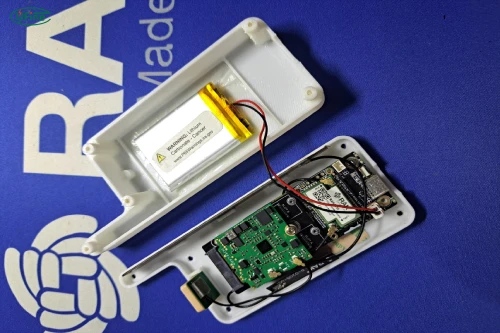
A battery doesn’t provide a perfectly constant voltage. Its voltage changes with state of charge, load current, temperature, and battery chemistry.
For example, a conventional single-cell lithium-ion battery is often described as a 3.6 V or 3.7 V battery, but its voltage is higher when fully charged and falls as it discharges. The exact limits depend on the cell specification and the product’s protection settings.
Now imagine your product uses a microcontroller that requires a regulated 3.3 V supply. A battery voltage that starts above 4 V may eventually fall close to, or below, the voltage needed to maintain that output. Without an appropriate power-conversion stage, the circuit may stop operating correctly before the battery’s stored energy is fully used.
A DC-DC converter helps by regulating the voltage supplied to the load. Depending on the design, it can step voltage down, step it up, or handle both conditions.
However, voltage regulation isn’t the only consideration. A converter also consumes energy, generates heat, and responds to changes in load. That’s why two devices using batteries of similar capacity can have noticeably different runtimes.
Part 2. What is a Buck converter?
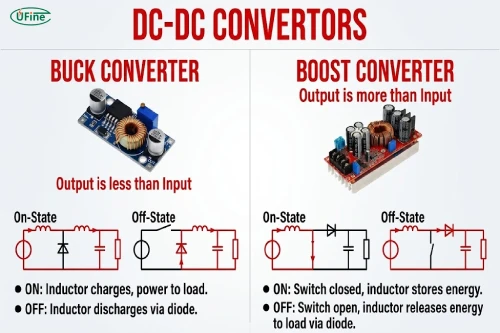
A Buck converter is a step-down DC-DC converter. It takes a higher input voltage and produces a lower regulated output voltage.
Suppose your battery pack supplies 12 V, but part of your circuit needs 5 V. A Buck converter can reduce the voltage to the required level without using a linear regulator to dissipate the excess voltage as heat.
Buck converters are widely used in embedded electronics, industrial control boards, portable equipment, and battery packs that power several voltage rails.
Their main limitation is straightforward: a conventional Buck converter cannot maintain an output voltage above its input voltage. As the battery voltage falls toward the required output, the converter may reach its operating limit. The exact point depends on its minimum input voltage, duty-cycle range, and other design parameters.
For example, if a Buck converter is designed to supply 3.3 V, you shouldn’t assume it will maintain a stable 3.3 V output all the way down to a battery voltage of 3.3 V. The circuit may need some additional input-voltage headroom.
This matters when you want to use as much of the battery’s available capacity as possible. A converter that works well with a fully charged battery may behave differently near the end of discharge.
Part 3. What is a Boost converter?
A Boost converter does the opposite of a Buck converter: it increases a lower DC input voltage to a higher output voltage.
Imagine a portable device powered by a single lithium-ion cell that needs a stable 5 V supply for a sensor, display, or USB output. Since the battery voltage can fall below 5 V during discharge, a Boost converter can raise the voltage to the required level.
But boosting voltage comes with a trade-off: the lower the input voltage, the more input current the converter generally needs to deliver the same output power.
Consider a device that requires 5 V at 1 A, giving an output power of 5 W. If the battery voltage is 3.7 V and the converter is 90% efficient, the approximate battery current is:
Input current (A) = Output power (W) / (Input voltage (V) x Efficiency)
Input current = 5 / (3.7 x 0.90) ≈ 1.50 A
If the battery voltage drops to 3.0 V under similar conditions, the input current rises to approximately 1.85 A. This higher current can increase voltage drop across the battery’s internal resistance, wiring, and connectors.
A Boost converter also has an important limitation. A conventional Boost topology can raise voltage, but it cannot normally regulate the output downward when the input voltage rises above the target. If the battery’s voltage range crosses the required output voltage, a different topology may be necessary.
Part 4. What is a Buck-Boost converter?
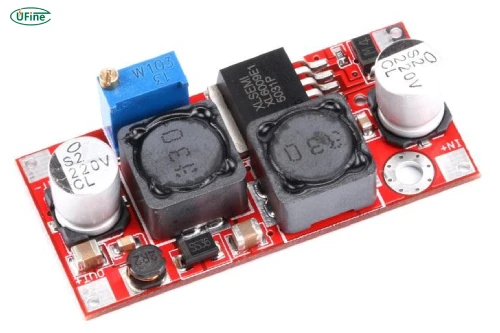
A Buck-Boost converter combines step-down and step-up operation. It can be useful when a battery’s voltage starts above the required output and later falls below it.
For example, suppose a single-cell lithium-ion battery powers a device that needs a regulated 3.3 V rail. The battery may be above 3.3 V after charging and below 3.3 V later in discharge. A suitable Buck-Boost converter can regulate the output in both conditions.
There is one technical detail worth knowing: Buck-Boost is a family of converter topologies, not one universal circuit. A traditional inverting Buck-Boost converter produces an output with reversed polarity. A non-inverting four-switch Buck-Boost can step voltage up and down while maintaining the same output polarity as the input.
The trade-off is that some Buck-Boost designs require more components or more complex control than a basic Buck or Boost converter. Their actual efficiency, size, cost, and maximum output current depend on the particular device and operating conditions.
This doesn’t mean Buck-Boost is automatically less efficient. It means you should evaluate its performance across the full battery voltage range and load profile, rather than comparing only headline efficiency figures.
Part 5. Buck vs. Boost vs. Buck-Boost: the key differences
The three topologies solve related but different problems. This table summarizes their practical differences.
| Feature | Buck converter | Boost converter | Buck-Boost converter |
|---|---|---|---|
| Main function | Steps voltage down | Steps voltage up | Steps voltage up or down |
| Typical use | Higher-voltage battery powering a lower-voltage rail | Lower-voltage battery powering a higher-voltage rail | Battery voltage moves above and below the required output |
| Main limitation | Needs sufficient input voltage above the output | Cannot normally step down when input exceeds output | May involve greater circuit complexity; performance depends on topology |
| Important design concern | Dropout or loss of regulation near low battery voltage | Higher input current at low battery voltage | Efficiency and regulation across both operating regions |
| Common applications | Embedded boards, motor-control electronics, auxiliary power rails | Displays, LEDs, sensors, USB outputs | Single-cell battery devices needing a stable supply across discharge |
The important distinction is the relationship between the battery’s entire voltage range and the required output. Looking at the nominal battery voltage alone can lead to the wrong conclusion.
Part 6. How converter choice affects battery life
A converter doesn’t create energy. It changes voltage and current while consuming some energy in the process.
A useful starting point is:
Input power (W) = Output power (W) / Efficiency
Suppose your device needs 5 W continuously. At 90% efficiency, the converter draws approximately 5.56 W from the battery. At 80% efficiency, it draws 6.25 W. The difference becomes additional energy drawn from the battery, much of which is lost as heat.
However, efficiency is not a fixed number. A converter might perform well at moderate load but less efficiently when the device is barely active. This is especially important for IoT sensors, smart locks, trackers, and wearables that spend most of their time in standby and only occasionally transmit data.
In these applications, quiescent current (Iq) deserves close attention. It is the current required by the converter’s internal circuitry to remain operational under its specified measurement conditions. Shutdown current, external feedback components, and other leakage paths can also contribute to standby drain.
For a device that sleeps for hours between brief bursts of activity, a converter with low standby consumption may provide more practical benefit than one with a slightly higher peak efficiency. Texas Instruments explains these trade-offs in its technical resources on DC-DC converters and low-power operation.
Also consider what happens as battery voltage falls. A converter that needs more input current to maintain output power may experience greater conduction losses in the battery and wiring. If those losses cause voltage to sag far enough, the device could shut down even though some usable battery energy remains.
Ufine Battery provides customized lithium battery solutions for different voltage, capacity, size, and application requirements, from prototype development to mass production.
Find Your Battery SolutionPart 7. How to choose the right converter for your device
Now that the operating differences are clear, the selection process becomes more practical.
Start with the battery’s actual voltage range. For a rechargeable cell, use the manufacturer’s specified full-charge voltage and the lowest voltage your system is designed to use. The latter may be determined by the battery specification, protection circuit, and system requirements.
Next, define the load. A microcontroller drawing a few milliamps in sleep mode has different needs from a radio module that briefly draws hundreds of milliamps, or a motor that produces a large startup surge.
Then compare the converter’s input range, output voltage, continuous output-current capability, peak-current limits, efficiency curves, and thermal performance. Check whether it can maintain regulation at both the highest and lowest battery voltages.
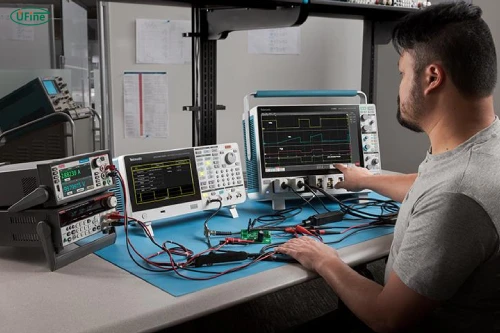
Finally, test the complete device under realistic conditions. Measure the battery voltage and converter output during startup, wireless transmission, and other high-load events. If the device spends most of its time asleep, measure standby current too. A bench test at one battery voltage and one load current will not tell the whole story.
FAQs
1. What is the difference between a switching converter and a linear regulator?
A switching converter uses high-frequency switching and energy-storage components to regulate voltage efficiently. A linear regulator controls voltage by dissipating excess energy as heat. Switching converters are often preferred when efficiency is important, while linear regulators can be simpler and produce less switching noise.
2. Why do DC-DC converters need input and output capacitors?
Input capacitors help supply pulsed switching current and reduce disturbances on the power source. Output capacitors help smooth voltage ripple and support the load during transient changes. Their capacitance, equivalent series resistance (ESR), voltage rating, and placement can affect stability and performance.
3. What is the difference between continuous conduction mode and discontinuous conduction mode?
In continuous conduction mode (CCM), the inductor current remains above zero during a switching cycle. In discontinuous conduction mode (DCM), it falls to zero for part of the cycle. Some converters automatically change operating modes depending on load, which can affect efficiency, ripple, and electromagnetic noise.
4. How does PCB layout affect DC-DC converter performance?
Poor layout can increase parasitic resistance and inductance, leading to additional losses, voltage spikes, noise, and unstable operation. High-current switching paths should generally be kept short, and grounding and component placement should follow the converter manufacturer’s layout recommendations.
5. What is the difference between synchronous and asynchronous converters?
An asynchronous converter typically uses a diode as part of its power-conversion path. A synchronous converter replaces that diode with a controlled MOSFET, which can reduce conduction losses in many operating conditions. Synchronous designs can improve efficiency, particularly at higher currents, but their control and implementation may be more complex.
Related Tags:

More Articles

How to Match 18650 Cells for a Reliable Battery Pack?
Building an 18650 battery pack? Learn how to compare cell capacity, voltage, and internal resistance to avoid mismatches and improve reliability.
Why Do 18650 Battery Packs Get Hot During Discharge?
Is your 18650 battery pack overheating under load? Learn what causes excess heat, how to spot dangerous symptoms, and what to do next.
18650 Battery BMS: How to Get the Specs Right
Learn how to choose a BMS for an 18650 battery pack. Compare voltage, current ratings, protection features, and balancing before you buy.
Why Does My Ring Camera Battery Drain So Fast or Stop Charging?
Is your Ring camera battery draining fast or not charging? Discover common causes, practical fixes, and when to replace the battery.
Battery Pack Overheating? Causes and Solutions
Is your battery pack getting too hot? Learn the common causes, identify potential risks, and discover practical ways to prevent overheating.