- Key takeaways
- Part 1. What are battery terminal connectors?
- Part 2. Battery terminal connector types: detailed comparison
- Part 3. Common battery terminal types by application
- Part 4. How to choose the right battery terminal connector
- Part 5. How to connect battery terminals safely
- Part 6. Common battery terminal connection problems
- Part 7. How to maintain battery terminal connectors
- Part 8. FAQs about battery terminal connector types
Battery terminal connectors form the electrical link between a battery and its cables, equipment, or power system. The correct connector reduces contact resistance, voltage drop, heat, corrosion, and unexpected power loss.
This guide explains the main battery terminal connector types used in automotive, marine, RV, solar, industrial, and backup power systems. It also covers connector selection, installation, inspection, and maintenance.
Key takeaways
- Battery terminals are the conductive points on the battery. Terminal connectors attach cables or equipment to those points.
- Common battery terminal types include top posts, side posts, threaded studs, L terminals, blade terminals, and cable lugs.
- Most 12V car batteries use top-post or side-post terminal connections. Marine and lithium batteries often use threaded studs with ring lugs.
- Connector size must match the terminal, cable gauge, current, polarity, and installation environment.
- Do not use a universal torque value. Follow the battery and connector manufacturer’s specifications.
- For a common negative-ground vehicle, disconnect the negative terminal first. When reconnecting, install the positive terminal first.
Part 1. What are battery terminal connectors?
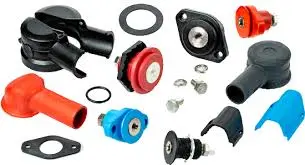
Battery terminal connectors link a battery to cables, busbars, chargers, motors, inverters, and other loads. Common materials include copper, brass, lead alloy, steel, and aluminum. Tin, nickel, or zinc coatings can improve corrosion resistance.
A reliable terminal connection must provide two functions:
- Electrical contact: It must carry the required current with low resistance.
- Mechanical retention: It must stay secure during vibration, impact, and temperature changes.
A loose, corroded, or undersized connector raises resistance. This can cause voltage drop, hard starting, unstable power, heat, damaged insulation, or connector failure.
Battery terminals vs. battery connectors
These terms describe different parts of a battery connection:
- Battery terminal: A post, stud, tab, or threaded insert built into the battery.
- Terminal connector: A clamp, lug, ring terminal, or bolt assembly attached to the terminal.
- Battery plug connector: A removable plug such as XT60, Anderson, JST, Deans, or EC5.
- Battery port: An interface for power, charging, communication, or service access.
For example, an M8 stud on a 12V marine battery is the battery terminal. The tinned copper ring lug bolted to it is the terminal connector.
Small lithium battery packs, drones, and RC products often use plugs instead of exposed posts. See our guide to JST, Molex, XT, and Anderson battery connectors for common plug types.
Part 2. Battery terminal connector types: detailed comparison
| Terminal or Connector Type | Common Applications | Typical Connection | Main Advantages | Main Limitations |
|---|---|---|---|---|
| Top-Post Terminal | Passenger cars, light trucks, marine batteries | Clamp around a tapered post | High current capacity and wide availability | Post sizes vary; exposed posts may corrode |
| Side-Post Terminal | Automotive batteries and compact engine bays | Threaded bolt into a recessed terminal | Low profile and less exposed metal | Wrong bolt length can damage the terminal |
| Threaded Stud Terminal | Marine, RV, solar, industrial and lithium batteries | Ring lug or busbar secured with a nut | Stable high-current connection | Thread size and torque must match |
| L-Type or Flag Terminal | UPS, mobility equipment and sealed lead-acid batteries | Cable lug bolted to a right-angle tab | Compact and easy to access | Less mechanical strength than large studs |
| Blade or Faston Terminal | Small sealed batteries, alarms and control systems | Female quick-disconnect pushed onto a flat tab | Fast assembly without a bolt | Limited current and vibration resistance |
| Ring Terminal or Cable Lug | Automotive, marine, battery banks and industrial systems | Closed eye installed over a stud or bolt | Secure and suitable for high current | Must match the cable, hole size and crimp tool |
1. Top-post battery terminal connectors
Top-post batteries have two tapered posts on the upper surface. A split clamp fits around each post and is tightened with a bolt.
They are common in cars, trucks, boats, agricultural equipment, and general-purpose 12V batteries. They support high starting current and are easy to service.
Common formats include SAE posts and smaller JIS pencil posts. Their dimensions differ, so the same clamp may not fit both.
Best practice: Check the post standard, size, and polarity layout. Never force the wrong clamp onto the post.
2. Side-post battery terminal connectors
Side-post batteries have recessed threaded terminals in the battery case. A bolt passes through the cable connector and threads into the terminal.
The low-profile design suits engine bays with little space above the battery. It is mainly used in automotive systems.
The bolt diameter, thread, and length must match. A short bolt may not hold the cable. A long bolt may bottom out or damage the terminal.
Best practice: Use the specified terminal bolt. Do not correct the wrong bolt with extra washers or spacers.
3. Threaded stud terminals
Threaded studs are common on marine, RV, solar, industrial, and lithium batteries. Typical metric sizes include M5, M6, and M8.
A ring terminal, cable lug, busbar, or fuse holder fits over the stud and is secured with a nut. This creates a stable high-current connection.
Stud size alone does not define current capacity. Terminal design, lug area, cable size, contact resistance, and battery construction also matter.
Use the battery manufacturer’s torque value. Low torque can cause movement and heat. Excess torque can strip the thread, rotate the terminal, or damage the seal.
When replacing a lead-acid battery with a lithium model, the existing top-post clamp may not fit an M6 or M8 stud. Review how to convert M6 or M8 lithium terminals to standard battery posts before choosing an adapter.
4. L-type or flag battery terminals
An L-type terminal is a right-angle metal tab with a bolt hole. It is common on sealed lead-acid batteries, UPS units, mobility equipment, emergency lights, and backup systems.
Its shape saves space and allows the cable to run along the top or side of the battery.
An L terminal uses a bolt and cable lug. A blade or Faston terminal uses a push-on connector.
Best practice: Support the cable so its weight does not bend the tab. Add strain relief in vibrating equipment.
5. Blade or Faston battery terminals
Blade terminals are flat metal tabs used on many small sealed lead-acid batteries. They are also called Faston, quick-connect, or push-on terminals.
A matching female receptacle slides onto the tab. Common F1 and F2 terminals have different sizes and are not interchangeable.
Blade terminals allow fast assembly without bolts. They suit moderate-current equipment better than high-current starter systems.
Best practice: Match the receptacle to the blade size and cable gauge. Replace loose or heat-damaged connectors.
6. Ring terminals and cable lugs
A ring terminal has a closed eye that fits over a bolt or threaded stud. It cannot slide off while the fastener remains installed.
A cable lug is a broader category. Ring, fork, pin, palm, and compression terminals are all types of cable lugs.
Ring terminals are common in vehicles, boats, solar systems, inverters, industrial equipment, and backup power systems. Tinned copper lugs offer better corrosion resistance in marine and humid conditions.
The lug must match:
- The cable conductor material
- The cable cross-sectional area or AWG size
- The battery stud or bolt diameter
- The required current
- The crimping tool and die
- The operating environment
UL 486A-486B covers many wire connectors. UL 486C covers splicing connectors, while UL 310 covers quick-connect terminals. The correct standard depends on the connector design and application.
What about clamp and alligator-clip connectors?
Spring clamps and alligator clips provide fast temporary connections for testing, charging, and laboratory work.
They should not replace a permanent connector. Dirt, corrosion, movement, or weak springs can reduce contact pressure and create heat.
For permanent use, choose a bolted clamp, ring terminal, busbar, approved plug, or another connector rated for the current and environment.
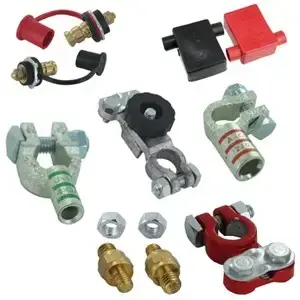
Part 3. Common battery terminal types by application
| Application | Common Battery Terminal Type | Typical Cable Connector | Selection Notes |
|---|---|---|---|
| Passenger car starter battery | SAE or JIS top post | Top-post clamp | Check post size, polarity, and cable direction |
| Side-terminal car battery | Recessed threaded terminal | Side-post connector and bolt | Match the thread and bolt length |
| Marine or RV battery | Threaded stud or dual terminal | Tinned copper ring lug | Prioritize corrosion resistance and cable support |
| Solar battery bank | M6, M8, or larger stud | Compression lug or busbar | Check continuous current, surge current, and spacing |
| Industrial equipment | Stud, post, or application-specific terminal | Heavy-duty lug or busbar | Consider vibration, service access, and fault current |
| UPS or alarm battery | Blade, L terminal, or small stud | Quick-disconnect or ring terminal | Match the terminal and cable size |
| RC car, drone, or hobby battery | Wire lead or battery port | XT60, XT90, Deans, EC, JST, or similar plug | These are plug connectors, not battery posts |
12V battery connector types
“12V battery connector types” may refer to battery terminals or removable power plugs.
Common 12V battery terminal types include:
- SAE top posts for automotive starter batteries
- JIS pencil posts for some Asian vehicle batteries
- Side-post terminals for selected automotive batteries
- M6 or M8 studs for lithium, marine, RV, and storage batteries
- L terminals for sealed lead-acid batteries
- F1 and F2 blades for alarms, UPS units, and small equipment
Common removable plugs include Anderson, XT60, XT90, EC5, and SAE two-pin connectors. Select them by cable size, continuous current, peak current, and operating environment.
Automotive battery terminal types
Top-post and side-post terminals are the main automotive battery terminal types. Some vehicles use remote terminals linked to a battery under a seat, in the trunk, or behind a panel.
Positive and negative posts may have different sizes. Their clamps are also polarity-specific. The wrong clamp may feel tight but still make poor contact.
Before replacing a car battery connector, confirm:
- Top-post, side-post, or remote-terminal design
- Positive and negative post dimensions
- Cable entry angle
- Cable gauge
- Required accessory connections
- Available terminal clearance
Replace terminals that are cracked, stretched, badly corroded, or unable to tighten. See our guide to replacing a damaged car battery connector for the correct steps.
Part 4. How to choose the right battery terminal connector
1. Identify the terminal type and size
Check whether the battery uses a top post, side post, threaded stud, L terminal, blade terminal, wire lead, or plug connector.
Use the battery specification when available. Otherwise, measure the post, thread, tab, or mounting hole. Do not select a connector from a photo alone.
See our guide to identifying lithium battery terminal types for common terminal formats.
2. Check the current rating
The connector must support both continuous current and short current peaks. Starters, motors, winches, and inverters often draw much higher current during startup.
Current capacity depends on the connector material, contact area, cable size, crimp quality, tightening force, and operating temperature.
3. Match the connector to the cable
The terminal barrel must match the cable gauge. An oversized barrel can create a weak crimp. An undersized barrel can damage the conductor strands.
Use the correct crimping tool and die. Pliers, hammers, and vises do not provide a reliable high-current crimp.
4. Match the stud, hole, and thread
A ring terminal should fit closely over the stud. Too much clearance can reduce contact area and allow movement.
For threaded terminals, confirm the thread diameter, pitch, bolt depth, washer type, and tightening torque. The wrong bolt can damage the terminal or fail to secure the cable.
5. Choose the right material
Copper offers high conductivity. Brass combines conductivity with strength. Tinned copper is better suited to marine, humid, and outdoor systems.
Avoid unapproved combinations of different metals. Moisture and salt can cause galvanic corrosion at the connection.
6. Consider vibration and the environment
Vehicles, boats, robots, and industrial machines need secure connectors and cable strain relief. Heavy cables should not hang directly from a small stud, blade, or L terminal.
For wet, dusty, or corrosive locations, consider plated terminals, sealed heat-shrink tubing, terminal boots, water-resistant housings, and corrosion-resistant fasteners.
7. Check installation space
Confirm terminal height, cable bend radius, tool access, cover clearance, and service space.
A post adapter may solve a terminal mismatch, but it adds another contact point. Check our battery post adapter compatibility guide before using one in a high-current system.
Part 5. How to connect battery terminals safely
These steps apply to common low-voltage batteries and negative-ground vehicle systems. Follow the battery and equipment manufacturer’s instructions. High-voltage EV and hybrid batteries require trained technicians.
Turn off the system
Switch off the ignition, charger, inverter, and connected loads. Remove metal jewelry and wear eye protection and suitable gloves.
Confirm voltage and polarity
Locate the positive “+” and negative “−” markings. Do not rely only on cable color. Also confirm the system voltage and grounding design.
Disconnect the battery
On a negative-ground system, remove the negative cable first, then the positive cable. This reduces short-circuit risk when a tool touches nearby metal.
The OSHA battery safety guidance also recommends disconnecting the grounded cable first.
Inspect and clean the terminals
Check for corrosion, cracks, melted insulation, damaged threads, and broken cable strands. Replace damaged parts before reconnection.
Clean the contact surfaces with a battery terminal brush or approved cleaner. Keep dirt and liquid away from battery vents.
The CCOHS battery handling guide also recommends cleaning corrosion from terminal posts and cable clamps.
Prepare the cable terminal
Strip only the required insulation length. Insert the cable fully and crimp it with the correct tool and die.
Use sealed heat-shrink tubing when moisture protection or strain relief is needed.
Install and tighten the connector
Place the connector flat against the terminal. Avoid stacking many ring terminals on one stud. Use a busbar or distribution block for multiple cables.
Tighten to the manufacturer’s torque value. Too little torque can cause heat. Too much can damage the thread or battery seal.
Reconnect the battery
On a negative-ground system, connect the positive cable first and the negative cable last.
Jump-starting may require a different ground point. Follow the vehicle manufacturer’s procedure.
Protect and test the connection
Install terminal covers, cable clamps, and strain relief. Apply an approved terminal protectant to the outside of the completed connection when needed.
Check that the connector cannot move by hand. Then test the system under normal load. Excess voltage drop or rapid heating indicates a poor connection.
Part 6. Common battery terminal connection problems
| Problem | Likely Cause | Recommended Action |
|---|---|---|
| Connector becomes hot | Loose joint, poor crimp, corrosion, undersized connector or high current | Disconnect safely, inspect the full joint and replace damaged parts |
| Vehicle starts intermittently | Loose top-post clamp, internal cable corrosion or poor ground connection | Clean, tighten to specification and test voltage drop |
| White or green deposits appear | Electrolyte vapor, moisture, copper oxidation or damaged sealing | Clean safely and inspect the battery for leakage |
| Ring lug rotates on the stud | Incorrect torque, oversized hole or poor washer arrangement | Use the correct lug and mounting hardware |
| Side-post bolt will not tighten | Wrong bolt length, damaged thread or debris in the insert | Stop tightening and inspect the terminal |
| Blade connector feels loose | Wrong receptacle size or reduced spring tension | Replace it with the correct quick-disconnect terminal |
| Battery post is damaged | Over-tightening, forced removal or incorrect clamp size | Replace the damaged battery or use an approved repair method |
Part 7. How to maintain battery terminal connectors
Inspect the connections regularly
Inspection frequency depends on the application. Vehicles, boats, outdoor systems, and vibrating equipment need more frequent checks than clean indoor backup systems.
Look for:
- Loose clamps, nuts, or bolts
- White, blue, or green corrosion
- Darkened or melted insulation
- Cracked terminal covers
- Broken cable strands
- Movement between the cable and lug
- Water, salt, oil, or chemical contamination
- Heat marks around the connector
Keep the contact surfaces clean
Disconnect the battery before cleaning exposed terminal connections. Use tools and cleaning products suitable for the battery chemistry and connector material.
For lead-acid batteries, remove deposits from the post, clamp, tray, and hold-down parts. Keep liquid and debris away from vent openings. Lithium batteries may have different enclosure and cleaning requirements, so follow the battery manufacturer’s instructions.
Control cable stress
Secure heavy cables near the battery. Leave enough length for service, but avoid loose loops that can vibrate or rub against sharp edges.
Do not use the battery terminal as the main mechanical support for an inverter cable, busbar, fuse holder, or accessory harness.
Monitor temperature and voltage drop
A connector may appear clean while having high internal resistance. During operation, compare the connector temperature with nearby cables and terminals.
For high-current systems, a millivolt voltage-drop test under load can identify resistance that is not visible during inspection. Investigate any connection that is much hotter than similar connections in the same circuit.
Replace damaged connectors
Replace a connector when it is cracked, stretched, deeply corroded, overheated, unable to tighten, or no longer matched to the terminal. Do not repair a critical high-current connection with temporary clips, twisted wire, or an improvised metal spacer.
Part 8. FAQs about battery terminal connector types
What is the L-type battery terminal?
An L-type battery terminal is a right-angle metal tab with a bolt hole. It is common on sealed lead-acid batteries, UPS units, mobility equipment, and compact backup power systems.
What is the most widely used type of battery terminal?
The top-post terminal is the most common type on passenger car batteries. Marine, RV, solar, and lithium batteries often use threaded stud terminals instead.
Do you connect red or black first on the battery?
For a common negative-ground vehicle, connect the red positive cable first. Connect the black negative cable last. Follow the equipment manufacturer’s instructions when the grounding design is different.
Which battery terminal do I connect to first?
Connect the positive terminal first and the negative terminal last during installation. When disconnecting the battery, remove the negative terminal first.
What is the difference between ring and lug terminal connectors?
A cable lug is a broad category of cable-end terminals. A ring terminal is a cable lug with a closed circular hole that fits over a bolt or battery stud.
Related Tags:

More Articles

JST vs Molex: The Right Battery Connector Choice
JST or Molex for your battery? Learn how connector selection affects current, voltage drop, reliability, and device performance.
Custom Battery Pricing: Costs Manufacturers Don’t Mention
A low battery quote may not be the final cost. Discover common hidden expenses that affect custom lithium battery projects.
Battery Wire Length: Hidden Cause of Power Loss
A longer battery wire can cause voltage drop, power loss, and unstable operation. Learn how wire length affects battery performance.
How Device Sleep Modes Affect Battery Life
Think sleep mode extends battery life? Learn why devices still drain power and how firmware, hardware, and batteries affect runtime.
LiPo Battery and PCB Design: Clearance, Insulation, and Placement
Learn how to optimize LiPo battery PCB clearance, insulation, placement, wiring, and thermal design—and avoid common integration mistakes.