- Key takeaways
- Part 1. Understand what a BMS does
- Part 2. Start with your 18650 battery pack configuration
- Part 3. Choose the correct BMS voltage rating
- Part 4. Calculate the required BMS current rating
- Part 5. Check the BMS protection functions
- Part 6. Decide whether you need passive or active balancing
- Part 7. Consider temperature sensors and communication features
- Part 8. A practical example of choosing a BMS for a 4S2P pack
- Part 9. Common mistakes when choosing a BMS
- 10. FAQs
Selecting a BMS isn’t as simple as finding a circuit board with the right voltage. You also need to consider the battery chemistry, series and parallel configuration, current demand, charging requirements, and protection features.
A BMS that looks suitable on paper may still cause problems if it cannot handle startup current, uses the wrong voltage thresholds, or doesn’t fit the pack’s thermal and installation requirements.
Let’s look at how to choose a BMS that matches your 18650 battery pack and its actual application.
Key takeaways
- Match the BMS to the cell chemistry and series count. The term 18650 describes a cell’s size, not its chemistry.
- Check both continuous and peak current. A BMS must handle normal operation and temporary surges.
- Coordinate the BMS with the charger and load. Voltage settings, current limits, and protection behavior must work together.
- Consider balancing and temperature monitoring. These features help manage differences between cells and detect unsafe operating conditions.
- Evaluate the complete battery pack. The BMS cannot compensate for unsuitable cells, poor wiring, or inadequate thermal design.
Part 1. Understand what a BMS does
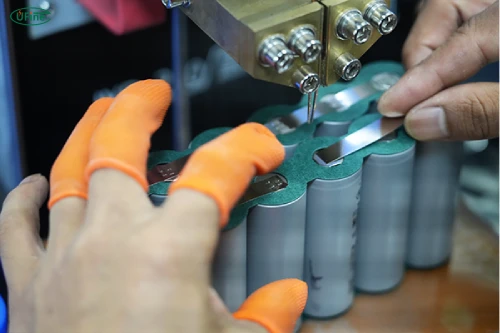
A battery management system monitors and helps protect a rechargeable battery pack. Depending on its design, it can detect overvoltage, undervoltage, excessive current, short circuits, and abnormal temperatures. Many BMS boards also provide cell balancing to help keep series-connected cell groups at similar voltage levels.
Why does this matter for an 18650 battery pack?
When you connect multiple lithium-ion cells, they don’t always behave identically. Small differences in capacity, internal resistance, temperature, and aging can cause their voltages to diverge during charging and discharging.
Without suitable protection, one cell group could reach its voltage limit before the others. A properly specified BMS helps prevent this situation from developing into a more serious problem.
However, a BMS is not a replacement for a suitable charger, quality cells, or good pack construction. It is one part of a complete battery safety system, and its actual capabilities depend on the model and configuration.
Part 2. Start with your 18650 battery pack configuration
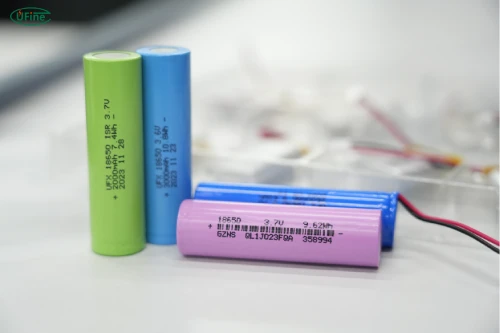
Before comparing BMS products, determine how the cells are connected.
In a battery pack, series connections increase voltage, while parallel connections increase capacity and can increase the pack’s available current capability. The exact results depend on the cells and the design.
For example, a 4S2P pack contains four series-connected groups, with two cells connected in parallel in each group. That means eight cells in total.
For a conventional lithium-ion cell rated at 3.6–3.7V nominally, a 4S pack has a nominal voltage of 14.4–14.8V. If each cell has a maximum charging voltage of 4.2V, the pack’s maximum charging voltage is 16.8V.
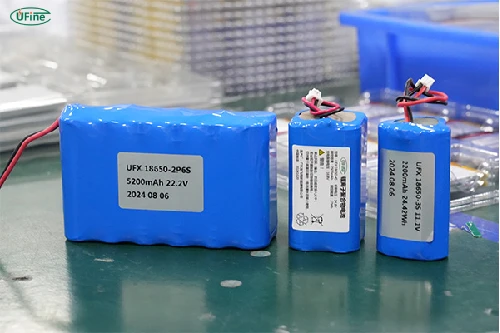
The important detail is that the BMS series rating follows the number of series-connected groups, not the total number of individual cells. A suitable 4S BMS may therefore be used with a 4S2P pack, provided its other electrical and installation requirements are met.
| Pack configuration | Total cells | Nominal pack voltage* | Typical full-charge voltage* |
|---|---|---|---|
| 2S1P | 2 | 7.2–7.4V | 8.4V |
| 3S2P | 6 | 10.8–11.1V | 12.6V |
| 4S2P | 8 | 14.4–14.8V | 16.8V |
| 7S2P | 14 | 25.2–25.9V | 29.4V |
| 10S2P | 20 | 36–37V | 42.0V |
Note: Illustrative values for conventional lithium-ion cells with a 3.6–3.7V nominal voltage and a 4.2V maximum charging voltage. Always follow the actual cell manufacturer’s specifications.
One more point deserves attention: 18650 is a cylindrical cell format, not a specific battery chemistry. Conventional lithium-ion cells and lithium iron phosphate (LiFePO₄) cells have different voltage characteristics. Never choose a BMS solely because its label says “18650” or because its voltage rating seems close. Confirm that it supports your exact chemistry and cell voltage limits.
Part 3. Choose the correct BMS voltage rating
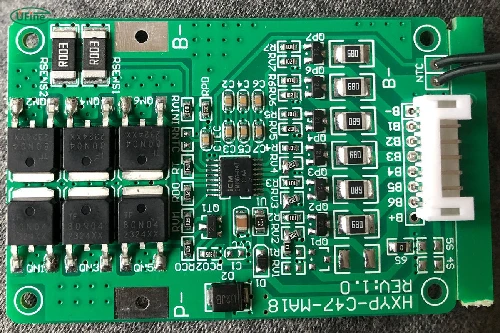
Voltage compatibility involves more than matching the nominal voltage printed on a battery pack.
You need to consider three things: the pack’s nominal voltage, its maximum charging voltage, and the BMS’s configured protection thresholds.
Let’s return to the 4S2P example. If the pack uses conventional lithium-ion cells rated for charging up to 4.2V each, the maximum pack charging voltage is 16.8V. The charger must be designed for this pack and use the appropriate charging profile.
A BMS intended for a different series count may have unsuitable voltage thresholds or cell-monitoring connections. Even if the board appears to power on, that doesn’t make it appropriate for the pack.
Also, don’t treat the BMS overvoltage protection threshold as the normal charging target. Protection is a safeguard, not a charging strategy. The charger should regulate voltage and current correctly during normal operation, while the BMS provides additional protection if something goes wrong.
For a custom battery pack, confirm the cell chemistry, maximum charge voltage per cell, number of series groups, and the BMS manufacturer’s specified operating range before making a selection.
Part 4. Calculate the required BMS current rating
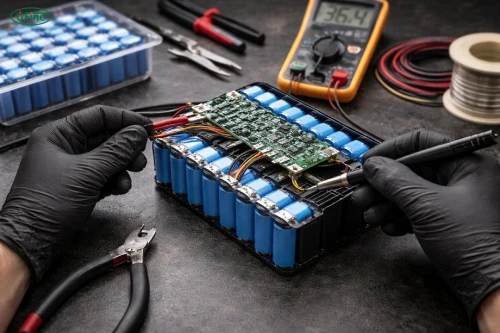
Current is another common source of trouble. A BMS may have the correct voltage rating but still shut down when the device draws more current than expected.
Start with the power demand of your application. For a load with a known power requirement, you can estimate current using:
Current (A) = Power (W) / Voltage (V)
Suppose a device consumes 200W from a 4S battery pack. At the nominal voltage of 14.8V, its estimated current is:
Current = 200W / 14.8V ≈ 13.5A
That is only a starting estimate. As the battery voltage drops during discharge, the current required to deliver the same power increases. Conversion losses in the device can also raise the battery-side current.
You should therefore evaluate the load at the lowest expected operating voltage, rather than sizing the BMS using nominal voltage alone.
Another important distinction is continuous current versus peak current. Motors, pumps, power tools, and other devices with high startup loads may briefly draw much more current than they use during normal operation. If the BMS’s overcurrent protection trips during startup, the device may repeatedly shut down even though its average power consumption appears acceptable.
For a pack with parallel cells, don’t assume the BMS current rating can be calculated simply by multiplying the cell current rating by the number of parallel cells. Parallel cells share the load, but actual current distribution depends on cell characteristics, connections, temperature, and pack construction. The BMS, wiring, connectors, and other components must all support the intended current.
Finally, check how the manufacturer defines its current rating. A board’s advertised maximum may depend on cooling, ambient temperature, installation, and other conditions. A nominal rating without those details isn’t enough to establish that the board will work safely in your application.
Part 5. Check the BMS protection functions
Not every BMS offers the same protection features. The right choice depends on how the battery will be charged, discharged, installed, and used.
Overcharge protection helps prevent a cell group from exceeding its permitted voltage. Overdischarge protection helps stop the pack from continuing to discharge after a group falls below its specified lower limit. These functions are especially important when the device itself does not reliably monitor battery voltage.
Overcurrent and short-circuit protection are equally important. They help interrupt abnormal current conditions, although response times and trip thresholds vary by design. If your application has a high startup current, check the protection behavior carefully so normal operation doesn’t cause unwanted shutdowns.
Temperature protection deserves attention, too. A battery pack operating inside an enclosed device may heat up more than one installed in a ventilated housing. Depending on the BMS, temperature sensors may help prevent charging or discharging outside the permitted temperature range.
Also consider what happens after a protection event. Some BMS boards recover automatically when the fault disappears, while others require the charger to be connected or a specific reset procedure. This behavior can affect how easily a device returns to service.
The key is to select protection thresholds that match the cell manufacturer’s limits and the application’s requirements. Generic protection values should not be assumed suitable for every lithium-ion cell.
Part 6. Decide whether you need passive or active balancing
When multiple cell groups are connected in series, their voltages can gradually become different. Cell balancing helps manage these differences, particularly during charging.
Passive balancing works by dissipating a small amount of energy from higher-voltage groups, usually through resistors. It is common in many conventional battery packs because the circuitry is relatively simple.
Active balancing transfers energy between cell groups instead of primarily dissipating the excess energy as heat. Depending on the design, it can be useful in larger or more demanding systems where balancing efficiency matters, but it typically adds complexity and cost.
So which one should you choose for an 18650 battery pack?
For many relatively straightforward applications, a suitable BMS with passive balancing may be sufficient. Active balancing may be worth evaluating when the pack is large, balancing requirements are more demanding, or system-level efficiency justifies the added complexity.
Neither option eliminates the need for well-matched cells. Balancing cannot restore lost capacity, repair a damaged cell, or make an unsuitable cell safe to use. If a pack repeatedly develops large voltage differences, investigate cell condition and pack construction rather than relying on balancing alone.
Part 7. Consider temperature sensors and communication features
The physical installation of a BMS can be just as important as its electrical ratings.
If the battery pack will operate in a compact enclosure, near a motor, or in an environment with limited airflow, check whether the BMS supports temperature sensing and whether the sensor can be positioned appropriately. A sensor placed far from the cells or near an unrelated heat source may not accurately represent the temperature that matters.
Communication features are another consideration. Basic packs may only need protection and balancing, while more advanced systems may benefit from Bluetooth, UART, CAN, or another supported interface. These features can provide information such as pack voltage, current, temperature, or fault status, depending on the BMS.
However, don’t pay for communication features without checking compatibility. The host device, communication protocol, software, and BMS must work together. Some boards require configuration tools or additional wiring, and not all products support the same data or commands.
Physical dimensions, mounting points, insulation, wiring routes, and heat dissipation also need to fit the final enclosure. A BMS that meets every electrical specification can still be unsuitable if it cannot be installed securely or if its thermal conditions exceed the manufacturer’s limits.
Part 8. A practical example of choosing a BMS for a 4S2P pack
Imagine you’re designing a 4S2P 18650 battery pack for a portable device. The pack uses conventional lithium-ion cells with a maximum charging voltage of 4.2V per cell.
Your selection process should begin with the pack’s electrical requirements, not with a search for the cheapest available BMS.
| Design consideration | What you need to confirm |
|---|---|
| Cell chemistry | The BMS supports the exact lithium-ion chemistry |
| Series configuration | The BMS supports four series-connected groups |
| Charging voltage | The charger and BMS support the pack’s 16.8V maximum charging voltage |
| Continuous current | The rating supports the device’s maximum sustained battery-side current |
| Peak current | Startup surges stay within the BMS’s permitted current and trip-time limits |
| Protection | Overvoltage, undervoltage, overcurrent, and short-circuit protection meet the design requirements |
| Temperature | Sensor support and operating limits suit the installation |
| Balancing | The balancing method and performance suit the pack |
| Physical integration | The board, connectors, wiring, and enclosure are compatible |
Once you have shortlisted a BMS, verify the specifications against the actual cell datasheet, charger, and load. Then test the assembled pack under representative operating conditions, including startup, sustained load, charging, and expected temperature conditions.
For a commercial product, the design should also be assessed against applicable battery safety standards and regulatory requirements. Passing a basic functional test does not establish that a battery pack is safe or compliant for every intended use.
Part 9. Common mistakes when choosing a BMS
One frequent mistake is choosing a BMS based only on nominal voltage. Voltage compatibility is essential, but it doesn’t tell you whether the board can handle the load, provide the required protection, or fit the pack.
Another mistake is assuming that a higher current rating automatically makes the battery pack more powerful. The cells, connections, wiring, connectors, and thermal design still determine what the complete pack can safely deliver.
It’s also easy to overlook charger compatibility. A suitable BMS cannot compensate for a charger with the wrong voltage or charging profile. Similarly, a BMS with balancing cannot fix badly mismatched or deteriorating cells.
Finally, don’t assume that every BMS includes temperature monitoring, balancing, or the same fault-recovery behavior. Read the manufacturer’s technical documentation rather than relying on a short product listing.
10. FAQs
Can I use a 4S BMS for a 4S2P 18650 battery pack?
Yes, if the BMS supports the cell chemistry, voltage limits, current requirements, and other design conditions. The “4S” refers to four series-connected groups, not the total number of cells.
Does a higher-amp BMS make an 18650 battery pack more powerful?
Not by itself. The pack’s output is limited by the cells and the entire electrical system. A higher-rated BMS cannot make cells safely deliver more current than they are designed to provide.
Do all 18650 battery packs need a BMS?
Multi-cell lithium-ion packs generally need appropriate monitoring and protection, but the exact implementation depends on the design and application. Follow the cell manufacturer’s guidance and applicable safety requirements.
What is the difference between a BMS and a PCM?
A protection circuit module (PCM) typically focuses on basic battery protection, while a BMS may offer broader monitoring, balancing, communication, and control functions. The terminology isn’t used consistently across all manufacturers, so compare actual features rather than product names.
Does a BMS control charging current?
Some BMS designs can limit or control charging current, but many conventional boards mainly monitor conditions and disconnect the charging path when a fault occurs. Check the specific model’s documentation, and use a compatible charger to regulate normal charging.
Can I use the same BMS for lithium-ion and LiFePO₄ cells?
Only if the BMS is explicitly designed and configured to support both chemistries under the intended operating conditions. Their voltage characteristics differ, so you should never assume that a board designed for one chemistry is suitable for the other.
Related Tags:

More Articles

Why Do 18650 Battery Packs Get Hot During Discharge?
Is your 18650 battery pack overheating under load? Learn what causes excess heat, how to spot dangerous symptoms, and what to do next.
Why Does My Ring Camera Battery Drain So Fast or Stop Charging?
Is your Ring camera battery draining fast or not charging? Discover common causes, practical fixes, and when to replace the battery.
Battery Pack Overheating? Causes and Solutions
Is your battery pack getting too hot? Learn the common causes, identify potential risks, and discover practical ways to prevent overheating.
How to Select Battery Wire Gauge for High-Current Robot Applications
Not sure which wire gauge your robot needs? Compare AWG sizes, calculate current and voltage drop, and find a safer battery wiring solution.
How to Reduce Standby Power Drain in Battery-Powered Robots
Learn how to measure robot standby current, calculate battery drain, and optimize sensors, wireless modules, and power management.