- Part 1. Xbox controller structure and working principle
- Part 2. What batteries do Xbox controllers take?
- Part 3. How does the battery affect the performance of the Xbox controller?
- Part 4. Xbox controller battery type
- Part 5. Xbox controller battery size
- Part 6. How long can the Xbox controller battery last?
- Part 7. Key features to look for in a Xbox controller battery
- Part 8. Xbox controller battery has no power signal?
- Part 9. Xbox controller battery charger
- Part 10. Xbox controller battery common faults
- Part 11. FAQs
Whether you’re gaming casually or competitively, the xbox controller battery is what keeps you in the game. One moment of battery failure, and you’re out. But have you ever wondered what type of battery your Xbox controller actually uses? How long does it last? And can you make it better?
In this guide, we’ll explore the structure of Xbox controllers, battery types, lifespan, key features to look for, and how to troubleshoot common issues. If you’re serious about uninterrupted gameplay, this is for you.
Key takeaways
- Most Xbox controllers use two AA batteries or rechargeable battery packs.
- Standard Xbox controller battery voltage is approximately 3V when using two 1.5V AA batteries.
- Rechargeable Xbox battery packs usually use lithium-ion technology with a nominal voltage of around 3.6V–3.7V.
- Battery capacity, energy density, and recharge cycles determine how long your Xbox controller can run.
- Rechargeable lithium batteries provide a compact and lightweight solution for modern gaming devices.
- Choosing the best battery for an Xbox controller depends on cost, convenience, and usage habits.
Part 1. Xbox controller structure and working principle
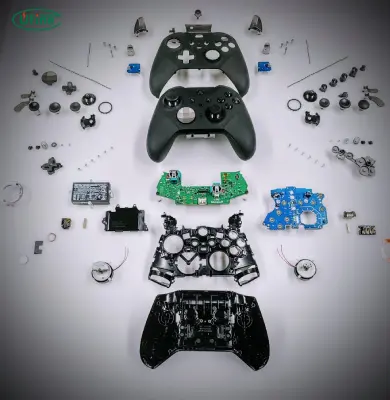
Before diving into the battery details, let’s take a quick look at how an Xbox controller works.
An Xbox controller has three core systems:
- Input System: Includes buttons, thumbsticks, D-pad, and triggers.
- Communication System: Wireless (Bluetooth or Xbox Wireless) or wired USB connection to the console or PC.
- Power System: Powered by either AA batteries or a rechargeable battery pack.
When you press a button or move a joystick, signals are sent through the controller’s circuit board, powered by the battery. If the xbox controller battery is weak or faulty, these signals may not be transmitted correctly—leading to delays, disconnects, or total shutdown.
Part 2. What batteries do Xbox controllers take?
The most common question from Xbox users is: what batteries do Xbox controllers take?
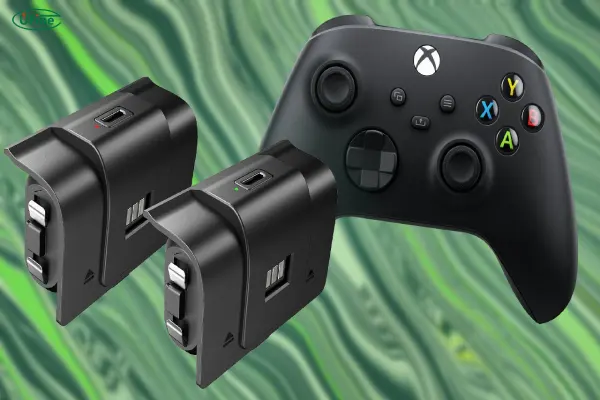
Most standard Xbox wireless controllers use two AA batteries installed inside the battery compartment on the back of the controller. This applies to many Xbox One controllers and Xbox Series X|S controllers.
You can use different types of AA batteries, including:
- Alkaline AA batteries
- NiMH rechargeable AA batteries
- Lithium AA batteries
In addition to replaceable AA batteries, Xbox controllers can also work with rechargeable battery packs designed specifically for Xbox devices.
These rechargeable packs are usually lithium-ion batteries that fit into the controller’s battery compartment and can be charged through USB cables or charging docks.
According to Xbox’s official support information, battery requirements can vary depending on the controller model and accessories used. Xbox Support
Part 3. How does the battery affect the performance of the Xbox controller?
Your xbox controller battery plays a much bigger role than you might think.
A good battery ensures:
- Stable wireless connection
- Strong vibration feedback (rumble)
- Smooth button and trigger responsiveness
- Consistent lighting on the Xbox button and indicators
On the other hand, a weak or low-capacity battery can lead to:
- Lag or latency in gameplay
- Controller randomly turning off
- Slow response time from buttons
- Bluetooth disconnection issues
In simple terms: a high-quality battery = better gaming.
Part 4. Xbox controller battery type
Now let’s get into the heart of the question: What type of battery does the Xbox controller use?
AA Alkaline Batteries
Most standard Xbox controllers are designed to work with two AA alkaline batteries. These are easy to replace and widely available.
Pros:
- Simple and convenient
- No charging downtime
- Affordable upfront
Cons:
- Not rechargeable (wasteful)
- Long-term cost adds up
- Weak performance during heavy gaming sessions
Rechargeable NiMH Battery Packs
Xbox also offers rechargeable battery packs as accessories. These are NiMH (Nickel-Metal Hydride) batteries that fit in the same slot as AA batteries.
Pros:
- Rechargeable and eco-friendly
- Better long-term cost efficiency
- Can charge while playing
Cons:
- Slightly lower voltage than alkalines
- Quality varies with brand
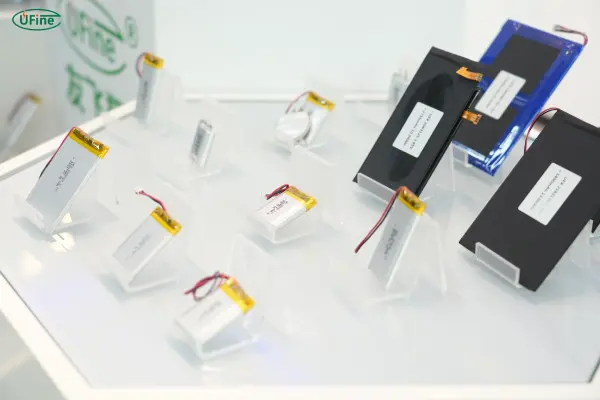
Lithium-Ion Battery Packs (3rd Party or Custom)
Some gamers upgrade to custom lithium-ion battery packs for longer life and better performance.
Pros:
- Higher energy density
- Lighter weight
- Long life span
Cons:
- More expensive upfront
- May require special chargers or mods
If you want a tailored solution, Ufine Battery is a reliable Chinese manufacturer that offers custom lithium batteries—including lithium polymer, cylindrical cells, and high-rate packs. You can even order batteries that fit your Xbox controller perfectly with better runtime and durability.
Contact Ufine Battery to build your custom Xbox battery.
AA batteries vs lithium battery packs for Xbox controllers
The following comparison shows the differences between common Xbox controller battery options.
| Feature | AA batteries | Rechargeable lithium battery pack |
|---|---|---|
| Rechargeable | Depends on battery type | Yes |
| Replacement convenience | Very easy | Requires compatible pack |
| Energy density | Lower | Higher |
| Weight | Usually heavier | Lightweight |
| Charging method | External charger needed for rechargeable AA | USB charging or charging dock |
| Customization | Limited | Highly customizable |
For casual users, AA batteries remain a practical choice. For manufacturers designing modern gaming devices or accessories, lithium battery solutions provide more flexibility in size, performance, and user experience.
Part 5. Xbox controller battery size
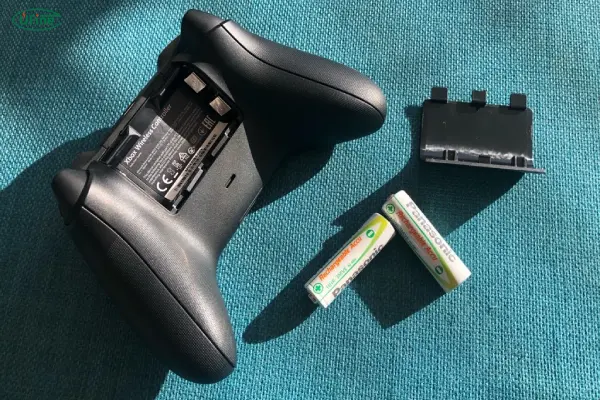
For Xbox controllers, the battery compartment is designed to fit either:
- Two AA batteries
- A single NiMH or lithium battery pack
Typical battery pack sizes:
- Length: Around 50–55 mm
- Width: 30–35 mm
- Voltage: 1.5V (AA), 2.4V (NiMH), 3.7V (Li-ion)
If you are replacing a battery pack, always make sure:
- The voltage matches
- The battery fits snugly
- The connectors align perfectly
Ufine Battery offers custom-sized lithium batteries that ensure perfect fitment for Xbox controllers. No swelling, no loose contacts.
Part 6. How long can the Xbox controller battery last?
Battery life depends on:
- Battery type
- Controller usage
- Features like vibration and Bluetooth
Here’s a general estimate:
| Battery Type | Play Time Per Charge |
|---|---|
| AA Alkaline | 20–30 hours |
| NiMH Rechargeable | 15–25 hours |
| Lithium-ion | 25–40+ hours |
Battery lifespan (how long before replacement) also matters:
| Battery Type | Lifespan (Charge Cycles) |
|---|---|
| AA Alkaline | One-time use |
| NiMH | 500–1,000 cycles |
| Lithium-ion | 300–800 cycles |
With a well-made lithium battery, you can expect 2–3 years of consistent performance.
Part 7. Key features to look for in a Xbox controller battery
When choosing a new xbox controller battery, keep these in mind:
Voltage Compatibility
Match your controller’s voltage (typically 2.4V or 3.7V)
Capacity (mAh)
Higher mAh means longer play time
Rechargeability
Go for batteries that support at least 500+ charge cycles
Size & Fit
Ensure it fits your controller’s compartment snugly
Connector Type
Matching plug type is essential for proper charging
Battery Chemistry
Lithium-ion or Li-polymer offers better performance
Brand Reliability
Trusted manufacturers like Ufine Battery guarantee safety, stability, and customization
Part 8. Xbox controller battery has no power signal?
Sometimes your controller shows no battery signal even with new batteries. Why?
Possible reasons:
- Battery not properly seated
- Dirty or corroded contacts
- Faulty battery pack
- Battery door not closed tight
- Internal controller issue
Try this:
- Clean contacts with alcohol
- Re-insert batteries and press firmly
- Try another battery pack
- Use a USB cable to check if the controller works wired
If none of these work, it may be time for a new battery—or controller repair.
Part 9. Xbox controller battery charger
Charging solutions vary by battery type:
- NiMH Battery Pack: Often comes with USB charging cable or dock
- Lithium-ion Battery: Needs a compatible smart charger
- Third-party kits: May include fast-charging docks
Important tips:
- Use manufacturer-recommended chargers
- Don’t leave batteries charging overnight
- Avoid low-quality knock-offs—they can overheat or damage your controller
If you’re using a custom lithium pack from Ufine Battery, we’ll recommend a suitable charger to pair with it. Safe and efficient charging is crucial.
Part 10. Xbox controller battery common faults
Here are some common problems and their causes:
| Problem | Likely Cause |
|---|---|
| Controller not turning on | Dead battery or poor contact |
| Won’t charge | Faulty charger or battery |
| Drains too fast | Old or low-capacity battery |
| Battery swells | Overcharging or low-quality cell |
| Overheating | Faulty lithium pack |
Never ignore signs like swelling or overheating. Stop using the battery immediately and replace it with a trusted one—preferably from a reliable manufacturer like Ufine Battery.
Part 11. FAQs
Can I use regular AA batteries in my Xbox controller?
Yes, Xbox controllers are designed to support AA batteries.
Is it better to use rechargeable batteries?
Yes. They save money, reduce waste, and are more convenient.
What’s the best battery for long gaming sessions?
A high-capacity lithium-ion pack from a trusted brand like Ufine Battery is ideal.
How do I know when my battery is dying?
Short play time, frequent disconnections, or charging issues are common signs.
Can I replace the battery myself?
Yes! As long as you match size, voltage, and connector, it’s safe to do.
Related Tags:

More Articles

JST vs Molex: The Right Battery Connector Choice
JST or Molex for your battery? Learn how connector selection affects current, voltage drop, reliability, and device performance.
Custom Battery Pricing: Costs Manufacturers Don’t Mention
A low battery quote may not be the final cost. Discover common hidden expenses that affect custom lithium battery projects.
Battery Wire Length: Hidden Cause of Power Loss
A longer battery wire can cause voltage drop, power loss, and unstable operation. Learn how wire length affects battery performance.
How Device Sleep Modes Affect Battery Life
Think sleep mode extends battery life? Learn why devices still drain power and how firmware, hardware, and batteries affect runtime.
LiPo Battery and PCB Design: Clearance, Insulation, and Placement
Learn how to optimize LiPo battery PCB clearance, insulation, placement, wiring, and thermal design—and avoid common integration mistakes.