- Part 1. Why sleep modes matter for battery-powered devices
- Part 2. What are sleep modes in battery-powered devices?
- Part 3. What happens inside a device during sleep?
- Part 4. How sleep modes reduce battery consumption
- Part 5. Why sleep mode does not always improve battery life
- Part 6. The relationship between sleep modes and battery selection
- Part 7. How to calculate battery runtime for sleep-based devices
- Part 8. How sleep modes affect different battery-powered applications
- Part 9. Firmware strategies to improve battery life
- Part 10. Common battery life design mistakes
- Part 11. How to design a long-life battery-powered device
- Part 12. FAQs
Sleep modes are one of the most effective ways to extend the battery life of portable electronic devices. However, simply putting a device into sleep mode does not always guarantee long runtime.
The real battery performance depends on how much current the device consumes while sleeping, how often it wakes up, how firmware manages power states, and whether the battery is properly matched to the application. A well-designed low-power device spends most of its time doing almost nothing—and that is where battery life is won or lost.
Key takeaways
- Sleep modes reduce battery consumption by lowering the device’s idle power draw.
- A lower sleep current can significantly extend runtime for devices that spend most of their time inactive.
- Entering sleep mode does not mean the device consumes zero power. Sensors, communication modules, and peripherals may still drain energy.
- Frequent wake-ups can consume more power than expected, especially when wireless communication is involved.
- Battery life depends on average current consumption, not only battery capacity.
- Firmware optimization, hardware selection, and battery design must work together for maximum runtime.
- Low-power applications such as IoT sensors, wearables, and trackers often require careful balance between sleep current, wake-up time, and battery capacity.
Part 1. Why sleep modes matter for battery-powered devices
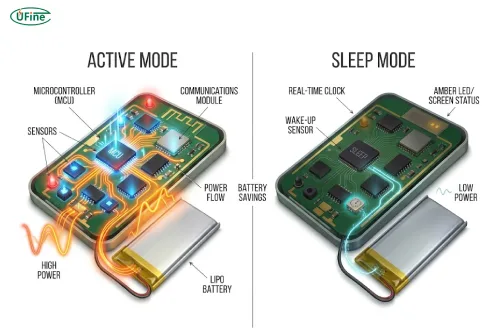
Many battery-powered products spend only a small portion of their time actively working.
For example:
- A temperature sensor may collect data once every few minutes.
- A wearable device may only transmit information occasionally.
- A smart tracker may remain idle until movement is detected.
- A remote control may stay unused for weeks.
In these situations, the device is not limited by continuous operation. Instead, battery life is determined by what happens during the long periods when the device is waiting.
This is why sleep modes are essential in embedded systems.
A device that reduces its standby current from several milliamps to only a few microamps can achieve a dramatic improvement in runtime. However, achieving long battery life requires more than selecting a low-power microcontroller. The entire system—including firmware, sensors, communication modules, power circuits, and battery selection—must be optimized together.
Part 2. What are sleep modes in battery-powered devices?
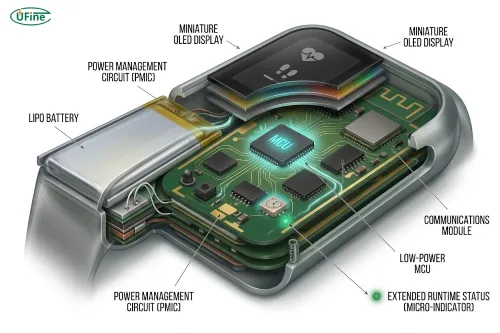
Sleep modes are low-power operating states that allow a microcontroller or electronic system to reduce energy consumption when full performance is unnecessary.
Different manufacturers may use different names, including:
- Sleep mode
- Idle mode
- Deep sleep
- Standby mode
- Hibernate mode
Although the names vary, the basic idea is similar: disable unnecessary functions while keeping enough capability to wake up and resume operation.
A typical power hierarchy looks like this:
| Operating mode | Device status | Typical power consumption |
|---|---|---|
| Active mode | CPU, sensors, communication modules fully running | Highest |
| Idle mode | CPU paused, some peripherals still active | Medium |
| Sleep mode | Main processing stopped, selected functions retained | Low |
| Deep sleep / standby | Only essential wake-up functions remain | Lowest |
The deeper the sleep mode, the more energy can usually be saved. However, deeper sleep often comes with trade-offs such as longer wake-up time and reduced memory retention.
Part 3. What happens inside a device during sleep?
When a device enters sleep mode, it does not simply “turn off.”
Instead, the system selectively shuts down unnecessary functions.
Depending on the design, sleep mode may:
- Stop the CPU clock
- Reduce operating frequency
- Disable unused peripherals
- Turn off sensors
- Disconnect wireless modules
- Reduce memory activity
- Keep a real-time clock running
- Maintain specific wake-up sources
For example, a Bluetooth sensor may keep a small timer active while shutting down the main processor. When the timer triggers, the device wakes, measures data, sends information, and returns to sleep.
The goal is not to keep everything powered all the time. The goal is to make the active periods short and efficient.
Part 4. How sleep modes reduce battery consumption
Lower current consumption during idle periods
Battery runtime is mainly determined by average current consumption:
Battery life ≈ Battery capacity / Average current consumption
However, average current is influenced by both active and sleep periods.
Consider a simple example:
A device operates actively at 50mA for 10 seconds every hour.
The remaining 59 minutes and 50 seconds are spent sleeping.
In this case, reducing sleep current from 500μA to 50μA may have a bigger impact than slightly reducing active current because the device spends most of its life asleep.
This is especially important for IoT devices and wearable products where the duty cycle is very low.
Average current matters more than peak current
Engineers often focus on peak power consumption, but for long-life battery devices, average current is usually the more important factor.
A device may briefly consume:
- 100mA during wireless transmission
- 20mA during sensor operation
But if it spends 99% of its time sleeping at 10μA, the sleep current heavily influences overall runtime.
This is why low-power design often focuses on:
- reducing standby current
- minimizing unnecessary wake-ups
- shutting down unused components
Part 5. Why sleep mode does not always improve battery life
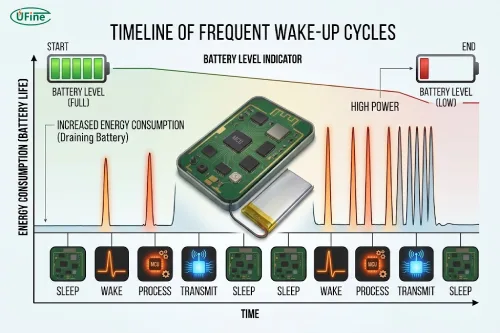
Although sleep modes are powerful, they are not automatically effective.
Many real-world battery problems come from poor power management rather than insufficient battery capacity.
High sleep current caused by poor configuration
A device may appear to be sleeping while still consuming unnecessary energy.
Common causes include:
- Sensors remaining powered
- LEDs staying active
- Communication modules maintaining connections
- Debug interfaces consuming current
- Pull-up resistors creating leakage paths
- Poorly selected voltage regulators
For example, a microcontroller may enter deep sleep successfully, but a connected sensor drawing several milliamps can completely eliminate the expected battery savings.
The entire power chain must be reviewed, not only the MCU.
Frequent wake-ups increase energy consumption
Every wake-up event requires energy.
During wake-up, the device may need to:
- Start the processor
- Initialize peripherals
- Read sensors
- Connect to wireless networks
- Process data
- Transmit information
A device that wakes up too frequently may spend more energy restarting than performing useful work.
For example:
A sensor that wakes every second to send tiny amounts of data may consume much more power than one that collects multiple readings and sends them together every few minutes.
Efficient battery-powered devices often use event-driven operation rather than constant polling.
Part 6. The relationship between sleep modes and battery selection
Sleep modes can reduce energy consumption, but they do not remove the need for proper battery selection.
A low-power device still requires a battery that matches:
- Required voltage
- Capacity
- Physical size
- Discharge characteristics
- Operating temperature
- Charging requirements
A larger battery is not always the best solution.
If a device consumes unnecessary power due to inefficient firmware or hardware design, increasing battery capacity only increases size and cost.
A better approach is to first reduce energy consumption and then select the appropriate battery.
Part 7. How to calculate battery runtime for sleep-based devices
For devices with active and sleep periods, average current should be calculated based on the actual duty cycle.
A simple calculation:
Average current = (Active current × Active time + Sleep current × Sleep time) / Total time
Example:
| Operating state | Current | Time percentage |
|---|---|---|
| Active operation | 80mA | 1% |
| Sleep mode | 50μA | 99% |
Although active current is much higher, the device spends most of its life sleeping.
This calculation helps engineers estimate whether a battery can meet the expected runtime before finalizing the product design.
Part 8. How sleep modes affect different battery-powered applications
IoT sensors
IoT devices often depend heavily on sleep modes.
Typical requirements:
- Extremely low standby current
- Periodic data collection
- Long unattended operation
For these products, sleep current can determine whether the device lasts months or years.
Wearable devices
Wearables have additional challenges:
- Small battery size
- Frequent sensor measurements
- Bluetooth communication
- Display power consumption
Sleep optimization helps balance user experience with limited battery capacity.
GPS trackers
GPS modules consume significant power when active.
A common strategy is:
- Sleep when stationary
- Wake based on movement or schedule
- Reduce unnecessary location updates
Smart remote controls
Remote controls spend almost all their time waiting.
For these products, ultra-low standby current is usually more important than high-performance processing.
Part 9. Firmware strategies to improve battery life
Firmware plays a major role in battery optimization.
Reduce unnecessary wake-ups
Instead of constantly checking for changes, use:
- Interrupt-based operation
- Timers
- Sensor-triggered events
The less often the device wakes, the less energy it consumes.
Turn off unused peripherals
Firmware should actively manage power states.
Examples:
- Disable sensors when not needed
- Turn off displays after inactivity
- Disconnect wireless modules when idle
- Reduce processor frequency when possible
Optimize communication behavior
Wireless communication is often one of the largest power consumers.
Optimization methods include:
- Increasing transmission intervals
- Reducing unnecessary connections
- Sending data in batches
- Using efficient communication protocols
Part 10. Common battery life design mistakes
Many battery-powered products fail to achieve expected runtime because of simple design mistakes.
Common examples include:
Mistake 1: Assuming sleep mode means zero power consumption
Even sleeping devices consume energy.
Mistake 2: Ignoring peripheral power consumption
A low-power MCU cannot compensate for inefficient external components.
Mistake 3: Testing only active current
Battery life depends on the complete operating cycle.
Mistake 4: Ignoring wake-up frequency
Frequent activation can quickly increase average consumption.
Mistake 5: Choosing battery capacity before understanding power requirements
Battery selection should follow power analysis, not replace it.
Part 11. How to design a long-life battery-powered device
A successful low-power design requires coordination between hardware, firmware, and battery selection.
| Design factor | Key question |
|---|---|
| Sleep current | How much power does the device consume while waiting? |
| Wake-up frequency | How often does the device become active? |
| Active power | How much energy does each operation require? |
| Firmware | Are unnecessary tasks minimized? |
| Peripherals | Can unused components be powered down? |
| Battery | Does the capacity match the actual duty cycle? |
| Testing | Has runtime been measured under real conditions? |
When a custom battery solution is needed
For some products, optimizing firmware is not enough.
A custom battery may be required when:
- The enclosure has limited space
- The device needs a specific shape or thickness
- Standard batteries cannot provide enough capacity
- A special connector or wire configuration is required
- The product needs extended standby time
A properly designed LiPo battery solution can be optimized for:
- Size
- Capacity
- Voltage
- Connector type
- Wire length
- Protection requirements
This allows the battery to become part of the overall product design rather than simply a component added at the end.
Part 12. FAQs
1. Why does my battery drain overnight even when the device is not being used?
A device can continue consuming power while idle because some components remain active in the background. Common causes include wireless connections, background monitoring tasks, sensors, LEDs, inefficient regulators, or high standby current from peripherals.
2. How does Bluetooth affect battery life during sleep mode?
Bluetooth can significantly influence battery life because maintaining connections, scanning for devices, and transmitting data require additional power. Optimizing connection intervals, reducing unnecessary advertising, and limiting communication frequency can help reduce energy consumption.
3. How do sensors affect battery life during sleep mode?
Sensors can consume significant power if they remain continuously active. Many low-power devices reduce energy consumption by powering sensors only when measurements are needed or using interrupt-based operation instead of constant monitoring.
4. Why does battery life decrease after firmware updates?
Firmware changes can modify power behavior. A new firmware version may increase wake-up frequency, keep peripherals active longer, change communication intervals, or introduce background processes that increase average current consumption.
5. Why does a device wake up frequently without user interaction?
Unexpected wake-ups can be caused by incorrect timer settings, sensor triggers, communication events, unstable power signals, or firmware bugs. Reducing unnecessary interrupts and reviewing system logs can help identify the source.
Related Tags:

More Articles

LiPo Battery and PCB Design: Clearance, Insulation, and Placement
Learn how to optimize LiPo battery PCB clearance, insulation, placement, wiring, and thermal design—and avoid common integration mistakes.
Battery Calibration: Why Is Your Battery % Wrong?
Is your battery percentage inaccurate? Learn how battery calibration works, when you need it, and how to fix unexpected battery drops.
Battery Calibration Guide: Fix SOC Errors in Lithium Systems
SOC accuracy problems can reduce device reliability. Learn how battery calibration, BMS, and fuel gauge optimization improve lithium battery performance.
How Internal Resistance Limits LiPo Battery Performance
Your LiPo Battery may have enough capacity but still fail under load. Discover how Internal Resistance causes voltage sag, heat, and power loss.