- Part 1. What is battery calibration?
- Part 2. Why does your battery percentage become inaccurate?
- Part 3. How to calibrate a lithium battery
- Part 4. How often should you calibrate a battery?
- Part 5. Does battery calibration improve battery life?
- Part 6. Do you really need to drain your battery to 0%?
- Part 7. Battery calibration vs. battery replacement
- Part 8. How to keep your LiPo battery healthy
- Part 9. When battery calibration does not work
- Part 10. Common battery calibration mistakes
- Part 11. FAQs
You may have experienced a device showing 30% battery and then shutting down unexpectedly, or seeing the percentage remain at 100% for a long time before dropping rapidly.
In situations like these, battery calibration may help.
But calibration is often misunderstood. It does not make an old battery “like new,” increase its physical capacity, or repair a damaged battery. Instead, it helps the device estimate the battery’s remaining charge more accurately.
Key takeaways
- Battery calibration helps synchronize the displayed battery percentage with the battery’s actual state of charge.
- A lithium battery’s percentage is an estimate, not a direct measurement of remaining capacity.
- Battery aging, temperature, charging patterns, and usage conditions can affect battery-level accuracy.
- You generally do not need to calibrate a lithium battery regularly.
- Calibration cannot restore capacity lost through normal battery aging.
- If a battery is swollen, damaged, leaking, or unusually hot, calibration is not the solution. Stop using the device and follow the manufacturer’s safety instructions.
Part 1. What is battery calibration?
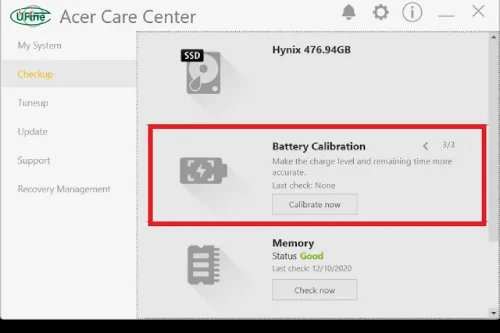
Battery calibration is the process of helping a device accurately estimate the battery’s state of charge.
When your phone, smartwatch, wireless earbuds, or other electronic device shows 75% battery, that number is not simply measured directly from the battery. The device estimates it using information such as battery voltage, charging and discharging behavior, current consumption, and battery characteristics.
Over time, the estimated battery level can become less accurate.
For example, a device might display:
| Displayed battery level | Possible real condition |
|---|---|
| 80% | Approximately 80% remaining |
| 30% | Actual remaining capacity may differ |
| 10% | Device may reach its low-voltage limit soon |
| 0% | System shutdown threshold rather than literally zero chemical energy |
Calibration helps the device establish more reliable reference points for full and low battery conditions.
This is why battery calibration is mainly about accuracy, not increasing battery capacity.
Part 2. Why does your battery percentage become inaccurate?
Several factors can cause the displayed battery percentage to drift away from the battery’s actual condition.
Battery aging
Lithium batteries gradually lose capacity as they go through charging and discharging cycles.
Imagine a new LiPo battery rated at 500mAh. After significant use, its actual capacity may be lower than when it was new. If the device’s battery estimation is still based on the original characteristics, the displayed percentage may no longer accurately represent the available runtime.
You may notice symptoms such as:
- Battery percentage dropping unusually quickly
- Device shutting down while showing remaining charge
- Battery reaching 100% unusually quickly
- Shorter runtime than when the device was new
Calibration may improve the measurement, but it cannot reverse chemical aging.
Frequent partial charging
Modern lithium batteries do not need to be fully discharged before every recharge.
In everyday use, you might charge your device from 40% to 70%, then later from 25% to 80%. This is normal and generally preferable to repeatedly forcing the battery through complete discharge cycles.
However, depending on the device and its battery-management system, its estimated battery level can become less synchronized with actual capacity over time.
Long periods without reaching a full charge
If a device is rarely allowed to complete a normal charging cycle, its battery estimation may sometimes become less accurate.
This does not mean you should regularly drain the battery to 0%. Instead, if the device manufacturer recommends a calibration procedure, follow that specific procedure.
Battery replacement
Replacing an old battery with a new one can also cause unusual battery readings.
The new battery may have different characteristics from the original battery, and the device may need time or a specific procedure to update its battery estimation.
If the device continues to show incorrect readings after a replacement, the issue may involve software, battery identification, calibration, or the charging system rather than the battery cell itself.
Temperature and heavy usage
Temperature can affect lithium battery performance.
Cold conditions can temporarily reduce available battery performance, while high temperatures can accelerate battery degradation.
Heavy workloads can also make battery readings appear to change quickly. For example, gaming, GPS navigation, video recording, high screen brightness, and other demanding functions can consume considerably more power than standby operation.
Part 3. How to calibrate a lithium battery
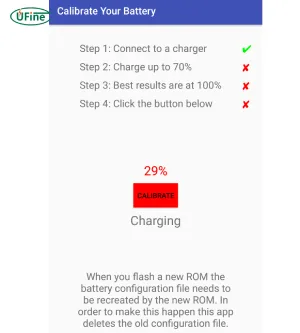
If your device manufacturer provides a specific calibration procedure, that should always be your first choice.
For devices without a dedicated procedure, a simple calibration cycle may help resynchronize the battery indicator.
Step 1: Charge the device to 100%
Use the charger and charging method recommended for your device.
Allow the device to complete its normal charging process. There is generally no reason to leave it connected indefinitely simply because you are calibrating the battery.
Step 2: Use the device normally
After reaching a full charge, use the device as you normally would.
There is no need to intentionally run demanding applications simply to drain the battery faster.
The purpose is to allow the device to observe normal battery discharge behavior.
Step 3: Let the device reach its low-battery point
Continue using the device until it reaches its normal low-battery warning or shutdown point.
The important distinction is that calibration is not the same as repeatedly deep-discharging a lithium battery.
You should not deliberately force a battery below the device’s designed operating limit.
Step 4: Recharge the device to 100%
Recharge the device using its normal charging system.
Avoid interrupting the process unnecessarily if you are performing a calibration cycle.
This gives the battery-management system another clear full-charge reference point.
Step 5: Check the battery percentage
After calibration, monitor the device during normal use.
Look for improvements such as:
- More consistent percentage changes
- Fewer sudden battery drops
- More predictable low-battery warnings
- Fewer unexpected shutdowns
If the device still loses power unusually quickly, calibration may not be the real problem.
Part 4. How often should you calibrate a battery?
For most consumers, you do not need to calibrate a lithium battery regularly.
Battery calibration is not a routine maintenance task like charging your device. Modern devices use battery-management software to estimate battery status continuously.
You might consider calibration when you notice persistent symptoms such as:
- Battery percentage jumping unexpectedly
- Device shutting down while showing significant charge
- Battery indicator remaining at one percentage for an unusually long time
- A noticeable mismatch between displayed percentage and actual runtime
If the battery works normally, there is usually no reason to perform calibration simply because a certain amount of time has passed.
Part 5. Does battery calibration improve battery life?
No. Battery calibration does not increase the battery’s physical capacity.
Consider a battery that originally provided 8 hours of runtime but now provides only 5 hours because of aging. Calibration cannot turn that 5 hours back into 8 hours.
Instead, calibration can make the battery indicator more accurate.
| Battery calibration | Battery health |
|---|---|
| Improves battery-level estimation | Describes actual battery condition |
| Helps synchronize battery readings | Changes as the battery ages |
| May reduce unexpected percentage changes | Determines available capacity |
| Does not restore lost capacity | Cannot be restored through calibration |
If your battery drains quickly even when the percentage is accurate, the battery may simply have reached the later stage of its useful life.
Part 6. Do you really need to drain your battery to 0%?
No.
This is one of the most common misconceptions about battery calibration.
Older rechargeable battery technologies were associated with memory-effect concerns, but lithium-ion and lithium-polymer batteries do not need to be regularly discharged completely.
For everyday use, repeatedly draining a LiPo battery to its lowest possible level is unnecessary.
A calibration cycle may occasionally involve allowing a device to reach its normal low-battery shutdown point, but that is different from making deep discharge a daily habit.
In other words:
Occasional calibration ≠ regular deep discharge.
For normal use, follow the charging recommendations provided by your device manufacturer.
Part 7. Battery calibration vs. battery replacement
Not every battery problem can be fixed through calibration.
Calibration may help when the main problem is an inaccurate battery indicator.
For example, the device may show 25% and suddenly drop to 5%, or it may shut down unexpectedly despite showing remaining charge.
Battery replacement is more appropriate when the battery has physically or chemically degraded.
You may need to investigate replacement if:
- Runtime has become significantly shorter
- The battery cannot hold enough charge for normal use
- The device frequently shuts down under normal workloads
- The battery becomes unusually hot
- The battery is swollen or physically damaged
Safety should always take priority over calibration. For example, the U.S. Food and Drug Administration has published safety notices involving lithium-ion batteries that could swell or overheat when improperly charged or used.
If you notice swelling, leakage, physical damage, smoke, or abnormal heating, stop using the device and follow the manufacturer’s instructions rather than attempting to calibrate the battery.
Part 8. How to keep your LiPo battery healthy
Good everyday battery habits are generally more useful than frequent calibration.
Avoid extreme temperatures
Do not intentionally expose your device to very high or very low temperatures for extended periods.
Temperature affects lithium battery performance and can also accelerate degradation.
Avoid unnecessary deep discharge
You do not need to wait until the battery reaches 0% before charging it.
Regularly charging your device during normal use is acceptable for lithium batteries.
Use a compatible charger
Use the charger, cable, and charging accessories recommended for your device.
A battery system is designed around specific charging voltage, current, and protection requirements.
Avoid excessive heat while charging
If your device becomes unusually hot during charging, check the charging environment and device workload.
Heat is an important factor in battery aging.
Follow storage recommendations
If you will not use a device for an extended period, follow the manufacturer’s storage recommendations rather than leaving the battery completely empty for a long time.
Part 9. When battery calibration does not work
If calibration does not solve the problem, the underlying cause may be something else.
The battery has lost capacity
An aging battery can be accurately measured and still provide much less runtime than a new battery.
Calibration cannot reverse this degradation.
The battery is damaged
A swollen, cracked, leaking, or abnormally hot battery should not be treated as a calibration problem.
Stop using it and follow the manufacturer’s safety and replacement instructions.
There is a software or hardware problem
Incorrect battery readings can also result from:
- Battery sensors
- Charging circuits
- Firmware
- Battery-management components
- Poor-quality replacement batteries
In these cases, repeatedly calibrating the battery is unlikely to solve the underlying issue.
Part 10. Common battery calibration mistakes
Repeatedly draining the battery to 0%
Doing this frequently is unnecessary and can increase stress on the battery.
Leaving the device charging indefinitely
Calibration does not require leaving a device connected to a charger for excessive periods.
Using an incompatible charger
A charger that does not meet the device’s specifications may create charging or safety problems.
Expecting calibration to restore capacity
Calibration can improve the accuracy of the battery indicator, but it cannot reverse battery aging.
Calibrating a damaged battery
Calibration should never be used as a way to troubleshoot a swollen, leaking, physically damaged, or abnormally hot lithium battery.
Part 11. FAQs
1. Why does my battery percentage drop faster below 20%?
Voltage can change more noticeably near the lower end of the battery’s operating range, which can make the percentage appear to fall faster.
2. Can a new battery have an inaccurate percentage?
Yes. A replacement battery may initially show inaccurate readings if the device has not correctly adapted to its characteristics.
3. Can software updates change battery percentage accuracy?
Yes. Firmware or operating-system updates can change battery-management algorithms and may affect how the remaining charge is estimated.
4. Why does my battery percentage change when I restart the device?
A restart can trigger the device to recalculate battery status using updated voltage, current, and system data.
5. Can calibration fix sudden battery percentage jumps?
It may help if the jumps are caused by inaccurate battery estimation. If the battery is severely aged or damaged, calibration may not solve the problem.
Related Tags:

More Articles

Buck vs. Boost vs. Buck-Boost Converter: Which Is Best for Battery?
Not sure which converter your battery-powered device needs? Compare Buck, Boost, and Buck-Boost designs and discover what affects voltage stability and runtime.
How to Match 18650 Cells for a Reliable Battery Pack?
Building an 18650 battery pack? Learn how to compare cell capacity, voltage, and internal resistance to avoid mismatches and improve reliability.
Why Do 18650 Battery Packs Get Hot During Discharge?
Is your 18650 battery pack overheating under load? Learn what causes excess heat, how to spot dangerous symptoms, and what to do next.
18650 Battery BMS: How to Get the Specs Right
Learn how to choose a BMS for an 18650 battery pack. Compare voltage, current ratings, protection features, and balancing before you buy.
Why Does My Ring Camera Battery Drain So Fast or Stop Charging?
Is your Ring camera battery draining fast or not charging? Discover common causes, practical fixes, and when to replace the battery.