- Key takeaways
- Part 1. Measure robot vacuum battery use on hard floors and carpet
- Part 2. Calculate robot vacuum battery capacity from a mixed-floor route
- Part 3. Set the robot vacuum battery reserve for return to dock
- Part 4. Select and validate a robot vacuum battery pack for carpet boost
- Part 5. Robot vacuum battery capacity FAQs
To size a battery for a robot vacuum cleaner, add the energy used on hard floors and carpet to the energy needed to reach the dock. Then check that the pack can handle the carpet-boost current peak at low charge.
Key takeaways
- Measure battery power on each surface and log how long carpet boost stays on.
- Set separate energy targets for completing the cleaning route and returning to the dock.
- Validate both usable watt-hours and the lowest voltage during carpet boost.
Part 1. Measure robot vacuum battery use on hard floors and carpet
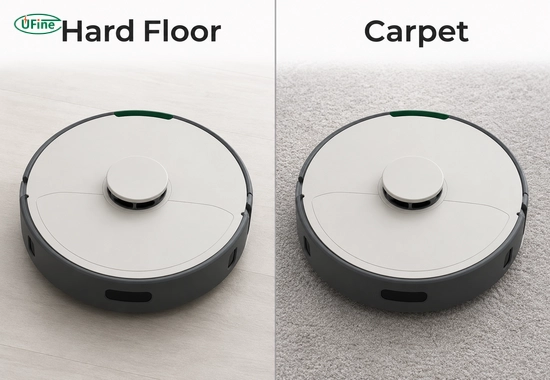
Test the same robot on both surfaces. Record voltage and current at the battery pack output. Keep the starting state of charge, pack temperature, brush condition, and firmware consistent across runs.
| Test run | What it tells you |
|---|---|
| Hard floor in standard mode | The baseline power draw for normal cleaning. |
| Carpet in standard mode | How the floor surface changes power draw at the same suction setting. |
| Carpet with boost enabled | How much extra power the robot draws when it raises suction on carpet. |
Record average power in watts (W), energy in watt-hours (Wh), and time in each mode. If boost switches on and off, use the time it actually stays on. A home with 30% carpet by area may produce a different share of cleaning time in boost mode.
If the robot pauses while waiting for a blocked path to clear, measure standby power while the robot is awake and include that energy if the route measurements have yet to capture it.
Check the test conditions behind published runtime figures. The Roborock Q5 Max Plus runtime test notes, for example, specify a full battery, Quiet mode, and hard floors. Record the floor mix and suction settings when quoting runtime for your own route.
Part 2. Calculate robot vacuum battery capacity from a mixed-floor route
Split the route into segments based on the surface and cleaning mode. Use average electrical power measured at the pack. That reading includes the suction motor, brush, wheels, and electronics active during the segment.
Segment energy (Wh) = Average battery power (W) × Time (minutes) ÷ 60
Worked example for an 80-minute cleaning route
The following values are illustrative. The robot must finish the full route on one charge, then reach the dock with enough energy for one alignment retry.
| Route segment | Time | Average battery power | Energy |
|---|---|---|---|
| Hard-floor cleaning in standard mode | 50 min | 24 W | 20 Wh |
| Carpet cleaning in boost mode | 25 min | 48 W | 20 Wh |
| Transitions and turns outside the cleaning segments | 5 min | 24 W | 2 Wh |
| Cleaning subtotal | 80 min | — | 42 Wh |
| Return travel to the dock | 5 min | 24 W | 2 Wh |
| Dock alignment with one retry | 2 min | 30 W | 1 Wh |
| Total usable energy required | 87 min | — | 45 Wh |
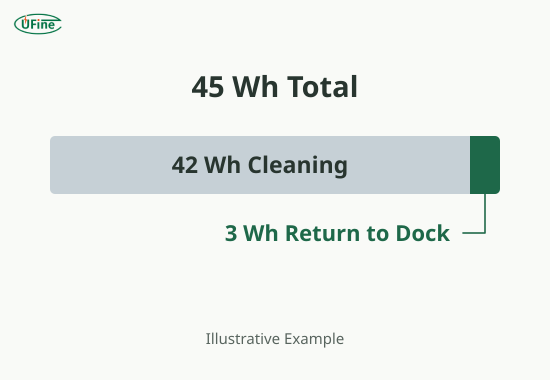
The pack needs to deliver 42 Wh before the low-battery return trigger and leave at least 3 Wh available for the modeled return. Count transitions and docking once if your route log already includes them.
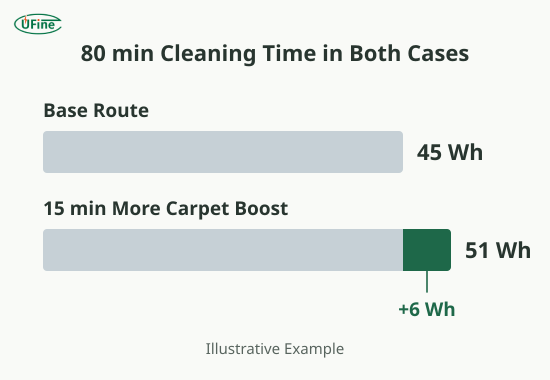
Now move 15 minutes from hard-floor cleaning to carpet boost. Keep the cleaning time and return route the same. The extra energy is (48 W − 24 W) × 15 ÷ 60 = 6 Wh. The usable energy target rises from 45 Wh to 51 Wh, even though the robot still cleans for 80 minutes.
Part 3. Set the robot vacuum battery reserve for return to dock
Start the return test at the farthest expected cleaning point. Measure energy in the robot’s actual return mode. Include the surfaces it must cross, a representative detour, and the number of docking retries the design must handle.
Use that measured energy to set the low-battery return trigger. Check that the energy available below the trigger is enough for the worst planned return, with margin for charge-estimation error. Repeat the check at the relevant pack temperature and with a pack representative of the planned replacement condition.
Define where the runtime test ends so two results can be compared:
| Test endpoint | What counts as complete |
|---|---|
| Cleaning runtime before recharge | The robot reaches its low-battery return trigger. |
| Single-charge mission | The robot cleans the full target route and docks successfully on one charge. |
| Recharge-and-resume mission | The robot finishes the route after a charging stop. Report active cleaning time and total elapsed time. |
On supported models, iRobot’s Recharge and Resume feature lets the robot return to charge and then continue its mission. Use the single-charge endpoint if your requirement is to finish the route without a charging stop.
Part 4. Select and validate a robot vacuum battery pack for carpet boost
Use rated Wh to screen battery packs. Then verify how much energy the robot can actually use within its operating range. For this example, assume 72% of rated energy will be usable at the planned battery replacement point. That is a project assumption to verify with pack data and testing.
| Cleaning scenario | Required usable energy | First-pass rated energy target |
|---|---|---|
| Base mixed-floor route | 45 Wh | 45 ÷ 0.72 = 62.5 Wh |
| Same route with 15 more minutes of carpet boost | 51 Wh | 51 ÷ 0.72 ≈ 70.8 Wh |
A 14.4 V, 5.0 Ah pack has a nominal energy of 72 Wh. At the assumed usable fraction, it would deliver about 51.8 Wh. That leaves about 0.8 Wh above the carpet-heavy requirement, making it a candidate for testing with little modeled margin.
Run two checks before approving the sample:
-
Complete the mixed-floor route and dock.
Start at the planned upper charge limit. Confirm that the robot finishes cleaning before it requests a charge and still has the required reserve for the return.
-
Enter carpet boost at low charge.
Capture pack current, pack output voltage, and controller input voltage during the same event. Record the peak current, pulse duration, and minimum voltage at both points. If the robot resets, compare the traces to check battery voltage sag under motor load.
Once the pack meets both requirements, use the robot battery pack validation checklist to set acceptance criteria for charging, mechanical fit, and pilot-lot approval.
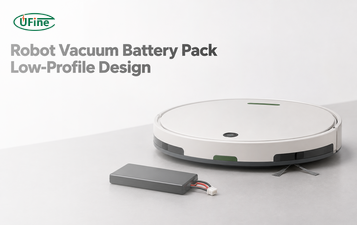
When requesting a sample, send the supplier the nominal voltage, required usable Wh, peak current and duration, operating temperature range, maximum pack dimensions, and connector specification. Use the battery bay drawing to confirm how to fit the battery pack into a low-profile robot vacuum chassis.
Part 5. Robot vacuum battery capacity FAQs
How much battery capacity does a robot vacuum need for hard floors and carpet?
Add the energy for hard-floor cleaning, carpet cleaning, transitions, and the return to dock. The pack must deliver that total within the robot’s operating range at the planned replacement point.
Does carpet boost shorten robot vacuum battery runtime?
Yes, when boost increases average battery power. The runtime impact depends on how much extra power it draws and how long boost stays active.
Should robot vacuum battery capacity be specified in Wh or mAh?
Use Wh to compare energy across different voltages. Multiply nominal voltage by capacity in amp-hours. For example, 14.4 V × 5.0 Ah = 72 Wh.
How much battery reserve does a robot vacuum need to return to its dock?
Measure the return from the farthest expected cleaning point. Include detours and docking retries, then allow for error in the robot’s charge estimate.
Can a larger robot vacuum battery prevent shutdown during carpet boost?
It can help if it keeps the controller input above its minimum voltage during the current peak. Verify loaded voltage and protection limits at low charge.
Related Tags:

More Articles
Robot Vacuum Battery Pack Design for a Low-Profile Chassis
Design a robot vacuum battery pack around bay height, connector clearance, and service access. Compare pouch and cylindrical packs in the same chassis.
How to Test a Robot Battery Pack Before Mass Production
Use this OEM checklist to test robot battery pack samples for startup load, usable energy, charging, protection, fit, and pilot-lot approval.
How to Size an AMR Battery for Short Charging Stops
Size an AMR battery using route energy, actual charging time, and return-to-dock reserve. See how one missed charge changes the required capacity.
Why Does My Robot Reset When the Motors Start? Battery Voltage Sag Explained
Find out why your robot resets at motor startup. Compare battery voltage, wiring loss, and the logic supply to pinpoint the cause.
3.7V LiPo Battery Pack vs. 3.7V Lithium-Ion Battery Pack: What’s the Difference?
Choosing a 3.7V battery pack? Compare LiPo and lithium-ion batteries, and learn how to select the right capacity, charger, protection, and connectors.