- Key takeaways
- Part 1. What is a battery connector?
- Part 2. Why replace a battery connector?
- Part 3. Signs you need battery terminal replacement
- Part 4. Tools needed for battery connector replacement
- Part 5. How to replace a battery connector step by step
- Part 6. Common mistakes when replacing battery terminals
- Part 7. Battery connector materials comparison
- Part 8. Can you replace just one battery terminal?
- Part 9. Risks of ignoring a bad battery connection
- Part 10. Battery connector replacement for different applications
- Part 11. Battery connector replacement FAQs
Replacing a battery connector helps restore proper electrical flow and prevents starting or charging problems. Corroded or loose battery terminals can cause voltage drops, overheating, and unreliable performance.
This guide explains how to replace battery terminals safely, how to change battery connector terminals step by step, and how to prevent future corrosion in automotive, RV, marine, and lithium battery systems.
Key takeaways
- Corroded or loose battery connectors reduce electrical conductivity and can cause starting issues.
- Always disconnect the negative terminal first and reconnect it last.
- Replacing battery terminals improves current flow, charging efficiency, and reliability.
- Severe corrosion may require replacing both the battery connector and battery cable.
- Use high-quality copper or brass battery terminal connectors for better durability.
- Proper cleaning and sealing help prevent future battery terminal corrosion.
- Battery terminal connector replacement is suitable for vehicles, RVs, boats, solar systems, and backup power equipment.
Part 1. What is a battery connector?
A battery connector is the interface between the battery and the electrical system. It allows current to flow from the battery to devices such as:
- Starter motors
- Alternators
- Inverters
- Fuse boxes
- Lighting systems
- Battery management systems (BMS)
Common battery connection types include:
- Top-post battery terminals
- Side-post battery connectors
- Ring terminal connectors
- Bolt-on battery cable lugs
- Quick-disconnect battery connectors
Over time, battery terminal connectors degrade because of:
- Acid vapor exposure
- Moisture
- Heat cycles
- Vibration
- Improper tightening
- Oxidation and corrosion
Once corrosion develops, electrical resistance increases. This can lead to slow cranking, unstable voltage, or charging failure.
For connector types and designs, see our related guide on Types of Battery Terminal Connectors.
Part 2. Why replace a battery connector?
Battery terminal replacement is usually necessary for one of these reasons:
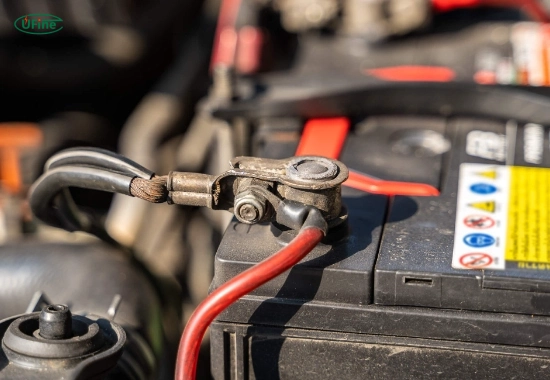
Corrosion on battery terminals
White, blue, or green powder around the battery post is a sign of corrosion. Corrosion blocks current flow and increases resistance.
Common symptoms include:
- Slow engine cranking
- Clicking sounds during startup
- Flickering headlights
- Charging problems
- Voltage drops under load
Damaged battery terminal clamps
Battery clamps can crack, loosen, or deform over time. A loose battery connection creates intermittent electrical contact.
Frayed or burned battery cables
If the copper wire inside the cable is blackened or brittle, replacing battery terminals alone may not solve the issue. You may need to replace battery cables and connectors together.
Upgrading the battery connection
Many factory connectors use thin stamped metal. Upgrading to heavy-duty copper or brass terminals improves:
- Conductivity
- Current handling
- Corrosion resistance
- Long-term reliability
This is especially important in:
- High-performance vehicles
- Marine systems
- Solar energy storage
- Off-grid lithium battery systems
- Heavy-duty equipment
Part 3. Signs you need battery terminal replacement
You should inspect or replace battery connector terminals if you notice:
| Symptom | Possible Cause |
|---|---|
| Vehicle struggles to start | Corroded battery connection |
| Battery terminal feels hot | High resistance connection |
| Lights flicker | Loose battery connector |
| Visible white or green buildup | Acid corrosion |
| Terminal moves by hand | Worn or oversized clamp |
| Battery cable insulation damage | Cable deterioration |
| Repeated battery charging issues | Poor electrical conductivity |
Part 4. Tools needed for battery connector replacement
Before replacing battery terminals, prepare the following tools:
- Safety gloves and safety glasses
- Socket wrench or spanner set
- Wire cutters
- Wire stripper
- Battery terminal cleaning brush
- Baking soda and water solution
- Replacement battery connector terminals
- Heat shrink tubing (optional)
- Crimping tool (for cable lug installation)
- Dielectric grease or anti-corrosion spray
For lithium battery systems and custom battery packs, using properly rated connectors is critical for current safety and thermal performance.
Part 5. How to replace a battery connector step by step
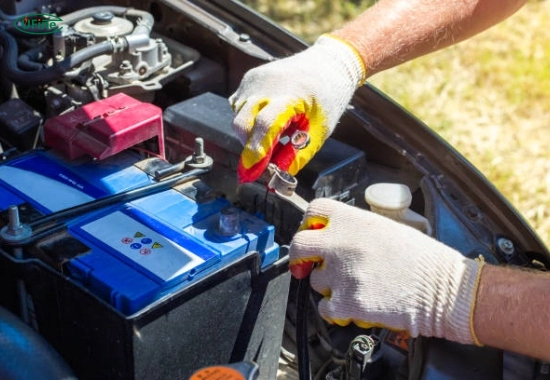
Turn Off Power and Disconnect the Battery
Safety comes first when replacing battery terminals.
Follow these steps:
- Turn off the vehicle or electrical equipment completely.
- Remove the ignition key.
- Wear protective gloves and eye protection.
- Locate the positive (+) and negative (-) terminals.
- Disconnect the negative terminal first.
- Disconnect the positive terminal second.
Disconnecting the negative cable first reduces the risk of short circuits.
According to the OSHA electrical safety guidelines, accidental contact with energized metal parts can create arc and spark hazards.
Inspect the Battery Cable and Connector
Before installing a new battery connector, inspect the full cable assembly.
Check for:
- Green or white corrosion
- Melted insulation
- Loose copper strands
- Burn marks
- Broken terminal clamps
- Excessive cable stiffness
If corrosion extends deep into the cable, replacing the battery cable may be necessary.
Clean the Battery Posts
Before installing new connectors, clean the battery posts thoroughly.
Cleaning process:
- Mix baking soda with water.
- Apply the solution to corroded areas.
- Use a brass brush to remove corrosion.
- Wipe the surface dry completely.
- Ensure the battery posts are smooth and clean.
A clean contact surface improves conductivity and reduces voltage loss.
The Battery Council International recommends regular inspection and cleaning to maintain reliable battery performance.
Remove the Old Battery Connector
Now remove the damaged connector.
How to replace battery terminal connectors:
- Cut off the old terminal connector close to the cable end.
- Strip approximately 10-12 mm of insulation.
- Expose clean copper wire.
- Remove oxidized copper strands if necessary.
If the copper appears black or heavily oxidized far into the cable, replace the entire cable instead of only the connector.
Install the New Battery Connector
This step is critical for long-term reliability.
Installing the replacement connector:
- Insert the stripped cable into the new battery connector.
- Crimp or tighten the connector securely.
- Avoid loose connections.
- Do not overtighten soft lead terminals.
- Apply heat shrink tubing if needed.
- Use dielectric grease to reduce corrosion.
For high-current lithium battery systems, properly crimped copper lugs provide lower resistance than cheap universal connectors.
You may also want to read our guide on what causes battery corrosion.
Reconnect the Battery
Reconnect the battery in the correct order:
- Connect the positive terminal first.
- Tighten the connector securely.
- Connect the negative terminal last.
- Ensure both terminals cannot rotate by hand.
A secure battery connection prevents intermittent electrical problems.
Test the Battery Connection
After replacing battery terminals, test the system.
Check for:
- Smooth engine starting
- Stable voltage
- No flickering lights
- No abnormal heating
- No sparking around terminals
If problems continue, inspect:
- Battery condition
- Alternator output
- Ground connections
- Fuse integrity
Part 6. Common mistakes when replacing battery terminals
Avoid these common battery connector replacement mistakes:
| Mistake | Risk |
|---|---|
| Disconnecting positive terminal first | Short circuit risk |
| Using undersized connectors | Overheating |
| Leaving corrosion under the clamp | High resistance |
| Overtightening terminals | Cracked battery post |
| Using poor-quality connectors | Early failure |
| Ignoring damaged cables | Recurring electrical problems |
Part 7. Battery connector materials comparison
| Material | Advantages | Disadvantages |
|---|---|---|
| Lead | Cheap and common | Corrodes easily |
| Brass | Good corrosion resistance | Higher cost |
| Copper | Excellent conductivity | Requires protection coating |
| Nickel-plated copper | High durability and conductivity | Premium option |
For industrial and lithium battery applications, copper or plated copper connectors are generally preferred.
Part 8. Can you replace just one battery terminal?
Yes. If only one battery terminal connector is damaged, you can replace a single connector.
However, replacing both terminals at the same time is often recommended because:
- Both connectors usually age similarly
- Electrical resistance stays balanced
- Future maintenance becomes easier
If the battery cables are old, replacing the full battery cable assembly may be more cost-effective long term.
Part 9. Risks of ignoring a bad battery connection
Failing to replace a damaged battery connector can cause serious electrical issues.
Possible consequences:
- Vehicle starting failure
- Voltage instability
- Alternator overloading
- Electronic system malfunction
- Heat buildup at the terminal
- Sparking and fire hazards
- Battery charging inefficiency
In high-current systems such as RV batteries, marine batteries, or lithium energy storage systems, a poor battery connection can generate significant heat and power loss.
Part 10. Battery connector replacement for different applications
| Application | Connector Recommendation |
|---|---|
| Passenger vehicles | Standard brass top-post terminals |
| Marine batteries | Tinned copper corrosion-resistant terminals |
| Solar battery banks | Heavy-duty crimp lugs |
| Lithium battery packs | High-current copper connectors |
| RV systems | Vibration-resistant battery terminals |
| Industrial equipment | Bolt-on heavy-duty connectors |
Part 11. Battery connector replacement FAQs
How do I replace a battery connector safely?
Turn off the power source first. Disconnect the negative terminal before the positive terminal. Wear gloves and eye protection, clean corrosion carefully, and reconnect the positive terminal first during installation.
How often should battery terminals be inspected?
Battery terminals should be inspected every 6 months. Vehicles in humid, marine, or high-vibration environments may require more frequent checks.
Can I replace battery terminals without replacing the cable?
Yes. If the cable itself is still in good condition and corrosion has not spread into the wire strands, only the terminal connector needs replacement.
What is the best material for battery terminal connectors?
Copper and brass connectors provide better conductivity and durability than basic lead terminals. Nickel-plated copper connectors offer the best corrosion resistance for demanding applications.
Why do battery terminals corrode repeatedly?
Repeated corrosion usually results from battery acid vapor leaks, moisture exposure, loose connections, or overcharging. Cleaning the terminals and applying dielectric grease can help reduce future corrosion.
Related Tags:

More Articles

JST vs Molex: The Right Battery Connector Choice
JST or Molex for your battery? Learn how connector selection affects current, voltage drop, reliability, and device performance.
Custom Battery Pricing: Costs Manufacturers Don’t Mention
A low battery quote may not be the final cost. Discover common hidden expenses that affect custom lithium battery projects.
Battery Wire Length: Hidden Cause of Power Loss
A longer battery wire can cause voltage drop, power loss, and unstable operation. Learn how wire length affects battery performance.
How Device Sleep Modes Affect Battery Life
Think sleep mode extends battery life? Learn why devices still drain power and how firmware, hardware, and batteries affect runtime.
LiPo Battery and PCB Design: Clearance, Insulation, and Placement
Learn how to optimize LiPo battery PCB clearance, insulation, placement, wiring, and thermal design—and avoid common integration mistakes.