- Part 1. What does a swollen laptop battery look like?
- Part 2. Why do lithium laptop batteries swell?
- Part 3. What happens if you keep using a swollen laptop battery?
- Part 4. What should you do if your laptop battery swells?
- Part 5. How to prevent laptop battery swelling
- Part 6. How to choose a reliable replacement laptop battery
- FAQs
According to the UL Standards & Engagement lithium-ion battery incident database, updated September 16, 2026, its global dataset contained 5,287 reported battery incidents across 52 countries, including 204 reports involving swelling. These figures cover multiple types of lithium-ion battery products, not laptops alone, and represent reported incidents rather than the actual frequency of battery swelling. Nevertheless, they highlight why battery deformation should never be ignored.
If your laptop battery is swelling, should you keep using the device? Can it explode? And what causes a battery that once worked perfectly to expand?
Let’s look at the science behind laptop battery swelling, the warning signs to watch for, and the safest ways to handle it.
Key Takeaways
-
Laptop battery swelling is usually caused by gas generation inside the battery cell due to internal chemical reactions and degradation.
-
Aging, excessive heat, physical damage, and manufacturing defects can contribute to swelling.
-
A swollen battery is damaged and should no longer be used or charged.
-
Never puncture, squeeze, bend, or attempt to repair a swollen lithium battery yourself.
-
Proper battery design, manufacturing quality, thermal management, and protection circuits help reduce battery-related risks.
Part 1. What does a swollen laptop battery look like?
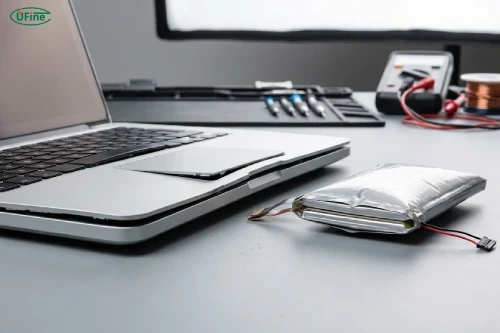
Laptop battery swelling happens when gas accumulates inside a battery cell, causing its outer pouch or enclosure to expand. In many laptops, the battery is hidden beneath the bottom cover, so you might notice changes to the laptop itself before seeing the battery.
For example, your trackpad might suddenly become difficult to click, or your laptop may no longer sit flat on a desk.
Some common warning signs include:
-
A raised trackpad: The trackpad may bulge upward or become difficult to press because the expanding battery pushes against it from underneath.
-
A bulging bottom cover: The laptop’s base may look uneven, develop gaps, or become noticeably curved.
-
Keyboard deformation: Certain keys may feel raised or become harder to press.
-
Unusual gaps in the casing: The laptop’s seams may begin separating as internal pressure increases.
-
Changes in battery performance: You may notice shorter battery life, unexpected shutdowns, or unusual heating alongside physical deformation.
Not every swollen battery produces all these symptoms. Sometimes, the only visible clue is a slightly raised laptop case.
If you suspect swelling, don’t press on the affected area to check whether it moves. Even gentle pressure can damage an already compromised battery.
Part 2. Why do lithium laptop batteries swell?
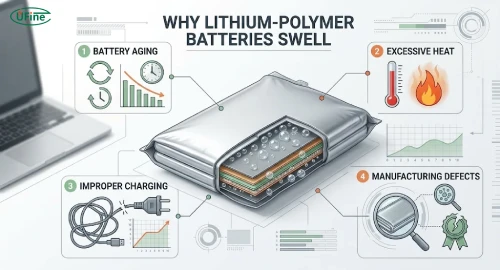
Most modern laptops use rechargeable lithium-ion or lithium-polymer battery cells. These batteries store and release energy through electrochemical reactions.
During normal operation, lithium ions move between the positive and negative electrodes through an electrolyte. However, as a battery ages or experiences abnormal conditions, unwanted side reactions can occur. These reactions may produce gas inside the cell.
Because the gas cannot simply escape from a sealed battery, internal pressure increases and the battery begins to expand.
So, what triggers this process?
1 Battery aging and repeated charge cycles
Every rechargeable battery gradually loses performance through repeated charging and discharging.
Over time, chemical reactions inside the cell can consume active materials, increase internal resistance, and generate gas. The risk of swelling may become greater as the battery deteriorates, although aging does not mean every battery will swell.
2 Excessive heat
Heat is one of the major factors affecting lithium battery degradation.
When a laptop operates under heavy workloads, such as gaming, video rendering, or intensive software development, its internal temperature can rise. Poor ventilation, blocked cooling vents, and prolonged exposure to high temperatures can make the situation worse.
High temperatures accelerate unwanted chemical reactions inside battery cells, potentially increasing the risk of gas generation.
3 Overcharging and improper charging conditions
Modern laptops generally include charging management systems designed to prevent overcharging. However, problems with charging circuits, incompatible power adapters, damaged components, or poor battery protection can create abnormal operating conditions.
Keeping a laptop plugged in is not automatically dangerous. The important factors are the battery’s condition, temperature, and how the charging system manages voltage and current.
4 Manufacturing defects and internal damage
Battery quality also matters.
Contamination during production, inconsistent electrode coatings, damaged separators, poor sealing, or internal short circuits can compromise cell stability.
Physical impacts, such as dropping a laptop or applying excessive pressure to its battery compartment, can also damage internal structures and increase safety risks.
Part 3. What happens if you keep using a swollen laptop battery?
A swollen battery is not simply an old battery that has become slightly larger. It is a damaged battery that may continue to deteriorate.
Continuing to use it can create several problems.
Damage to internal laptop components
As the battery expands, it puts pressure on nearby components. The trackpad, keyboard, display assembly, connectors, and laptop casing may become damaged.
In some cases, replacing the battery alone may not be enough to restore the device.
Overheating and potential fire hazards
A swollen battery may have compromised internal components or chemical stability. If the battery experiences further damage, it may overheat, release gases, or enter thermal runaway.
Thermal runaway is a dangerous chain reaction in which rising temperature accelerates internal chemical reactions, potentially resulting in fire or violent failure.
Battery leakage and gas release
A damaged battery may release electrolyte or gases. These substances can be harmful, and unusual odors or hissing sounds should be treated as serious warning signs.
The key point is simple: a swollen laptop battery should not be treated as safe just because the laptop still turns on.
Part 4. What should you do if your laptop battery swells?
If you notice that your laptop battery is swollen, don’t wait for the problem to get worse. Your priority should be to stop using the device and arrange safe handling.
Here’s what you should do.
1. Stop using the laptop immediately
Shut down the laptop if you can do so safely. Don’t continue working, gaming, or running demanding applications. A swollen battery should not remain in normal operation.
2. Disconnect the charger
Unplug the power adapter if it is safe to reach. Continuing to charge a damaged battery may increase the risk of overheating and further deterioration.
3. Don’t try to remove or repair the battery yourself
This is particularly important for laptops with built-in batteries. Avoid pressing, puncturing, bending, or squeezing the battery. Even a small amount of physical damage can cause a dangerous reaction.
If the battery is removable, don’t force it out if it is swollen or stuck.
4. Keep the device away from flammable materials
Place the laptop in a location away from direct sunlight, heaters, paper, bedding, and other combustible materials, provided you can move it safely.
If you notice smoke, flames, rapid heating, or unusual hissing, don’t handle or move the device. Move away, keep others clear, and contact emergency services.
5. Contact a qualified repair professional
Contact the laptop manufacturer or an authorized repair center. They can assess the damage, remove the battery using appropriate procedures, and recommend a compatible replacement.
6. Dispose of the damaged battery properly
Never put a swollen lithium battery in household garbage or ordinary recycling bins. Contact your local hazardous waste program or an authorized battery recycling facility for instructions.
The US Environmental Protection Agency’s lithium-ion battery disposal guidance provides further information on handling damaged and swollen batteries.
Part 5. How to prevent laptop battery swelling
You cannot completely eliminate the possibility of battery swelling, but good usage habits and proper battery management can reduce unnecessary stress on the cells.
Here are some practical ways to protect your laptop battery.
Keep your laptop cool
Avoid placing your laptop on blankets, pillows, or other soft surfaces that block ventilation. Make sure the cooling vents remain unobstructed, especially during demanding tasks.
If your laptop frequently becomes unusually hot, check its cooling system rather than simply accepting high temperatures as normal.
Use compatible charging equipment
Always use the original charger or a compatible replacement that meets the manufacturer’s voltage, current, and power specifications.
An unsuitable charger or damaged charging system can create abnormal electrical conditions.
Take advantage of battery charging limits
Many modern laptops offer battery health management features that limit maximum charging levels, such as 80%, depending on the manufacturer.
These features can help reduce the time a battery spends at a high state of charge, particularly when the laptop is frequently connected to external power.
Avoid physical damage
Don’t place heavy objects on your laptop or apply pressure to its bottom cover. Avoid dropping the device, especially when it contains a built-in battery.
Pay attention to battery condition
If you notice unusual heating, physical deformation, or a sudden change in battery performance, investigate the issue early. Don’t wait until the laptop casing starts separating.
Part 6. How to choose a reliable replacement laptop battery
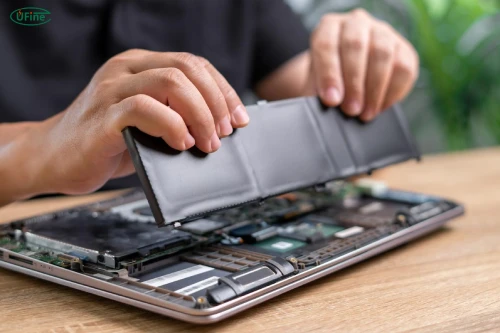
Once a swollen battery has been professionally removed, choosing the correct replacement becomes important.
Not all laptop batteries with similar capacities or dimensions are interchangeable. You need to consider several technical specifications.
|
Specification |
What you should check |
|---|---|
|
Voltage (V) |
Must match the laptop’s required battery voltage |
|
Capacity (mAh/Wh) |
Should meet the device’s supported capacity requirements |
|
Dimensions |
Must fit the available battery compartment |
|
Connector |
Must match the laptop’s electrical connection |
|
BMS |
Should provide appropriate battery monitoring and protection |
|
Certifications |
Check applicable safety and transportation requirements |
One common mistake is choosing a replacement battery based only on its capacity.
For example, a 5,000mAh battery is not automatically a suitable replacement for a 4,000mAh battery. Voltage, cell configuration, dimensions, connector design, and battery management compatibility all matter.
You should also consider the manufacturer’s quality control processes. Reliable battery production involves consistent cell manufacturing, electrical testing, protection circuit verification, and appropriate safety assessments.
A lower-priced battery from an unknown supplier may not offer the same level of quality and reliability.
FAQs
1. Can a swollen laptop battery explode?
Yes. A swollen lithium battery is damaged and may experience thermal runaway, which can lead to fire, smoke, or violent failure. Stop using and charging it immediately.
2. Can I still use my laptop with a swollen battery?
No. Even if the laptop still works normally, the battery is no longer safe for continued use. Shut down the device and arrange professional inspection and replacement.
3. Does a swollen laptop battery always need replacement?
Yes. Swelling indicates internal battery damage. It cannot be safely repaired by releasing the trapped gas or compressing the battery. The damaged battery needs professional removal and replacement.
4. Can a laptop battery swell while the laptop is turned off?
Yes. Battery degradation and internal chemical reactions can continue even when a laptop is powered off. Swelling does not require the device to be actively charging or operating.
5. Can a swollen laptop battery return to normal?
No. Once a battery has physically swollen, it should be considered permanently damaged. It cannot be restored to a safe condition through cooling, discharging, or other DIY methods.
6. Is it safe to charge a laptop with a swollen battery?
No. Charging a swollen battery can expose it to additional electrical and thermal stress. Disconnect the charger if safe and stop using the device.
7. How much does it cost to replace a swollen laptop battery?
The cost depends on the laptop model, battery availability, battery design, and repair service. Some laptops have easily replaceable batteries, while others require more complicated professional disassembly.
Related Tags:

More Articles

200 Amp Lithium Battery: Better Than Lead-Acid?
Is a 200Ah lithium battery worth the extra cost? Compare runtime, lifespan, usable power, and long-term savings before you buy.
Where to Find Reliable LiPo Battery Suppliers for OEM Projects
Looking for LiPo battery suppliers? Discover where to find reliable manufacturers and how to avoid costly sourcing mistakes.
Lithium Polymer vs. Lithium Ion Power Bank: What’s the Difference?
Are LiPo power banks really better? Discover the key differences in capacity, weight, lifespan, safety, and air travel before choosing one.
How to Choose the Right 2S Shorty LiPo Battery for Your RC Car?
Not sure which 2S Shorty LiPo to buy? Compare battery specs, popular brands, prices, and performance to find the right fit for your RC car.
What Happens If One Cell in a Battery Pack Goes Bad? How to Fix It
Found a faulty battery cell? Discover how to identify the problem, whether one cell can be replaced, and how to fix a battery pack safely.