- Part 1. What battery does the PS4 controller use?
- Part 2. What is the PS4 controller battery size?
- Part 3. Key features to look for in a good PS4 controller battery
- Part 4. Is the larger the capacity of the PS4 controller battery, the better?
- Part 5. How long does a PS4 controller battery last?
- Part 6. How to replace a PS4 controller battery
- Part 7. PS4 controller battery price
- Part 8. PS4 controller battery charger
- Part 9. Battery care and maintenance
- Part 10. FAQs
If you’re a PlayStation lover, you know how frustrating it is when your controller suddenly dies during a game. It’s a tiny thing—but the ps4 controller battery is the heart of your controller. Without it, there’s no gameplay. No action. No fun.
Whether you’re looking to replace a weak battery or upgrade to something stronger, this guide is for you. We’ll cover everything from the type and size of the PS4 controller battery to key features, charging, and how to make it last longer.
Let’s jump right in.
Key takeaways
- Most PS4 controllers use a rechargeable 3.7V lithium battery with around 1000mAh capacity.
- A replacement PS4 controller battery usually ranges from 800mAh to 2000mAh depending on size and design.
- Higher mAh ratings can provide longer gaming time but must match the controller’s available space and power requirements.
- The correct PS4 controller battery replacement should match voltage, connector type, dimensions, and protection design.
- Lithium polymer batteries are commonly used in compact electronics because they allow flexible customization.
- Battery quality, capacity, and customization requirements all affect the PS4 controller battery price.
Part 1. What battery does the PS4 controller use?
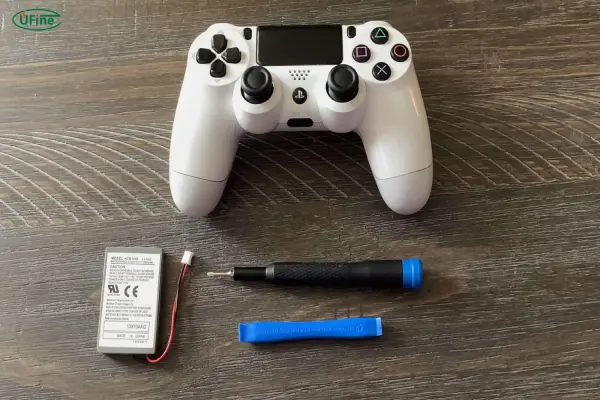
The PS4 controller, also called the DualShock 4, runs on a built-in rechargeable lithium polymer (LiPo) battery. Unlike Xbox controllers that use AA batteries, the PS4 controller has a battery pack sealed inside.
| Specification | Typical value |
|---|---|
| Battery type | Lithium-ion rechargeable battery |
| Nominal voltage | 3.7V |
| Battery capacity | Around 1000mAh |
| Charging voltage | 4.2V |
| Battery connector | Two-wire or three-wire connector |
| Battery shape | Flat pouch cell design |
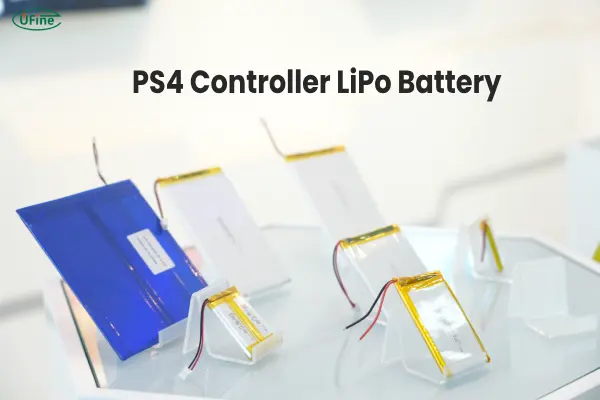
This type of battery is lightweight, compact, and offers decent power. But over time, even the best battery will start to wear out. That’s why knowing your options—and how to maintain them—is important.
Part 2. What is the PS4 controller battery size?
The standard ps4 controller battery size fits perfectly into the battery compartment of the DualShock 4.
Here are the usual specs:
- Dimensions: Around 43mm x 34mm x 9mm
- Voltage: 3.7V
- Connector: JST 2-pin or ZH 1.5mm 2-pin
There are two main versions of the PS4 controller:
- CUH-ZCT1 (older model): Slightly different battery connector
- CUH-ZCT2 (newer model): Uses a different plug and sometimes a larger capacity battery
So when replacing your battery, check your controller model first. You don’t want to buy a battery that doesn’t fit or connect properly.
At this point, if you’re looking for a battery that fits exactly, Ufine Battery can help. We’re a trusted Chinese manufacturer that provides custom lithium batteries, including lithium polymer and cylindrical models, tailored for devices like PS4 controllers. You can customize the size, voltage, and capacity to fit your needs perfectly.
Contact Ufine Battery for a custom PS4 controller battery.
Part 3. Key features to look for in a good PS4 controller battery
Not all batteries are made equal. When choosing a ps4 controller battery, here are 7 important things to look for:
1.Correct Voltage (3.7V)
Using the wrong voltage can damage your controller.
2. High Capacity (mAh)
The higher the mAh, the longer you can play between charges.
3. Good Cycle Life
Look for batteries rated for 300 to 800 charge cycles or more.
4. Compact Design
It should fit the controller without forcing or bulging.
5. Reliable Connector
Match the battery connector to your controller model (ZH or JST).
6. Quality Certification
Choose batteries with safety certifications like CE, RoHS, or UN38.3.
7. Brand Trustworthiness
Don’t go for the cheapest one. Trusted suppliers like Ufine Battery offer safe and stable batteries that won’t overheat or swell.
Part 4. Is the larger the capacity of the PS4 controller battery, the better?
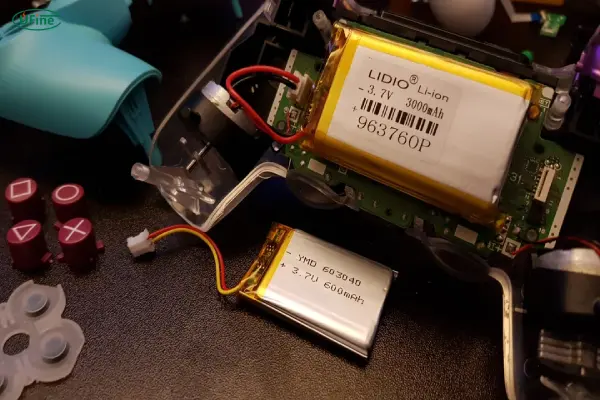
It’s tempting to think that bigger is always better—but with batteries, that’s not always true.
While a higher capacity battery (like 2000mAh) can provide longer play time, there are trade-offs:
- Size Constraint: Larger batteries might not fit perfectly in the controller case.
- Heat Generation: Higher capacity batteries may produce more heat, especially during intense charging or gameplay.
- Weight: Slightly heavier, which can change the controller’s feel.
So yes, a bigger battery can mean more game time, but only if it fits well and is made safely. That’s why custom solutions from manufacturers like Ufine Battery are a smart choice. We ensure both performance and safety.
Part 5. How long does a PS4 controller battery last?
There are two parts to this question:
a. Play Time Per Charge
A fully charged standard PS4 controller battery (1000–1200mAh) lasts about:
- 6 to 8 hours with vibration and lightbar on
- Up to 10 hours with lightbar and rumble turned off
b. Battery Lifespan
Most lithium polymer batteries last:
- 2 to 3 years of regular use
- Around 300 to 500 full charge cycles
After that, you’ll start to notice quicker power drains, slower charging, or the controller shutting off unexpectedly.
When that happens, it’s time for a replacement.
Part 6. How to replace a PS4 controller battery
A battery replacement PS4 controller project is a common solution when the original battery no longer provides enough runtime.
Replacing the battery usually involves the following steps:
- Turn off the controller completely.
- Remove the rear screws and open the controller housing.
- Disconnect the old battery connector carefully.
- Install the new compatible battery.
- Close the controller housing and test charging performance.
Before purchasing a replacement battery, check these specifications:
| Specification | What to check |
|---|---|
| Battery type | Lithium-ion or lithium polymer |
| Voltage | Usually 3.7V |
| Capacity | Match your runtime requirements |
| Size | Must fit inside the controller |
| Connector | Must match the original connector |
Choosing a compatible battery is important because the battery in PS4 controller systems is designed around specific electrical and physical requirements.
A high-quality replacement battery should provide stable voltage output, reliable charging, and proper protection against abnormal conditions.
Part 7. PS4 controller battery price
Prices vary depending on capacity and quality.
| Battery capacity | Price range |
|---|---|
| 800–1000mAh | $5–$10 |
| 1200–1500mAh | $10–$15 |
| 2000mAh+ (High quality) | $15–$25 |
Low-cost batteries often have:
- Fake labels (claiming more capacity than actual)
- Poor internal protection
- Shorter lifespan
Spending a little more for a safe, reliable battery is worth it. Again, Ufine Battery offers fair pricing on high-quality custom lithium polymer batteries with built-in protection circuits.
Part 8. PS4 controller battery charger
PS4 controllers use a micro-USB charging port. You can charge the controller with:
- PS4 console USB port
- USB wall charger
- Charging dock (for dual controllers)
- Power bank
Charging tips:
- Use a charger with 5V output and 800mA–1A current
- Don’t overcharge—unplug once it’s full
- Avoid using while charging for long hours—it generates heat
Some custom batteries from Ufine come with smart charging circuits to prevent overcharging or overheating, which helps prolong battery life.
Part 9. Battery care and maintenance
Want your ps4 controller battery to last longer? Try these tips:
1. Avoid Overcharging
Unplug when the battery is full.
2. Don’t Let It Drain to 0%
Charge when it hits 20–30%.
3. Store Properly
If not in use, store the controller in a cool, dry place.
4. Use Original or Certified Chargers
Cheap chargers can overheat or damage the battery.
5. Turn Off Features You Don’t Use
Vibration and lightbar drain battery fast.
6. Don’t Leave in Direct Sunlight or Hot Areas
Heat is a battery killer.
7. Charge Regularly
Even if you don’t use the controller often, charge it once a month.
These habits make a huge difference. You’ll be surprised how much longer your controller performs with just a little care.
Part 10. FAQs
Can I replace the PS4 controller battery myself?
Yes! It requires a small screwdriver and about 10 minutes. Just be gentle when opening the controller.
What’s the best replacement battery for PS4 controllers?
A 3.7V lithium polymer battery with at least 1200mAh, like the custom options from Ufine Battery.
Why does my controller die quickly even after a full charge?
The battery may be degraded or fake. Time for a replacement.
Can I upgrade to a higher capacity battery?
Yes, as long as it fits inside the controller and matches the voltage and connector.
Is it okay to leave the controller charging overnight?
Not recommended. It can slowly degrade the battery over time.
Related Tags:

More Articles

JST vs Molex: The Right Battery Connector Choice
JST or Molex for your battery? Learn how connector selection affects current, voltage drop, reliability, and device performance.
Custom Battery Pricing: Costs Manufacturers Don’t Mention
A low battery quote may not be the final cost. Discover common hidden expenses that affect custom lithium battery projects.
Battery Wire Length: Hidden Cause of Power Loss
A longer battery wire can cause voltage drop, power loss, and unstable operation. Learn how wire length affects battery performance.
How Device Sleep Modes Affect Battery Life
Think sleep mode extends battery life? Learn why devices still drain power and how firmware, hardware, and batteries affect runtime.
LiPo Battery and PCB Design: Clearance, Insulation, and Placement
Learn how to optimize LiPo battery PCB clearance, insulation, placement, wiring, and thermal design—and avoid common integration mistakes.