- Part 1. Do PS5 controllers have lithium batteries?
- Part 2. How the PS5 dual sense battery works
- Part 3. Key signs your PS5 controller battery is failing
- Part 4. Root causes behind battery problems
- Part 5. How to fix the most common PS5 battery issues
- Part 6. Replacing the PS5 controller battery
- Part 7. Can you upgrade the PS5 controller battery capacity?
- Part 8. Long-term battery maintenance tips
- Part 9. FAQs
If you’re a passionate gamer, you know the frustration when your PS5 controller runs out of battery in the middle of an intense session. The PS5 DualSense controller is a technological marvel, but its advanced features put significant demands on the battery. Over time, even a powerful lithium-ion battery can start to show signs of wear. That’s why understanding how to fix PS5 controller battery issues is crucial for any serious PlayStation gamer.
This comprehensive guide will help you understand the root causes of these battery problems, how to diagnose them, and—most importantly—how to fix or even replace the battery to restore full functionality.
Quick Troubleshooting Checklist: PS5 Controller Not Charging?
If your PS5 controller suddenly stops charging, check these common issues first:
- Try a different USB-C charging cable
- Connect the controller directly to the PS5 console
- Check if the charging port is blocked by dust or debris
- Reset the DualSense controller using the reset button
- Check whether the controller turns on when connected by cable
If your PS5 controller still won’t charge or turn on after these steps, the problem may be related to the internal battery, charging circuit, or battery connection.
Part 1. Do PS5 controllers have lithium batteries?
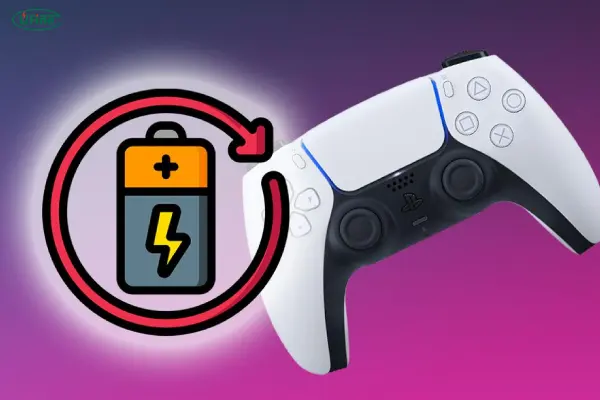
Yes, PS5 DualSense controllers use a built-in rechargeable lithium-ion polymer battery.
Unlike traditional removable batteries, the DualSense battery is integrated inside the controller housing. This design allows Sony to create a slimmer and more powerful controller while supporting advanced features such as:
- Adaptive triggers
- Haptic feedback
- Motion sensors
- Built-in microphone
- Wireless connectivity
However, lithium batteries naturally lose capacity over time. After hundreds of charging cycles, the battery may no longer provide the same runtime as when it was new.
This is why many gamers eventually experience issues such as:
- PS5 controller battery dying fast
- Shorter gaming sessions
- Unexpected shutdowns
- Controller needing constant charging
Part 2. How the PS5 dual sense battery works
The PS5 controller contains a built-in lithium-ion rechargeable battery. Here’s what you need to know:
- Type: Lithium-ion polymer (Li-Po)
- Voltage: 3.65V
- Capacity: Varies by model, typically between 1,560mAh and 2,200mAh
- Lifespan: About 500 full charge-discharge cycles
This battery powers all internal systems: adaptive triggers, haptic feedback, motion sensors, a microphone, and a light bar. These features are immersive but battery-intensive.
Over time, the battery’s ability to hold a charge diminishes. Partial charging, deep discharge, and exposure to heat also accelerate this degradation.
Part 3. Key signs your PS5 controller battery is failing
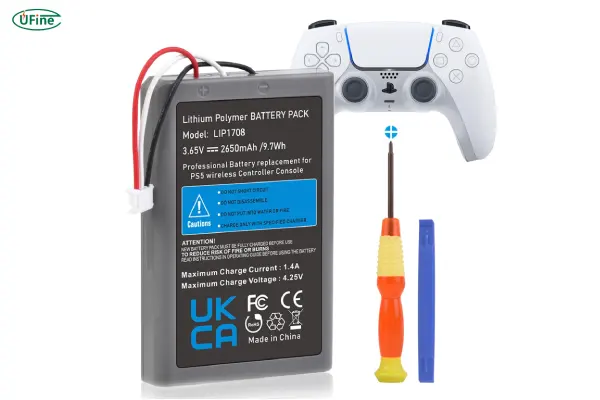
Before you start fixing anything, it’s essential to identify the problem. Here are typical signs of battery issues:
- Controller only works when plugged in: A classic sign of a dead or disconnected battery.
- Fast battery drain: It dies after just 1–2 hours.
- Inconsistent charging: It charges sporadically or disconnects frequently.
- No charge at all: Battery appears dead despite prolonged charging.
- Overheating: Battery or controller becomes warm while idle.
- Swollen battery: This is dangerous and must be replaced immediately.
Part 4. Root causes behind battery problems
Let’s go deeper into what might be going wrong:
A. Natural Degradation
Lithium-ion batteries degrade with each charge cycle. After 1–2 years of frequent use, it’s normal for battery performance to decline.
B. Charging Port or Cable Issues
A damaged USB-C cable or debris in the port can prevent proper charging. Always inspect your cables and clean the port gently with compressed air.
C. Firmware and Software Bugs
Sometimes, a system update can interrupt charging behavior. Resetting the controller or updating firmware may help.
D. Power Source Instability
Charging from a PC USB port or low-voltage adapter can slow charging. Use the PS5’s ports or a certified wall charger.
E. Hardware Defects
In rare cases, the battery or charging circuit may be defective from the start.
Part 5. How to fix the most common PS5 battery issues
Let’s get into practical solutions:
1. Controller Won’t Charge
- Test with another USB-C cable.
- Clean the USB port with a dry brush or compressed air.
- Try a different charging port on the PS5 or use a certified wall adapter.
- Reset the controller using the pinhole on the back.
- Update the system firmware.
2. Battery Drains Too Fast
- Go to Settings > Accessories > Controllers
- Set “Trigger Effect Intensity” and “Vibration Intensity” to low or off.
- Dim the light bar.
- Mute the built-in microphone.
- Enable rest mode charging in system settings.
These settings reduce the load on the battery and extend playtime.
Part 6. Replacing the PS5 controller battery
When fixes don’t work, replacement is your best bet. It’s not as difficult as you might think, though it requires care.
Tools Needed:
- Small Phillips screwdriver
- Plastic pry tool
- Replacement battery (same voltage, higher or similar capacity)
Step-by-Step Instructions:
- Turn off and unplug the controller.
- Remove the back cover screws hidden beneath the top shell.
- Carefully separate the shell using the plastic tool.
- Locate and unplug the old battery.
- Plug in the new battery, ensuring correct polarity.
- Reassemble the controller.
A high-capacity replacement battery can significantly improve playtime per charge.
Part 7. Can you upgrade the PS5 controller battery capacity?
Many users wonder whether a higher-capacity battery can extend DualSense battery life.
The answer depends on the battery size and electrical specifications.
A replacement battery must match:
- Voltage requirements
- Connector type
- Physical dimensions
- Charging compatibility
- Safety standards
Simply installing a larger battery does not always guarantee better performance. A properly designed lithium polymer battery with optimized energy density can provide longer runtime while maintaining safe operation.
For manufacturers developing gaming accessories, choosing the right battery design is essential for balancing:
- Battery life
- Product thickness
- Weight
- Safety
- Manufacturing cost
Best battery options for replacements
Look for the following when buying a battery:
- Same voltage (3.65V)
- Capacity: 2,200mAh or higher for better performance
- OEM Connector: Plug-and-play compatibility
- Certifications: CE, RoHS, UL
- Cycle Rating: 500+ for longer life
Ufine Battery, a top lithium battery manufacturer from China, offers custom battery solutions specifically for devices like gaming controllers. Whether you need ultra-thin batteries, high-rate cells, or high-temperature performance, Ufine has the technology to build custom power solutions.
Need a custom battery for your PS5 controller? Contact Ufine Battery to get a solution that fits your exact needs.
Part 8. Long-term battery maintenance tips
To extend your controller’s lifespan:
- Keep the battery between 20% and 80% charged
- Avoid extreme heat or freezing temperatures
- Don’t leave it charging overnight continuously
- Use official or certified charging cables
- Store the controller in a cool, dry place
These simple habits can slow down battery aging and prevent damage.
Part 9. FAQs
Can I charge the PS5 controller while playing?
Yes, but avoid playing for long hours while it’s charging—this generates heat that can degrade the battery.
How long does the PS5 controller battery last?
6–12 hours per charge, depending on usage. Expect 2–3 years of reliable service.
Will replacing the battery void my warranty?
Yes. Disassembling the controller may void your warranty, so check your coverage first.
Are third-party batteries safe?
Yes, if you choose a certified manufacturer like Ufine Battery with a good safety record.
Why does my controller randomly shut off?
This could be due to overheating, a bad battery connection, or a firmware glitch.
Related Tags:

More Articles
Buck vs. Boost vs. Buck-Boost Converter: Which Is Best for Battery?
Not sure which converter your battery-powered device needs? Compare Buck, Boost, and Buck-Boost designs and discover what affects voltage stability and runtime.
How to Match 18650 Cells for a Reliable Battery Pack?
Building an 18650 battery pack? Learn how to compare cell capacity, voltage, and internal resistance to avoid mismatches and improve reliability.
Why Do 18650 Battery Packs Get Hot During Discharge?
Is your 18650 battery pack overheating under load? Learn what causes excess heat, how to spot dangerous symptoms, and what to do next.
18650 Battery BMS: How to Get the Specs Right
Learn how to choose a BMS for an 18650 battery pack. Compare voltage, current ratings, protection features, and balancing before you buy.
Why Does My Ring Camera Battery Drain So Fast or Stop Charging?
Is your Ring camera battery draining fast or not charging? Discover common causes, practical fixes, and when to replace the battery.