- Part 1. What does USB rechargeable mean?
- Part 2. How does a USB rechargeable battery work?
- Part 3. What is inside a USB rechargeable battery?
- Part 4. Types of rechargeable cells
- Part 5. Types of battery charging ports
- Part 6. What makes USB rechargeable cells unique?
- Part 7. USB rechargeable cell pros and cons
- Part 8. USB rechargeable cell chargers
- Part 9. Common problems and solutions
- Part 10. Safety standards for USB rechargeable batteries
- Part 10. How manufacturers design USB rechargeable batteries
- Part 12. FAQs
Key Takeaways
- A USB rechargeable battery can be charged directly through a USB connection without a separate charger.
- Most USB rechargeable batteries use lithium-ion or lithium polymer cells combined with an integrated charging circuit.
- USB rechargeable batteries offer greater convenience, portability, and charging flexibility than traditional rechargeable batteries.
- Modern USB batteries contain charging ICs, protection circuits, and voltage regulation systems to ensure safe operation.
- USB-C is rapidly becoming the standard charging interface for rechargeable batteries.
- USB rechargeable batteries are widely used in consumer electronics, smart devices, medical equipment, and industrial applications.
Part 1. What does USB rechargeable mean?
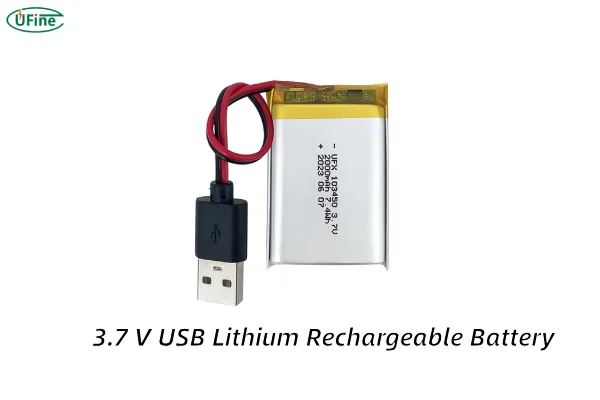
The term “USB rechargeable” simply means that a battery can be recharged directly through a USB connection.
Traditional rechargeable batteries require a separate charger. You remove the battery from the device and place it into a charging station designed specifically for that battery type.
A USB rechargeable battery works differently. It contains a built-in charging circuit that allows power from a USB source to flow directly into the battery.
For example:
- A standard rechargeable AA battery requires a battery charger.
- A USB rechargeable AA battery can be connected directly to a USB cable.
This design significantly improves convenience, especially when traveling or working remotely.
In simple terms, a USB rechargeable battery combines a battery cell and a charging system into a single product.
What is a USB rechargeable battery?
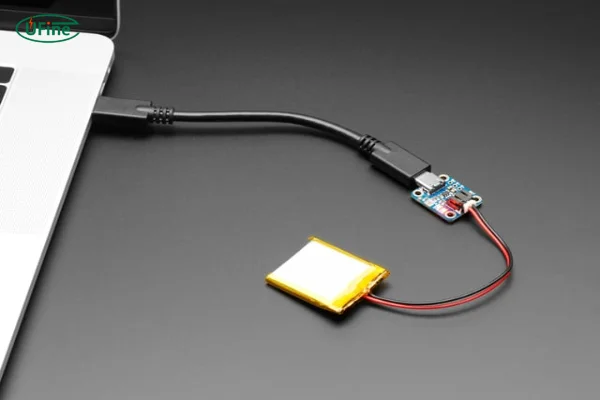
A USB rechargeable battery is a rechargeable battery equipped with an integrated charging circuit and a USB charging interface.
Internally, it contains both an energy storage cell and electronic components that manage charging and battery protection.
Most USB rechargeable batteries are based on lithium battery technology because lithium cells provide:
- High energy density
- Lightweight construction
- Long cycle life
- Low self-discharge rates
Common examples include:
- USB rechargeable AA batteries
- USB rechargeable AAA batteries
- USB rechargeable 18650 batteries
- USB rechargeable lithium polymer batteries
- Custom rechargeable battery packs with USB-C charging
Depending on the design, the charging interface may be:
- USB-C
- Micro USB
- USB-A integrated connector
Among these options, USB-C is becoming the dominant standard due to its faster charging capability and universal compatibility.
Part 2. How does a USB rechargeable battery work?
Although USB rechargeable batteries appear simple externally, they contain sophisticated electronics inside.
A typical USB rechargeable battery includes:
- USB charging port
- Charging management IC
- Protection circuit board
- Voltage regulation system
- Rechargeable battery cell
When you connect the battery to a USB power source, the charging circuit receives the incoming 5V power.
The charging IC then regulates voltage and current to match the battery cell’s charging requirements.
At the same time, the protection circuit continuously monitors:
- Overcharging
- Over-discharging
- Short circuits
- Overcurrent conditions
- Excessive temperatures
The battery cell stores energy chemically and releases it when connected to a device.
Without these internal electronic systems, direct USB charging would be unsafe and could significantly shorten battery life.
Part 3. What is inside a USB rechargeable battery?
Many users assume a USB rechargeable battery is simply a standard battery with a charging port attached.
In reality, it is a compact power system containing several integrated components.
| Component | Function |
|---|---|
| Lithium Cell | Stores electrical energy |
| Charging IC | Controls charging process |
| Protection Circuit | Prevents unsafe operating conditions |
| Voltage Regulator | Maintains stable output voltage |
| USB Connector | Receives charging power |
| Temperature Monitoring | Improves safety during charging |
The battery cell itself typically occupies most of the internal volume.
The remaining space contains a miniature PCB that handles charging management and safety protection.
This integrated design is what allows users to recharge the battery directly from a USB power source without requiring external charging equipment.
Part 4. Types of rechargeable cells
Rechargeable batteries are available in several types, each suited to specific uses. Here’s a breakdown:
Nickel-Cadmium (NiCd)
- Advantages: Durable and capable of handling high discharge rates.
- Disadvantages: Prone to memory effect (loss of capacity over time) and environmentally unfriendly due to toxic cadmium.
Nickel-Metal Hydride (NiMH)
- Advantages: Higher capacity than NiCd and less prone to memory effect.
- Disadvantages: Shorter lifespan and self-discharge when not in use.
Lithium-Ion (Li-ion)
- Advantages: Lightweight, high energy density, and long lifespan.
- Disadvantages: More expensive and sensitive to extreme temperatures.
Lithium-Polymer (LiPo)
- Advantages: Thin, flexible, and ideal for compact devices.
- Disadvantages: More expensive and requires careful handling to prevent damage.
Most USB rechargeable cells rely on Li-ion technology, offering the perfect balance between performance, durability, and cost-effectiveness.
NiMH Battery vs Li-Ion Battery vs NiCad Battery: How are they different?
Part 5. Types of battery charging ports
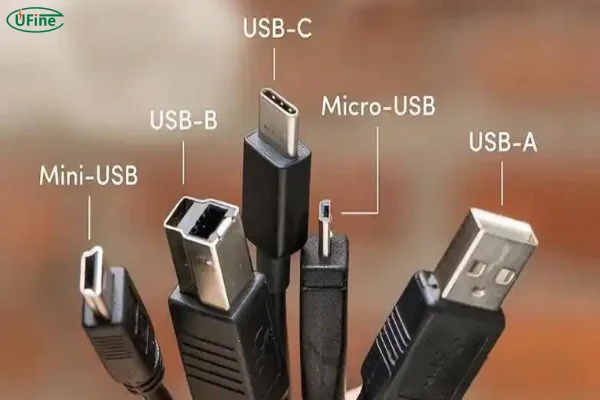
USB rechargeable cells utilize different types of charging ports, which determine their compatibility and charging speed.
Micro-USB
- Common in older devices and budget-friendly products.
- Offers slower charging speeds compared to newer standards.
USB-C
- Modern, fast, and reversible, making it easier to plug in.
- Supports higher power delivery, enabling quicker charging.
Mini-USB
- Rarely used today; found in older gadgets.
- Bulkier and less efficient compared to newer port types.
Lightning (Apple)
- Proprietary to Apple devices, not typically used in USB rechargeable cells.
Most USB rechargeable cells favor Micro-USB or USB-C ports for their wide compatibility and ease of use. USB-C, in particular, is becoming the preferred choice due to its superior charging capabilities.
Part 6. What makes USB rechargeable cells unique?
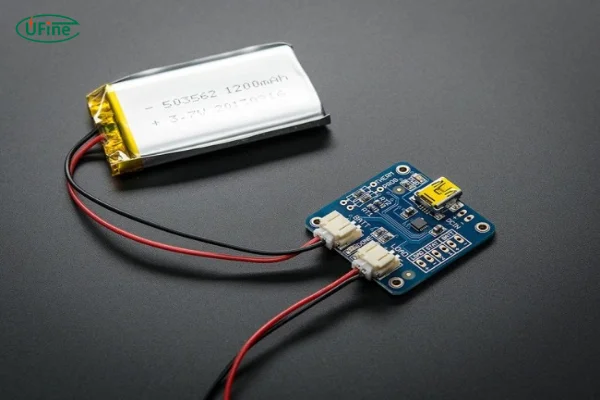
USB rechargeable cells offer several features that set them apart from other rechargeable options.
Built-in Charging Circuitry
Traditional rechargeable batteries require a separate charger, often specific to the battery type. USB rechargeable cells eliminate this hassle, incorporating the charging mechanism directly into the battery.
Universal Compatibility
Whether you’re at home, in the office, or on the road, you can charge these batteries anywhere with a USB port. This universality means fewer accessories to carry and greater convenience.
Sustainability
By reducing reliance on disposable batteries, USB rechargeable cells minimize electronic waste, making them an eco-friendly choice.
Portability
Their compact design and ability to charge on the go make them ideal for travelers, outdoor enthusiasts, and emergency kits.
These features make USB rechargeable cells a practical and forward-thinking solution for modern energy needs.
Part 7. USB rechargeable cell pros and cons
Pros:
- Convenience: Charge directly using USB cables—no need for additional chargers.
- Cost-Effective: Save money over time by avoiding disposable batteries.
- Eco-Friendly: Reduces waste and supports sustainability.
- Versatility: Works with a wide range of devices.
- Portability: Easy to carry and charge anywhere.
Cons:
- Initial Cost: Slightly more expensive than traditional rechargeable batteries.
- Charging Speed Variability: Dependent on the port type (e.g., USB-C is faster than Micro-USB).
- Capacity Limitations: May not match the energy capacity of some non-USB rechargeable batteries.
Understanding these advantages and disadvantages can help you make an informed decision about whether USB rechargeable cells are the right choice for your needs.
Part 8. USB rechargeable cell chargers
While USB rechargeable cells are designed to work with standard USB ports, the type of charger you use can affect their performance and longevity.
Recommended Chargers:
- USB Wall Adapters: Provide fast and reliable charging.
- Power Banks: Great for on-the-go charging, especially during travel.
- Laptop/PC USB Ports: Convenient for desk use, though typically slower.
Tips for Choosing a Charger:
- Look for adapters with appropriate voltage and amperage to match the cell’s specifications.
- Avoid low-quality chargers, as they may cause overheating or damage.
Part 9. Common problems and solutions
Battery is not charging
Possible causes include:
- Damaged charging cable
- Faulty USB adapter
- Failed charging circuit
- Triggered protection circuit
Battery becomes hot during charging
Potential reasons include:
- Excessive charging current
- Internal cell aging
- Poor-quality charger
A slight temperature increase is normal, but excessive heat should be investigated immediately.
Capacity drops quickly
Common causes include:
- Natural battery aging
- High-temperature exposure
- Frequent deep discharges
- Poor storage practices
Part 10. Safety standards for USB rechargeable batteries
Safety is one of the most important considerations when designing rechargeable battery systems.
Reputable manufacturers typically test batteries according to standards such as:
- UN38.3
- IEC 62133
- CE
- RoHS
- UL certification requirements
These standards evaluate transportation safety, electrical performance, environmental compliance, and protection against hazardous operating conditions.
When selecting a USB rechargeable battery supplier, always verify that appropriate certifications are available.
Part 10. How manufacturers design USB rechargeable batteries
From a manufacturing perspective, developing a USB rechargeable battery involves much more than attaching a charging port to a battery cell.
The design process typically includes:
Cell selection
Engineers choose the appropriate battery chemistry based on energy density, safety, cycle life, and application requirements.
Charging circuit design
Charging parameters must be optimized to balance charging speed, battery life, and safety.
Protection system development
Protection circuits are designed to prevent abnormal operating conditions.
Thermal testing
Engineers evaluate temperature performance during charging and discharging.
Cycle life testing
Repeated charge-discharge testing validates long-term reliability.
Certification and compliance
Products must meet transportation, safety, and regulatory requirements before entering the market.
This engineering process is one reason why high-quality USB rechargeable batteries generally outperform low-cost alternatives.
Ufine Battery can customize USB rechargeable batteries with specific capacity, voltage, dimensions, charging ports, and protection circuits for your application.
Find A Solution NowPart 12. FAQs
Do USB rechargeable batteries stop charging automatically?
Most quality USB rechargeable batteries include a charging management circuit that automatically stops charging when the battery reaches full capacity, helping prevent overcharging.
Can USB rechargeable batteries be charged while inside a device?
It depends on the battery and device design. Some battery packs support in-device charging, while individual USB rechargeable AA or AAA batteries usually need to be connected directly to a USB cable.
Are USB rechargeable batteries safe for air travel?
Generally yes. Most USB rechargeable batteries can be transported by air if they comply with airline and lithium battery regulations. Always check local airline requirements before traveling.
Can USB rechargeable batteries be recycled?
Yes. USB rechargeable batteries contain valuable materials such as lithium, copper, and aluminum and should be recycled through approved battery recycling programs rather than disposed of in household waste.
What charging cable do USB rechargeable batteries use?
The charging interface depends on the battery model. Common options include USB-C, Micro USB, and integrated USB-A connectors. USB-C is becoming the most widely adopted standard.
Related Tags:

More Articles

Buck vs. Boost vs. Buck-Boost Converter: Which Is Best for Battery?
Not sure which converter your battery-powered device needs? Compare Buck, Boost, and Buck-Boost designs and discover what affects voltage stability and runtime.
How to Match 18650 Cells for a Reliable Battery Pack?
Building an 18650 battery pack? Learn how to compare cell capacity, voltage, and internal resistance to avoid mismatches and improve reliability.
Why Do 18650 Battery Packs Get Hot During Discharge?
Is your 18650 battery pack overheating under load? Learn what causes excess heat, how to spot dangerous symptoms, and what to do next.
18650 Battery BMS: How to Get the Specs Right
Learn how to choose a BMS for an 18650 battery pack. Compare voltage, current ratings, protection features, and balancing before you buy.
Why Does My Ring Camera Battery Drain So Fast or Stop Charging?
Is your Ring camera battery draining fast or not charging? Discover common causes, practical fixes, and when to replace the battery.