- Key Takeaways
- Part 1. What is a battery terminal adapter?
- Part 2. Why are battery terminal adapters used?
- Part 3. Battery terminal connector types and matching adapters
- Part 4. 12v battery terminal types vs. 12v battery connector types
- Part 5. How to choose the correct battery terminal adapter
- Part 6. How to install battery terminal adapters safely
- Part 7. Battery terminal adapter maintenance and corrosion prevention
- Part 8. Common battery terminal adapter problems and solutions
- Part 9. When should you avoid a battery terminal adapter?
- Part 10. Battery terminal adapter FAQs
A battery terminal adapter converts one battery terminal format into another. It helps connect a battery to cable clamps, ring terminals, accessory wires, or equipment that uses a different connection type.
Battery terminal adapters are common in automotive, marine, RV, solar, UPS, lawn equipment, and industrial battery systems. However, the adapter must match the terminal size, polarity, thread, current load, cable layout, and operating environment.
Key Takeaways
- A battery terminal adapter changes the connection format, not the battery voltage, capacity, or polarity.
- Common options include top-post, side-post, stud-post, marine, JIS-to-SAE, and U1 flag-to-top-post adapters.
- Check the terminal type, post diameter, thread size, current rating, and installation space before selection.
- Loose, corroded, or undersized adapters can cause voltage drop and heat.
- Do not use an adapter to repair a damaged battery post or correct reversed polarity.
Part 1. What is a battery terminal adapter?
A battery terminal adapter is a conductive part installed between the battery terminal and the cable connection. It converts, extends, or changes the original terminal so that a different connector can be attached.
For example, an adapter may convert:
- A side-post terminal into an SAE top post.
- An M8 threaded stud into a top post.
- A smaller JIS post into an SAE-size post.
- A Group U1 flag terminal into a vertical top post.
- A battery post into a stud for ring terminals.
An adapter only changes the physical connection. It does not change the battery’s electrical output.
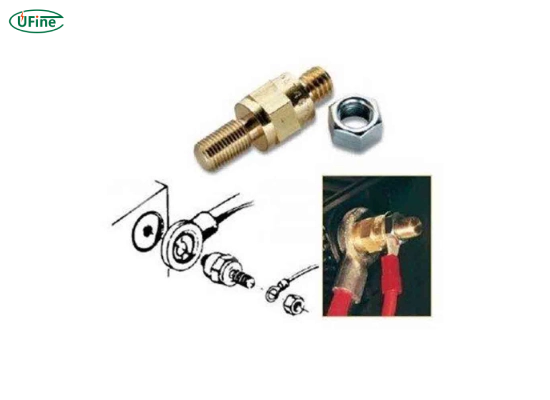
Battery terminal, cable terminal, and adapter differences
| Component | Function | Example |
|---|---|---|
| Battery terminal or post | The electrical contact built into the battery | SAE post, side post, or M8 stud |
| Cable terminal | The cable end attached to the battery | Post clamp, ring lug, or flag connector |
| Battery terminal adapter | Converts one connection format into another | Stud-to-top-post adapter |
| Battery connector | A removable plug between cables or devices | Anderson, XT60, JST, or SAE two-pin plug |
For a broader explanation of different types of battery terminals, read our guide to battery posts and battery terminal types.
Part 2. Why are battery terminal adapters used?
Battery terminal adapters solve connection problems when the battery terminal does not match the existing cable or equipment.
Convert between battery terminal types
A replacement battery may have the correct voltage, capacity, and dimensions but use a different terminal. An adapter can connect it to the existing cable system without replacing the full cable assembly.
Connect accessory cables
Marine, RV, solar, and off-grid systems may need extra connections for chargers, inverters, monitors, or DC equipment. A stud or multi-connection adapter provides a suitable point for ring terminals.
Improve terminal access
Stud extenders and angled adapters can make recessed terminals easier to reach. The final connection must still have enough clearance from the battery cover, enclosure, and opposite terminal.
Retain an existing cable layout
An adapter may allow a new battery to work with existing equipment wiring. This is only suitable when the adapter can handle the current and does not place mechanical stress on the terminal.
Part 3. Battery terminal connector types and matching adapters
The correct adapter depends on both the battery-side terminal and the cable-side connector. The following table compares the most common battery terminal connector types.
| Battery Terminal Type | Common Adapter | Typical Application | Critical Check |
|---|---|---|---|
| SAE top post | Post-to-stud adapter or post shim | Cars, trucks, and generators | Positive and negative post diameter |
| JIS pencil post | JIS-to-SAE post adapter | Compact and Asian vehicle batteries | Post size and cable clearance |
| Side post | Side-post-to-top-post adapter | Selected automotive batteries | Thread size and bolt length |
| Threaded stud | Stud-to-top-post adapter | LiFePO4, RV, solar, and UPS systems | M5, M6, M8, or imperial thread |
| Marine dual terminal | Stud extender or multi-port adapter | Boats, RVs, and trolling motors | Corrosion resistance |
| Group U1 flag terminal | U1 flag-to-top-post adapter | Lawn tractors and utility equipment | U1L or U1R polarity layout |
| L terminal | L-terminal-to-post or stud adapter | Motorcycles and small equipment | Bolt-hole size and terminal direction |
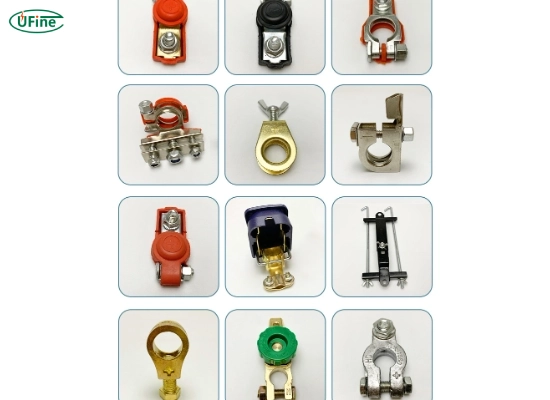
Top-post battery terminal adapters
Top-post adapters include post shims, post-to-stud converters, and JIS-to-SAE converters. Post shims should only be used when designed for the specific battery post and cable clamp. An uneven or loose shim can increase electrical resistance.
Side-post battery terminal adapters
Side-post adapters screw into recessed threaded terminals and provide a top post or stud connection. Confirm the thread and bolt length before installation. A long bolt may bottom out and damage the battery, while a short bolt may not provide enough thread engagement.
Stud-post battery terminal adapters
Stud terminals are common on lithium, deep-cycle, solar, marine, and UPS batteries. Stud sizes may include M5, M6, M8, or imperial threads. Similar-looking threads are not always compatible.
Marine battery terminal adapters
Marine terminal adapters often include threaded studs, wing nuts, or multiple connection points. Choose brass, tinned copper, or another corrosion-resistant material. Heavy cables should also be supported to reduce stress on the battery terminal.
U1 battery flag terminal-to-top-post adapters
U1 battery flag terminal-to-top-post adapters convert flat Group U1 flag terminals into vertical posts for standard clamps. They are often used in lawn tractors, garden equipment, generators, and small utility vehicles.
Check whether the battery is U1L or U1R. These codes identify the position of the positive terminal. The adapter changes the terminal shape but does not change polarity.
Part 4. 12v battery terminal types vs. 12v battery connector types
Common 12V battery terminal types include SAE top posts, JIS posts, side posts, threaded studs, U1 flag terminals, and L terminals. The terminal design depends on the battery construction and application, not only on its 12V rating.
The phrase 12V battery connector types may also describe removable plugs such as Anderson, XT, barrel, or SAE two-pin connectors. These plugs are different from the terminals built into the battery.
For more details, see our comparison of common 12V battery terminal connector types.
Part 5. How to choose the correct battery terminal adapter
Use the following checks when selecting battery terminal adapters or battery terminal adaptors.
1. Identify both connection formats
Record the battery terminal and the cable connector separately. For example:
- Battery side: M8 threaded stud.
- Cable side: SAE top-post clamp.
- Required adapter: M8 stud-to-top-post adapter.
2. Measure the battery post or thread
Do not select an adapter from a product photo alone. Check:
- Post diameter and taper.
- Metric or imperial thread.
- Thread diameter and pitch.
- Mounting-hole diameter.
- Available height and side clearance.
Standard automotive battery dimensions and terminal requirements may be referenced in SAE J537 storage battery specifications. Always prioritize the battery and equipment manufacturer’s technical data.
3. Confirm battery polarity
Positive and negative posts may have different diameters. U1L and U1R batteries also place the positive terminal on different sides.
Never use a battery terminal adapter to reverse polarity. Incorrect polarity can damage chargers, wiring, control units, and connected equipment.
4. Check current capability
The adapter must support the continuous and peak current of the application. Starter motors, inverters, winches, and trolling motors can draw high current.
Loose joints, small contact areas, and poor conductive materials increase resistance. The result may be voltage drop, heat, or unstable equipment operation.
5. Choose the correct adapter material
| Material | Main Advantage | Common Application |
|---|---|---|
| Brass | Good conductivity and mechanical strength | Automotive and general equipment |
| Copper or tinned copper | High conductivity and corrosion resistance | Marine and high-current systems |
| Lead alloy | Compatible with traditional lead battery posts | Post adapters and shims |
| Plated steel | High mechanical strength | Bolts and fastening hardware |
Avoid unsuitable combinations of dissimilar metals in wet or salty environments because they may increase galvanic corrosion.
6. Evaluate vibration and cable stress
Vehicles, boats, and industrial equipment expose battery connections to vibration. The adapter should not rotate, loosen, or carry the unsupported weight of heavy cables.
7. Check the operating environment
For marine, outdoor, or industrial applications, consider moisture, salt, temperature, chemicals, dust, and vibration. Use an adapter designed for those conditions.
Part 6. How to install battery terminal adapters safely
Installation methods differ by battery and equipment. Follow the battery, vehicle, charger, and adapter manufacturer’s instructions.
Battery terminal adapter installation steps
- Turn off the equipment: Remove the key, disconnect chargers, and switch off all loads.
- Confirm polarity: Identify the positive (+) and negative (−) terminals.
- Disconnect the negative cable first: This reduces short-circuit risk.
- Disconnect the positive cable: Keep tools away from nearby metal parts.
- Clean and inspect the terminals: Remove corrosion and replace damaged components.
- Install the adapter: Seat it fully and align the cable without pulling or twisting.
- Tighten to specification: Use the torque required by the manufacturer.
- Reconnect the positive cable first: Reconnect the negative cable last.
- Inspect the final connection: Confirm that the adapter cannot move or contact the opposite terminal.
- Test the system: Check voltage, charging, starting performance, and abnormal heat.
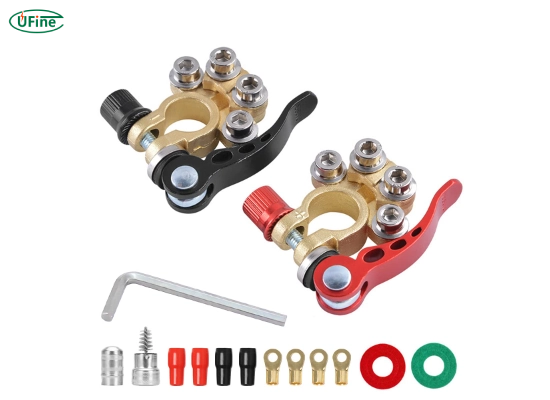
Battery terminal adapter installation mistakes
- Do not reverse the positive and negative connections.
- Do not force mismatched threads or post sizes.
- Do not overtighten a soft battery post or threaded insert.
- Do not allow the cable to pull, bend, or rotate the adapter.
Part 7. Battery terminal adapter maintenance and corrosion prevention
Inspect battery terminal adapters during routine battery maintenance.
- Check for corrosion, looseness, cracks, and damaged threads.
- Look for heat marks, melted covers, or cable discoloration.
- Keep the battery top and terminal surfaces clean and dry.
- Support heavy cables to reduce terminal stress.
- Replace adapters that cannot maintain a secure connection.
Corrosion increases contact resistance and reduces power delivery. Learn about the causes and prevention of battery terminal corrosion.
Part 8. Common battery terminal adapter problems and solutions
| Problem | Likely Cause | Recommended Action |
|---|---|---|
| Adapter remains loose | Wrong post size, worn clamp, or damaged thread | Confirm the dimensions and replace the incorrect part |
| Connection becomes hot | High resistance, loose hardware, or excessive current | Switch off the system and inspect the connection |
| Slow cranking or voltage drop | Corrosion, poor contact, or a damaged cable | Clean, tighten, and test the cable and adapter |
| Rapid corrosion | Moisture, salt, electrolyte, or incompatible metals | Clean the area and use a corrosion-resistant adapter |
| Cable cannot reach safely | Wrong terminal layout or adapter orientation | Use the correct battery layout or cable assembly |
| Side-post adapter will not tighten | Incorrect bolt length or damaged threads | Stop installation and verify the required hardware |
Part 9. When should you avoid a battery terminal adapter?
A battery terminal adapter is not suitable when:
- The battery polarity or terminal layout is incorrect.
- The adapter causes poor cable routing or insufficient clearance.
- The adapter is not rated for the system current.
- The original battery post is cracked, loose, burnt, or damaged.
- The equipment manufacturer does not permit terminal adapters.
For OEM battery projects, selecting the correct terminal, wire length, cable lug, and connector during battery design is usually more reliable than adding an adapter after installation.
Part 10. Battery terminal adapter FAQs
What does a battery terminal adapter do?
It converts one battery terminal format into another, such as a stud into a top post.
Are battery terminal adapters universal?
No. The post size, thread, polarity, current, and cable connection must match.
Can a battery terminal adapter reverse polarity?
No. It changes the terminal shape, not the positive and negative polarity.
What is a U1 flag terminal-to-top-post adapter?
It converts a Group U1 flag terminal into a vertical post for a standard clamp.
Why does a battery terminal adapter become hot?
Common causes are a loose joint, corrosion, poor contact, or excessive current.
Related Tags:

More Articles
Buck vs. Boost vs. Buck-Boost Converter: Which Is Best for Battery?
Not sure which converter your battery-powered device needs? Compare Buck, Boost, and Buck-Boost designs and discover what affects voltage stability and runtime.
How to Match 18650 Cells for a Reliable Battery Pack?
Building an 18650 battery pack? Learn how to compare cell capacity, voltage, and internal resistance to avoid mismatches and improve reliability.
Why Do 18650 Battery Packs Get Hot During Discharge?
Is your 18650 battery pack overheating under load? Learn what causes excess heat, how to spot dangerous symptoms, and what to do next.
18650 Battery BMS: How to Get the Specs Right
Learn how to choose a BMS for an 18650 battery pack. Compare voltage, current ratings, protection features, and balancing before you buy.
Why Does My Ring Camera Battery Drain So Fast or Stop Charging?
Is your Ring camera battery draining fast or not charging? Discover common causes, practical fixes, and when to replace the battery.