- Key takeaways
- Part 1. Define second-source robot vacuum battery pack requirements
- Part 2. Run an A/B test for robot vacuum battery pack compatibility
- Part 3. Evaluate robot vacuum battery pack test results against OEM limits
- Part 4. Release a robot vacuum battery pack pilot lot
- Part 5. Robot vacuum battery pack supplier qualification FAQs
Qualify a second battery pack against the existing robot’s electrical, charging, and fit requirements. Use the current approved pack as a reference, then verify that the new supplier can repeat the approved build in a pilot lot.
Key takeaways
- Set pass limits before samples arrive. Use the robot’s requirements to judge both packs.
- Test low-charge carpet boost separately from usable battery energy. A pack can pass one check and fail the other.
- Link pilot test results to the pack revision, component lots, and final inspection records.
Part 1. Define second-source robot vacuum battery pack requirements
Start with the approved pack drawing, the robot’s electrical limits, and the current charging configuration. Give the candidate supplier the requirements below and ask for a list of differences from the approved build.
| Requirement | What to specify before sampling |
|---|---|
| Power and energy | Nominal voltage, minimum loaded voltage at the specified measurement point, minimum usable watt-hours (Wh), and peak current with its duration and repetition rate |
| Connector and harness | Plug and socket part numbers, pinout, polarity, wire length, and any thermistor, pack ID, or data signals |
| Dock charging | Approved dock and firmware versions, permitted charge voltage and current, pack temperature limits, and expected start and stop behavior |
| Mechanical fit | Maximum installed pack dimensions, mounting points, wire exit, connector clearance, and the service removal path |
| Proposed build changes | Any differences in cells, protection settings, firmware, or harness that may affect the test plan |
Use the robot battery pack sample acceptance checklist to assign each test to the supplier or OEM and agree on the records needed for approval.
Part 2. Run an A/B test for robot vacuum battery pack compatibility
Test both packs in the same robot, with the same firmware and charging dock. Keep the route, carpet, suction settings, and brush condition consistent. Use the same charge preparation procedure and record the starting state of charge (SOC), pack temperature, and sample ID. If the reference pack has been in service, record its age and condition.
| A/B check | How to test | What the candidate pack must do |
|---|---|---|
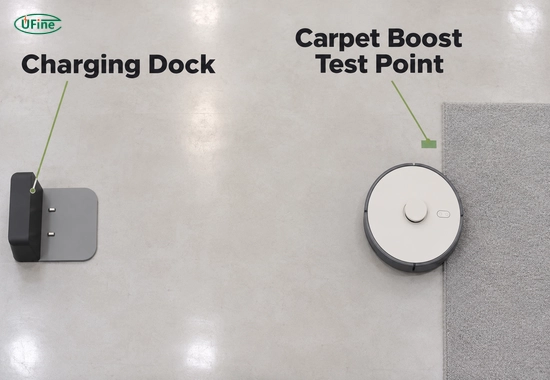
| Carpet boost at low charge | Near the lowest planned cleaning SOC, drive from hard floor onto the target carpet with boost enabled. Log pack current, pack output voltage, and controller input voltage on the same time base. | Enter boost without a reset or unintended cutoff. Keep controller input at or above the agreed minimum throughout the event. |
| Usable energy and return to dock | Run the same mixed-floor route. Log delivered Wh, when the robot requests a charge, and whether it reaches the dock. | Complete the required cleaning route and reach the dock with the specified energy reserve. |
| Dock charging and pack recognition | Use the approved dock at the expected arrival SOC and temperature. Check charge start, restart after a planned interruption, and normal charge termination. | Be recognized where pack identification is used. Charge within the approved limits without unexpected faults. |
| Closed-cover fit and service removal | Install the pack and harness, close the cover, and remove the pack through the intended service opening. | Let the cover seat correctly, keep the harness clear of pinch points, and allow pack removal without pulling on the leads. |
For the fit check, use the battery bay and connector requirements for low-profile robot vacuums to verify both the space occupied by the installed pack and the clearance needed to unplug it.
During the charging test, log dock contact, pack recognition, and actual charge current separately. This helps isolate a failure if the robot docks successfully but charging never starts. Texas Instruments’ robot vacuum charging design guide shows how charging functions can be divided between the dock and the robot.
Part 3. Evaluate robot vacuum battery pack test results against OEM limits
Judge usable energy and peak-load voltage against separate limits. This makes it clear which requirement the candidate meets and which one needs corrective action.
Illustrative A/B result for a carpet-boost test
The boost test starts at 20% SOC and a pack temperature of 23 °C. Usable energy is measured separately over the agreed operating window. All values below are illustrative.
| Test item | OEM acceptance limit | Pack A · Approved reference | Pack B · Candidate |
|---|---|---|---|
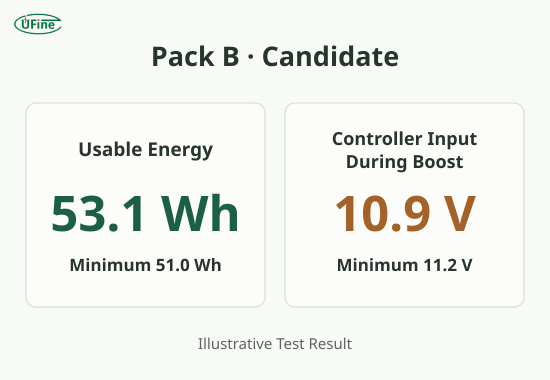
| Usable energy | At least 51.0 Wh | 52.4 Wh | 53.1 Wh |
| Minimum controller input during carpet boost | At least 11.2 V | 11.8 V | 10.9 V |
| Robot behavior during carpet boost | No reset or unintended cutoff | No reset | Controller reset |
Put Pack B on hold. It delivers 53.1 Wh, but controller input falls 0.3 V below the limit during boost and the robot resets.
Compare pack output and controller input at the instant controller voltage reaches its minimum. A large drop at the pack output calls for a check of the pack’s pulse performance and protection behavior. If pack output stays within its limit, measure the loss along the connector, harness, and board path.
After a revision, rerun the failed test under the same conditions. Also repeat checks affected by the change. A harness revision, for example, can affect both voltage drop and cover clearance.
Part 4. Release a robot vacuum battery pack pilot lot
Build the pilot lot on the intended production line using the materials and process proposed for regular supply. Select units from different points in the run. Repeat the tests most likely to reveal build variation, such as loaded voltage, dock charging, and connector fit.
| Release item | Evidence to review |
|---|---|
| Build matches the approved sample | Pilot build records match the approved drawing, controlled component list, and pack revision. |
| Pilot units meet the same limits | Results are linked to individual pilot unit IDs. Any failure has a documented cause, corrective action, and retest result. |
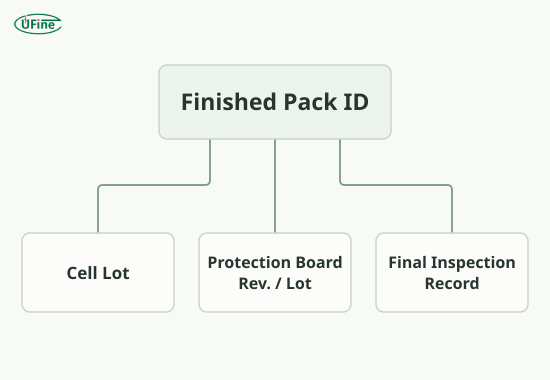
| Finished packs are traceable | A finished pack ID or lot links to the cell lot, protection board revision or lot, and final inspection record. |
| Production checks are defined | The supplier records agreed end-of-line checks, such as output voltage, polarity, and connector condition. |
| Changes require review | The supplier has a written process for notifying the OEM of changes to cells, protection boards, firmware, connectors, or manufacturing sites before implementation. |
Review transport and applicable product safety documents for the configuration being released. Match the UN 38.3 lithium battery test summary to the battery design being shipped. If the supplier provides a cell test summary, confirm which documentation applies to the assembled pack.
Part 5. Robot vacuum battery pack supplier qualification FAQs
Can a second robot vacuum battery supplier use the same voltage and capacity rating?
Yes. Matching ratings allow the candidate to enter review. Approval depends on how the pack performs in the existing robot and dock.
How many robot vacuum battery pack samples are needed to qualify a second supplier?
Set the sample count based on test risk and expected production variation. Use engineering samples for compatibility and pilot-lot units for repeatability.
What if the approved robot vacuum battery pack also fails the A/B test?
Check the test setup, the reference pack’s condition, and the basis for the acceptance limit. Resolve the discrepancy before approving the candidate.
Does a second robot vacuum battery supplier need a new UN 38.3 test summary?
Verify that the test summary covers the battery design being shipped. If the design has changed, ask the compliance team whether it must be treated as a new battery type.
Can one robot vacuum model use battery packs from two approved suppliers?
Yes, if both packs are approved for the same robot, firmware, and dock configuration. Keep each supplier’s pack revision and production lot traceable.
Related Tags:

More Articles
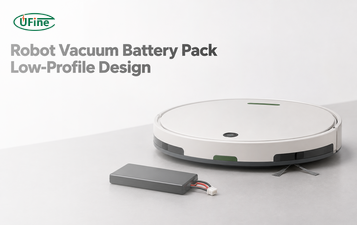
Robot Vacuum Battery Pack Design for a Low-Profile Chassis
Design a robot vacuum battery pack around bay height, connector clearance, and service access. Compare pouch and cylindrical packs in the same chassis.
How to Test a Robot Battery Pack Before Mass Production
Use this OEM checklist to test robot battery pack samples for startup load, usable energy, charging, protection, fit, and pilot-lot approval.
How to Size an AMR Battery for Short Charging Stops
Size an AMR battery using route energy, actual charging time, and return-to-dock reserve. See how one missed charge changes the required capacity.
Why Does My Robot Reset When the Motors Start? Battery Voltage Sag Explained
Find out why your robot resets at motor startup. Compare battery voltage, wiring loss, and the logic supply to pinpoint the cause.
3.7V LiPo Battery Pack vs. 3.7V Lithium-Ion Battery Pack: What’s the Difference?
Choosing a 3.7V battery pack? Compare LiPo and lithium-ion batteries, and learn how to select the right capacity, charger, protection, and connectors.