- Key Takeaways
- Part 1. Understanding lithium battery terminals
- Part 2. Common colors for battery polarity
- Part 3. How to tell the positive and negative terminals of a lithium battery
- Part 4. Negative battery terminal types
- Part 5. How to identify terminals without labels
- Part 6. Which terminal should I choose for my lithium battery?
- Part 7. How to connect the terminal to the lithium battery?
- Part 8. Tips for safe handling
- Part 9. Troubleshooting common mistakes
- Part 10. FAQs
Properly identifying the positive and negative terminals of a lithium battery is crucial for safe usage and device performance. Connecting a battery incorrectly can lead to short circuits, device damage, or even fire hazards. In this guide, we’ll show you how to tell the difference between the positive and negative terminals of a lithium battery, using color codes, symbols, and simple tools.
Key Takeaways
- Red is positive, black is negative: It’s a simple color cue that saves headaches.
- Symbols and shapes help: +/− signs and raised vs. flat ends make identification easy.
- Use a multimeter if in doubt: It’s quick, safe, and reliable.
- Handle with care: Proper connection, storage, and inspection prevent accidents.
Part 1. Understanding lithium battery terminals
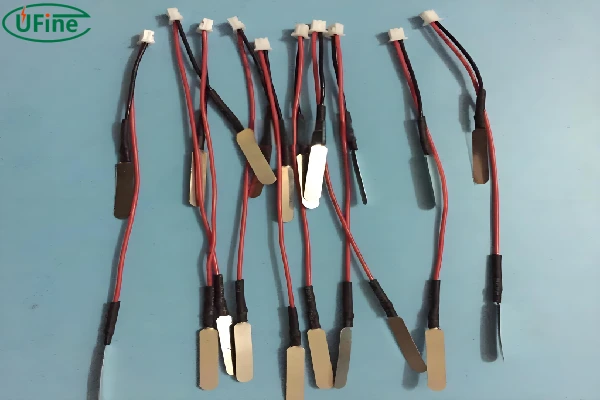
A lithium battery has two terminals: positive (+) and negative (−). These are usually marked clearly on the battery casing:
- Positive (+): Often marked with a plus sign
- Negative (−): Often marked with a minus sign
Some lithium cells also have physical differences between terminals. For instance, cylindrical cells like 18650 or 21700 batteries often have a slightly raised positive end.
Visual Example:
| Terminal | Symbol | Typical Color |
|---|---|---|
| Positive | + | Red |
| Negative | − | Black |
Part 2. Common colors for battery polarity
One of the easiest ways to identify battery terminals is by color:
- Red = Positive terminal
- Black = Negative terminal
Some lithium batteries may use different colors for smaller batteries or specialty cells, but red and black are industry-standard for most consumer electronics.
Quick Tip: Always double-check markings if colors are missing or faded.
Part 3. How to tell the positive and negative terminals of a lithium battery
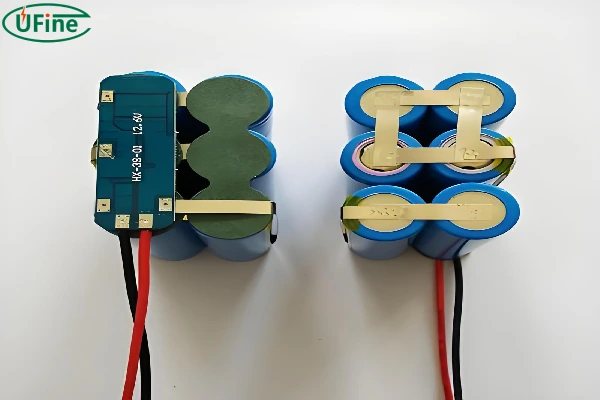
Here’s a comprehensive way to distinguish between the positive and negative terminals on a lithium battery:
Look for Symbols
- Positive Terminal: Marked with a + sign.
- Negative Terminal: Marked with a – sign.
Check the Colors
- Positive Terminal: Usually red.
- Negative Terminal: Usually black.
- Examine the Shape and Position
- Positive Terminal: Often slightly raised or has a different shape than the negative terminal. In some batteries, the positive terminal might have a larger or more prominent metal contact.
- Negative Terminal: This may be recessed or have a different design to distinguish it from the positive terminal.
Use a Multimeter
If the markings are unclear, you can use a multimeter to confirm the polarity:
- Set the Multimeter to DC Voltage: Make sure the multimeter is set to measure DC voltage.
- Connect the Probes: Touch the red probe to one terminal and the black probe to the other.
- Read the Display: If the multimeter shows a positive value, the red probe is on the positive terminal, and the black probe is on the negative terminal. If it shows a negative value, the probes are reversed.
By using these methods, you can accurately identify the positive and negative terminals, ensuring proper and safe connections.
Part 4. Negative battery terminal types

Different devices and batteries may use various types of negative terminals to suit specific needs. Here are some common types:
Flat Terminals
- Description: Flat and often flush with the surface of the battery.
- Uses: Common in small batteries used in electronics like remote controls and cameras.
- Advantages: Easy to connect and disconnect, ideal for compact spaces.
Bolt Terminals
- Description: Feature a bolt or screw mechanism for secure attachment.
- Uses: Found in larger batteries, such as those in vehicles and industrial equipment.
- Advantages: Provide a strong, stable connection that can handle higher current loads.
Spring Terminals
- Description: Incorporate a spring mechanism for easy and quick connections.
- Uses: Often used in consumer electronics where batteries need frequent changing.
- Advantages: Convenient for devices that require regular battery replacements.
Part 5. How to identify terminals without labels
Sometimes, batteries do not have clear markings. Here are practical methods to identify polarity:
1 Using a multimeter
- Set the multimeter to DC voltage
- Place the red probe on one end and black probe on the other
- Positive reading → red probe is on the positive terminal
- Negative reading → reverse the probe
2 Physical inspection
- Cylindrical lithium batteries often have a flat negative end and a raised positive end
- Check for small symbols etched on the casing
3 Consult the datasheet or manufacturer
- Always refer to manufacturer’s instructions if the battery is unmarked
Part 6. Which terminal should I choose for my lithium battery?
Selecting the correct terminal for your lithium battery depends on your specific needs and application. Here’s what to consider:
Device Requirements
- Consult the Manual: Always refer to the device’s user manual for battery specifications and terminal types.
- Match the Original: If replacing a battery, choose one with terminals identical to the original to ensure compatibility.
Application Type
- High Current Devices: For applications requiring high current, such as automotive or industrial use, bolt terminals provide a secure and stable connection.
- Portable Electronics: For smaller, portable devices, flat or button terminals are more convenient and practical.
Durability and Safety
- Quality Matters: Investing in high-quality batteries with robust terminals can prevent issues such as corrosion and poor connectivity.
- Safety Features: Some batteries come with built-in safety features like short-circuit protection, which can be crucial for high-risk applications.
Part 7. How to connect the terminal to the lithium battery?

Properly connecting the terminals to your lithium battery is crucial for safe operation and longevity. Here’s a step-by-step guide:
Steps to Connect Terminals
- Identify the Terminals: Clearly identify the positive (marked with + or red) and negative (marked with – or black) terminals.
- Prepare the Area: Ensure the battery and the device’s battery compartment are clean and dry. Dirt or moisture can lead to poor connections or corrosion.
- Connect the Positive Terminal: Always connect the positive terminal first. This reduces the risk of short circuits. Secure the connection by tightening any bolts or ensuring a firm contact if using flat or button terminals.
- Connect the Negative Terminal: After the positive terminal is securely connected, attach the negative terminal. Again, ensure a tight and secure connection to avoid any loose contacts.
- Check the Connection: Once both terminals are connected, double-check to ensure they are securely fastened, and there is no play in the connections. This helps prevent accidental disconnections and ensures consistent power flow.
- Power Up: Turn on your device to check if the battery is properly connected and functioning as expected. If the device does not power on, recheck the connections and ensure they are correctly placed and secured.
Part 8. Tips for safe handling
Correct polarity is not just about identifying terminals—it’s also about safe handling:
- Always connect positive to positive, negative to negative
- Avoid shorting the terminals with metal objects
- Store batteries in protective cases if not in use
- Check for battery damage before use
Part 9. Troubleshooting common mistakes
Even experienced users can make polarity mistakes. Common issues include:
- Device does not turn on → likely reversed polarity
- Overheating battery → check terminal connection
- Erratic device behavior → inspect polarity and battery health
Quick Fixes:
- Always remove the battery before correcting the wiring
- Use a multimeter to confirm polarity
Part 10. FAQs
Can I use any lithium battery in place of another?
Not always. Different lithium batteries have varying voltages, capacities, and sizes. Even if the terminals match, using the wrong type can damage your device or reduce battery life. Always check specs first.
Is it safe to mix old and new lithium batteries?
Mixing batteries of different ages or charge levels can be risky. The older battery may overheat or discharge unevenly, potentially harming your device. Keep them separate whenever possible.
Do rechargeable lithium-ion batteries have the same polarity as disposable ones?
Yes. Whether disposable or rechargeable, the positive is typically red/raised and the negative black/flat. The difference lies mainly in chemistry and capacity, not terminal identification.
Can reversed polarity permanently damage a lithium battery?
Sometimes, yes. Short-term reversal may not always destroy a battery, but repeated or prolonged mistakes can permanently reduce capacity or even make it unsafe. Always double-check before connecting.
Related Tags:

More Articles

JST vs Molex: The Right Battery Connector Choice
JST or Molex for your battery? Learn how connector selection affects current, voltage drop, reliability, and device performance.
Custom Battery Pricing: Costs Manufacturers Don’t Mention
A low battery quote may not be the final cost. Discover common hidden expenses that affect custom lithium battery projects.
Battery Wire Length: Hidden Cause of Power Loss
A longer battery wire can cause voltage drop, power loss, and unstable operation. Learn how wire length affects battery performance.
How Device Sleep Modes Affect Battery Life
Think sleep mode extends battery life? Learn why devices still drain power and how firmware, hardware, and batteries affect runtime.
LiPo Battery and PCB Design: Clearance, Insulation, and Placement
Learn how to optimize LiPo battery PCB clearance, insulation, placement, wiring, and thermal design—and avoid common integration mistakes.