- Part 1. How many hours does a 3 cell laptop battery last?
- Part 2. What affects the runtime of a 3 cell laptop battery?
- Part 3. How to calculate 3 cell laptop battery runtime
- Part 4. 3 cell vs. 4 cell vs. 6 cell laptop battery: what's the difference?
- Part 5. How to find the right replacement 3 cell laptop battery
- Part 6. How much does a 3 cell laptop battery replacement cost?
- FAQs
According to CNET’s laptop testing data published in July 2026, the average battery life of laptops tested in the first half of 2026 reached nearly 17.5 hours, compared with approximately 8–9 hours between 2020 and 2023. Some tested models even exceeded 24 hours. However, these results cover different laptop designs and battery capacities, not exclusively 3-cell models.
If your laptop uses a 3-cell lithium-ion battery, you may be wondering whether it can last 3, 5, or even 8 hours on a single charge. You might also be looking for a replacement battery, comparing compatible models, or checking how much a new battery costs.
In this guide, we’ll cover everything you need to know about 3-cell laptop batteries, from runtime calculations and battery configurations to replacement options and prices.
Key takeaways
-
A 3-cell laptop battery typically provides around 3–8 hours of runtime, depending on its energy capacity and laptop power consumption.
-
Battery capacity is measured in Wh, which is more useful for comparing energy than mAh alone.
-
Three cells do not automatically mean less battery life than four or six cells. Total energy capacity matters more.
-
Before buying a replacement, check the original battery model, voltage, capacity, dimensions, and connector.
-
Replacement prices vary by laptop brand, battery quality, and installation requirements. An official Dell 3-cell 42Wh replacement, for example, is listed at $89.99.
Part 1. How many hours does a 3 cell laptop battery last?
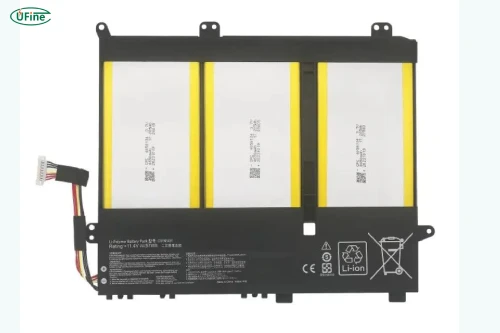
A 3-cell laptop battery is a rechargeable battery pack containing three individual battery cells. Most modern laptop battery packs use lithium-ion or lithium-polymer technology.
In a common 3S1P configuration, three cells are connected in series to increase the total voltage while maintaining approximately the same amp-hour capacity as one cell.
For example, three lithium-ion cells with a nominal voltage of 3.7V each can form a battery pack with a nominal voltage of 11.1V.
You may encounter several voltage ratings on laptop battery labels:
-
10.8V: Common nominal rating for certain 3-cell battery designs.
-
11.1V: Another common nominal voltage for three-cell lithium-ion packs.
-
11.4V: Used with certain higher-voltage lithium-ion cell designs.
These ratings are related to the cell chemistry and manufacturer’s specifications. They should not be treated as automatically interchangeable.
A typical 3-cell laptop battery can last approximately 3–8 hours on a full charge. Some energy-efficient laptops may run longer, while gaming laptops and mobile workstations can drain the same battery much faster.
For example, a 3-cell battery with a capacity of 42Wh could provide around 4.2 hours of runtime if the laptop consumes an average of 10W.
Here are some estimated runtimes under different usage conditions:
|
Laptop usage |
Approximate power consumption |
Estimated runtime with 42Wh |
|---|---|---|
|
Light browsing and document editing |
7W |
6 hours |
|
Office work and multitasking |
10W |
4.2 hours |
|
Video streaming |
15W |
2.8 hours |
|
Gaming and intensive workloads |
25W |
1.7 hours |
These figures are simplified estimates, assuming the full rated battery energy is available. Actual runtime will vary because of conversion losses, battery aging, display brightness, and changing workloads.
The important thing to remember is that a 3-cell battery does not have one fixed runtime. Two laptops using 3-cell batteries can deliver very different results even if their batteries have similar specifications.
Part 2. What affects the runtime of a 3 cell laptop battery?
Even when two laptop batteries have the same rated capacity, their actual runtime can differ because the laptops consume different amounts of power.
Battery capacity
Capacity is one of the most important factors. A 50Wh battery generally provides more operating time than a 35Wh battery when both laptops consume the same amount of power.
Processor and graphics performance
A laptop running a high-performance CPU or dedicated GPU usually consumes more energy than one designed for everyday office tasks. Gaming, video rendering, and intensive multitasking can shorten battery runtime considerably.
Screen brightness and display technology
A bright display requires more power. High-resolution panels, high refresh rates, and certain touchscreen designs can also increase energy consumption.
Background applications and wireless connections
Applications running in the background continue using power even when you are not actively interacting with them. Wi-Fi, Bluetooth, cloud synchronization, and automatic updates can also contribute to battery drain.
Battery age and charging cycles
As a lithium-ion battery ages, its ability to store energy gradually decreases. A battery originally rated at 42Wh may deliver considerably less usable energy after years of regular use.
When should you replace a 3 cell laptop battery?
A laptop battery gradually loses capacity as it goes through charging and discharging cycles. However, you don’t necessarily need to replace it just because it is a few years old.
Pay attention to changes in its performance.
For example, if your laptop originally lasted five hours but now shuts down after only one hour under similar conditions, the battery may have experienced significant capacity degradation.
Other warning signs include:
-
Battery percentage drops suddenly or behaves inconsistently.
-
The laptop shuts down unexpectedly despite showing remaining charge.
-
The battery cannot reach its normal full-charge capacity.
-
The operating system reports poor battery health.
-
The battery becomes swollen or physically deformed.
A swollen battery requires immediate attention. Stop using and charging the laptop, and arrange professional servicing. Do not puncture, compress, or attempt to remove a damaged battery without appropriate expertise.
Part 3. How to calculate 3 cell laptop battery runtime
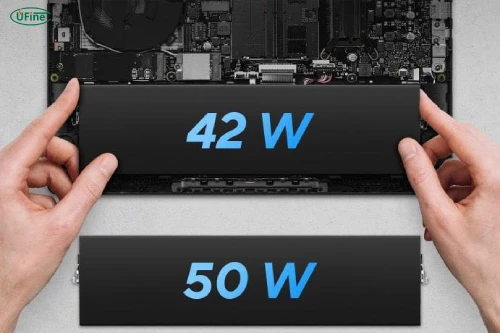
You don’t need specialized equipment to estimate how long your laptop battery will last. A simple calculation using battery energy and laptop power consumption is enough.
The basic formula is:
Battery runtime (hours) = Battery capacity (Wh) ÷ Average power consumption (W)
For example, suppose your laptop has a 3-cell battery rated at 11.4V and 3,700mAh.
First, convert mAh into Ah:
3,700mAh ÷ 1,000 = 3.7Ah
Then calculate the battery’s energy:
11.4V × 3.7Ah = 42.18Wh
If your laptop consumes an average of 12W:
42.18Wh ÷ 12W = approximately 3.5 hours.
The following table shows how battery capacity and power consumption influence estimated runtime.
|
Battery capacity |
8W consumption |
12W consumption |
20W consumption |
|---|---|---|---|
|
30Wh |
3.75 hours |
2.5 hours |
1.5 hours |
|
42Wh |
5.25 hours |
3.5 hours |
2.1 hours |
|
50Wh |
6.25 hours |
4.2 hours |
2.5 hours |
This calculation is useful when comparing replacement batteries or estimating whether a particular capacity meets your daily requirements.
Part 4. 3 cell vs. 4 cell vs. 6 cell laptop battery: what’s the difference?
The number of cells is often used to describe laptop battery configurations, but more cells do not always mean longer battery life.
A 6-cell battery may provide more energy than a 3-cell battery, but this depends on the capacity and configuration of the individual cells.
|
Battery type |
Typical configuration |
Common characteristics |
|---|---|---|
|
3-cell |
3S1P or another 3-cell arrangement |
Compact design, often used in thin laptops |
|
4-cell |
2S2P or another 4-cell arrangement |
Flexible voltage and capacity configurations |
|
6-cell |
3S2P or another 6-cell arrangement |
Can provide higher capacity with suitable cell selection |
For example, a 3-cell battery rated at 56Wh can store more energy than a 6-cell battery rated at 48Wh.
When comparing batteries, look at these specifications:
-
Total energy (Wh): Determines how much energy the battery can store.
-
Voltage (V): Must match the laptop’s electrical requirements.
-
Physical dimensions: The battery must fit inside the laptop.
-
Weight: A larger battery pack may increase the laptop’s overall weight.
Can you replace a 3-cell battery with a 6-cell battery? Sometimes, but only if the laptop manufacturer supports that configuration and the replacement is electrically and mechanically compatible. A higher cell count alone does not guarantee compatibility.
Part 5. How to find the right replacement 3 cell laptop battery
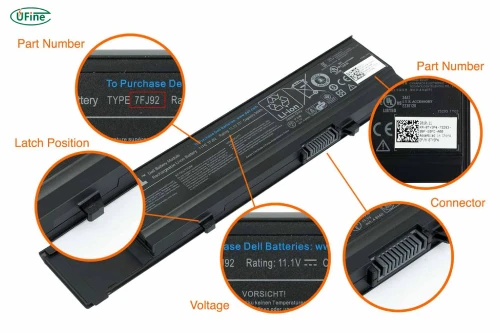
If your original laptop battery no longer holds a charge, replacing it may be more economical than purchasing a new laptop.
However, finding the correct replacement requires more than searching for a 3-cell battery. Different laptop models can use completely different battery designs, even within the same product series.
1. Find the original battery model number
Start by checking the label on your existing battery. Look for the battery part number, such as an HP HT03XL or a Dell battery part number.
You can also find battery information in your laptop’s user manual or the manufacturer’s support website.
2. Check the voltage and capacity
Compare the replacement battery’s voltage with the original specification. Also check the capacity in mAh or Wh.
A higher-capacity replacement may provide longer runtime, but it must be explicitly compatible with your laptop.
3. Check dimensions and connector type
Battery packs can have different shapes, thicknesses, cable lengths, and connector positions.
Even if two batteries have the same voltage and capacity, they may not fit the same laptop.
4. Understand OEM and aftermarket batteries
OEM batteries are manufactured or supplied through the original equipment manufacturer’s authorized supply chain. Aftermarket batteries are produced by third-party manufacturers.
Aftermarket options may cost less, but quality, capacity accuracy, protection features, and warranty coverage can vary. Choose a reputable supplier and check the compatibility information carefully.
Part 6. How much does a 3 cell laptop battery replacement cost?
The price of a replacement 3-cell laptop battery depends on the brand, model, battery capacity, quality, and purchasing channel.
As a practical reference, third-party replacement batteries for common laptop models may cost approximately $25–$60, while genuine OEM replacement batteries can cost around $60–$120 or more. These are indicative shopping ranges rather than fixed market prices.
For a real-world example, Dell lists a 3-cell, 42Wh lithium-ion replacement battery for select laptops at $89.99 on its US website.
Professional installation can add to the total cost, particularly for laptops with sealed enclosures or batteries secured with adhesive.
Here are some factors that influence the final price:
-
Brand and model: Premium laptop models may require specialized battery packs.
-
Battery capacity: Higher-energy designs may cost more.
-
Cell quality: Cell manufacturer, consistency, and performance affect manufacturing costs.
-
Protection circuitry: Battery management and protection components add to the pack cost.
-
Certifications and testing: Compliance testing and quality assurance can increase production costs.
-
Installation: Labor charges depend on the laptop’s internal design.
Is replacing the battery worth it? If your laptop still performs well and the replacement battery is reasonably priced, replacing the battery can be a practical way to extend the device’s useful life.
FAQs
1. Is a 3 cell laptop battery better than a 2 cell battery?
Not necessarily. A 3-cell battery may offer a different voltage or energy capacity, but the actual performance depends on its Wh rating and configuration.
2. Can I replace a 3 cell laptop battery with a higher-capacity battery?
Yes, if the higher-capacity battery is specifically compatible with your laptop’s voltage, connector, dimensions, charging system, and battery management requirements.
3. Is an aftermarket laptop battery safe to use?
It can be safe when manufactured and tested to appropriate standards, with reliable protection circuitry and confirmed device compatibility. Buy from a reputable supplier rather than choosing based on price alone.
4. Can I use an 11.4V battery instead of an 11.1V battery?
Do not assume they are interchangeable. Check the laptop manufacturer’s compatibility specifications and the replacement battery manufacturer’s confirmation before installation.
5. How do I know if my laptop battery needs replacing?
Shorter runtime, unexpected shutdowns, poor battery health reports, and charging problems may indicate degradation. Physical swelling or damage requires immediate attention.
Related Tags:

More Articles
3.7V LiPo Battery Pack vs. 3.7V Lithium-Ion Battery Pack: What’s the Difference?
Choosing a 3.7V battery pack? Compare LiPo and lithium-ion batteries, and learn how to select the right capacity, charger, protection, and connectors.
How to Build a 7.4V 18650 Battery Pack: Full Guide
Building a 7.4V 18650 battery pack? Discover the right cells, 2S configuration, BMS, wiring, and common mistakes to avoid.
18650 3S2P Battery Pack: Wiring, Parts & Safety Tips
Learn how to build an 18650 3S2P battery pack, choose the right cells, BMS, connectors, and wires, and avoid common assembly mistakes.
Solar Battery Bank: How Many Batteries Are Enough?
Find out how many batteries your solar system needs. Learn how to calculate battery capacity, compare battery types, and avoid costly sizing mistakes.
Swollen Laptop Battery? Don’t Ignore These Signs
Is your laptop case bulging? Find out why lithium batteries swell, what risks you should know, and how to handle a swollen battery safely.