- Part 1. Robot types and their battery needs
- Part 2. Types of robot batteries
- Part 3. Key factors to consider
- Part 4. Charging strategies
- Part 5. Replacement strategies
- Part 6. Real-world examples
- Part 7. Cost considerations
- Part 8. Safety and environmental factors
- Part 9. Future trends
- Part 10. Conclusion
- Part 11. FAQs
Picking the right battery for a robot might sound simple, but it’s actually one of the most important decisions you’ll make—get it wrong, and your robot could stop working mid-task, overheat, or wear out its battery way too quickly.
Whether you’re dealing with a heavy-duty industrial robot, a humanoid AI robot, a mobile delivery bot, or a small educational robot, the choice of battery affects runtime, power output, weight, cost, and safety. In this guide, we’ll break down everything you need to know—without all the confusing jargon—so you can make an informed decision.
For a detailed look at the global humanoid robot market and value chain, check out this comprehensive report by Morgan Stanley.
The Humanoid 100: Mapping the Humanoid Robot Value Chain
Part 1. Robot types and their battery needs
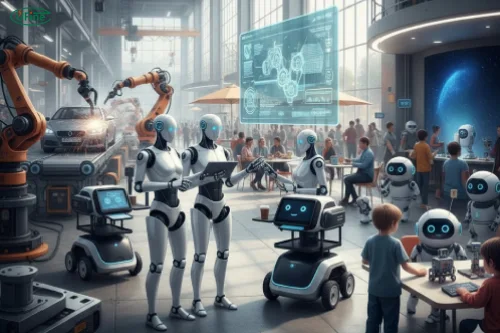
Not all robots are created equal. Their energy needs vary wildly:
Industrial Robots – These guys lift heavy stuff and work all day. They need high energy density, strong continuous power, and excellent thermal management.
Humanoid / AI Robots – Robots that walk, balance, and compute at the same time need high peak power, lightweight packs, and ideally swappable modules so they can keep going without downtime.
Mobile Service Robots – Delivery or inspection robots need moderate energy and efficient batteries. Fast charging or modular packs can save time between shifts.
Consumer / Educational Robots – Toys or classroom bots run short bursts at low power. Here, low-cost, easy-to-replace batteries win.
Part 2. Types of robot batteries

Here’s a quick overview of the main battery types you’ll see in robots:
| Battery Type | Energy Density (Wh/kg) | Rechargeable | Typical Use | Pros | Cons |
|---|---|---|---|---|---|
| Li-ion | 250–300 | Yes | Industrial, Humanoid | High energy & power, mature tech | Expensive, needs thermal management |
| LiFePO₄ | 100–160 | Yes | Industrial, Service | Very safe, long life | Heavier, lower energy density |
| NiMH | 60–120 | Yes | Education, Toys | Good temp tolerance, moderate cost | Lower power, medium cycle life |
| Lead-Acid | 30–50 | Yes | Heavy industrial, backup | Cheap, can handle high current | Heavy, bulky |
| Non-Rechargeable | 20–50 | No | Toys, low-use robots | Simple, no charging required | Short lifespan per cell |
Rechargeable or not?
- Frequent use = rechargeable (Li-ion, LiFePO₄)
- Occasional use = non-rechargeable is fine (toys, light-duty robots)
Curious about the inner workings of a humanoid robot battery? Our detailed guide on battery pack design explains how performance and safety are achieved.
Inside Humanoid Robot Battery Pack Design
Part 3. Key factors to consider
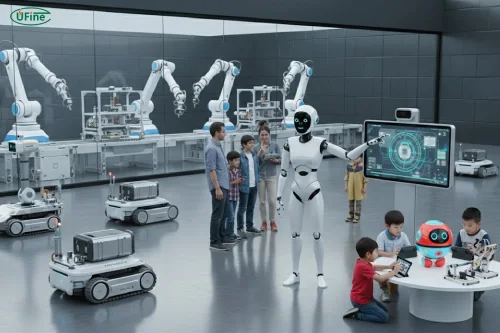
When choosing a battery, it’s not just about chemistry. Here’s what to keep in mind:
Energy Density & Peak Power – Make sure your battery can handle both average load and sudden peaks. Humanoid robots, for example, can draw huge power when walking or running.
Size & Weight – Heavier batteries might slow down your bot or throw off balance. For humanoids or mobile robots, weight matters a lot.
Battery Life & Cycle Count – How long will it last? LiFePO₄ can survive 2000+ cycles, while Li-ion might last 500–1000 under heavy use.
Self-Discharge & Storage – Leaving a Li-ion pack at 0% or 100% for weeks can hurt it. NiMH loses charge slower, but still needs attention.
Charging Requirements & BMS – Fast charging is convenient but may reduce lifespan. Always check if your charger matches the battery chemistry. A BMS (battery management system) helps prevent overcharge, overdischarge, and overheating.
Replacement & Modularity – Swappable packs reduce downtime. Fixed batteries are cheaper but harder to replace.
Safety & Certification – UL, CE, UN38.3 certifications are important. Fireproof designs and BMS protection are key for industrial and humanoid robots.
Cost & TCO – Think beyond upfront cost. Consider replacement, maintenance, and operational costs over the robot’s lifetime.
Environmental Tolerance – Temperature, humidity, and vibration can impact performance. LiFePO₄ handles heat and cold better than Li-ion; NiMH is more forgiving in toys.
Part 4. Charging strategies
How you charge your robot matters almost as much as the battery you pick.
- Slow charging – Gentler on the battery, longer lifespan
- Fast charging – Saves time but generates heat; can shorten cycle life
- BMS monitoring – Tracks state of charge (SOC) and health (SOH) to prevent accidents
- Tip: Avoid storing at full 100% or empty 0% charge for long periods
Part 5. Replacement strategies
- Swappable modules are great for humanoid or service robots—just pop in a new pack and keep going.
- Fixed batteries are fine for toys or short-use robots but may require sending the whole robot for service.
- Replacement frequency should match your robot’s cycle demands and battery chemistry.
Watch the Walker S2 in action—the world’s first humanoid robot that can autonomously swap its own battery, showcasing how modular packs keep robots running longer.
Part 6. Real-world examples
- Humanoid AI Robots: Li-ion modular packs for high peak power, swappable for continuous operation.
- Service Robots: LiFePO₄ or Li-ion packs for full-shift operations, modularity reduces downtime.
- Consumer / Educational Robots: NiMH or non-rechargeable batteries for safe, low-cost operation.
Part 7. Cost considerations
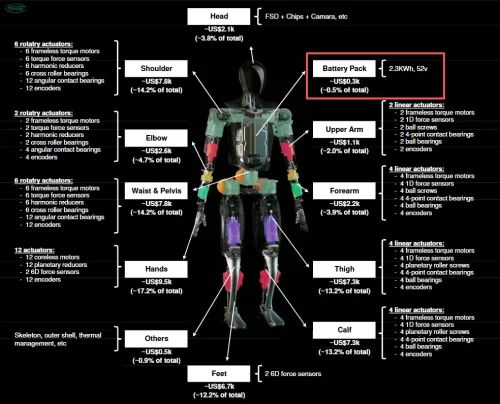
Total Ex Software Bom for Tesla Optimus at 50 60k per Unit
| Battery Type | Approx. Cost per kWh | Replacement Cost | Notes |
|---|---|---|---|
| Li-ion | $300–500 | Medium | High upfront cost, moderate maintenance |
| LiFePO₄ | $250–400 | Medium | Longer lifespan, safer |
| NiMH | $150–250 | Low | Good for toys/education |
| Lead-Acid | $50–100 | Low | Bulky, heavy |
| Non-Rechargeable | $1–5 per cell | High if frequent | Simple, disposable |
Tip: Don’t just look at upfront cost—calculate total cost of ownership (TCO) including maintenance, downtime, and replacement.
Part 8. Safety and environmental factors
- Temperature: Extreme cold or heat reduces performance; LiFePO₄ is more tolerant than Li-ion.
- Fireproofing: Some Li-ion packs are designed with fireproof casings.
- Certifications: UL, CE, UN38.3 ensure compliance and safety.
- BMS Protections: Prevents overcharging, short circuits, and thermal runaway.
Part 9. Future trends
- Solid-state batteries: Higher energy density, safer, but still emerging.
- AI-managed energy systems: Optimize discharge and charge cycles to extend battery life.
- Modular and swappable packs are becoming standard in enterprise-grade humanoids and service robots.
Part 10. Conclusion
Choosing the right robot battery isn’t one-size-fits-all. Consider:
- Robot type & power needs
- Battery chemistry, lifespan, weight, cost, and safety
- Charging strategy, replacement ease, and environment
By weighing these factors and looking at real-world examples, you can pick a battery that keeps your robot running efficiently, safely, and cost-effectively for years.
Part 11. FAQs
Q: How can I tell when a robot battery needs replacement?
A: Check battery health using the BMS if available. Signs include faster discharge, reduced peak power, swelling, or excessive heat. Most Li-ion packs last 500–1000 cycles; LiFePO₄ can last 2000+ cycles.
Q: Can I mix different battery chemistries in one robot?
A: Generally, no. Mixing chemistries (e.g., Li-ion with NiMH) can lead to uneven discharge, reduced lifespan, or even safety hazards. Stick to one chemistry type per power system.
Q: How does temperature affect robot battery performance?
A: Extreme cold reduces output, extreme heat accelerates degradation. LiFePO₄ performs better in high temperatures; NiMH is more tolerant in cold. Always follow manufacturer specs.
Q: How do I estimate total cost of ownership for robot batteries?
A: Consider upfront cost, expected cycles, replacement frequency, downtime, and maintenance. A cheaper battery may cost more in the long run if it needs frequent replacement.
Q: Can a non-rechargeable battery be used in industrial robots?
A: Rarely. Non-rechargeable batteries are suitable only for low-power, short-duration applications like toys or educational robots. Industrial robots need high energy and swappable or rechargeable packs.
Related Tags:

More Articles

고방전 배터리는 높은 전류와 발열로 배터리수명이 줄어듭니다. 구조적 한계, 사용 패턴, 충전 습관 등 실제 수명 단축 요인을 체계적으로 분석했습니다.
Capacitor vs Battery: What is the Difference?
Capacitor vs battery explained in detail. Learn the difference between capacitor and battery in energy storage, charging speed, lifespan, and real applications.
18650 Battery vs AA: Which Is Better for Your Device?
Compare 18650 vs AA batteries in capacity, voltage, rechargeability, and applications. Learn which battery type fits high-drain or everyday devices.
What is the Difference Between Battery Cell, Battery Control Module, and Battery Pack?
Compare battery cells, modules, and packs. Learn functions, design differences, control modules, and selection tips for EV, ESS, and industrial use.
How to Prevent LiPo Battery Explosion?
Can LiPo batteries explode or catch fire? Learn key causes of LiPo battery fires and proven charging, storage, and handling tips to reduce explosion risk.