- Part 1. What is a lithium ion battery monitor?
- Part 2. Why do you need a lithium ion battery monitor?
- Part 3. How does a lithium ion battery monitor work?
- Part 4. Key features of a good lithium ion battery monitor
- Part 5. Understanding State of Charge (SOC) and State of Health (SOH)
- Part 6. Where are lithium ion battery monitors used?
- Part 7. How to install a lithium ion battery monitor
- Part 8. Common problems battery monitors help avoid
- Part 9. Best practices for using a lithium ion battery monitor
- Part 10. Choosing the right lithium ion battery monitor
- Part 11. FAQs about lithium ion battery monitor
What is a lithium ion battery monitor and how does it work? A lithium-ion battery monitor is a smart device that tracks the performance, charge level, and overall health of a lithium-ion battery in real time. It helps users manage energy more efficiently and avoid costly battery damage or failure.
In today’s world, where lithium-ion batteries power everything from smartphones to solar energy systems, understanding how to monitor them properly is essential. This article will explain in plain English what a lithium-ion battery monitor is, how it works, and why it matters.
Part 1. What is a lithium ion battery monitor?
A lithium ion battery monitor is a device or system designed to measure and report the status of a lithium-ion battery. Its main job is to keep track of key battery parameters like:
- Voltage
- Current
- Temperature
- State of charge (SOC)
- State of health (SOH)
By monitoring these values, the battery monitor helps to protect the battery, extend its lifespan, and ensure safe operation.
Think of it like a dashboard gauge for your vehicle, but instead of measuring speed or fuel level, it tells you how your battery is doing.
Part 2. Why do you need a lithium ion battery monitor?
You might wonder: Do I really need a battery monitor? If you’re using lithium-ion batteries in any serious capacity—like in RVs, solar setups, marine systems, or electric vehicles—the answer is yes.
Here’s why:
- Prevent overcharging and deep discharging, which can damage the battery
- Track usage patterns to optimize energy consumption
- Ensure safety by monitoring temperature and voltage fluctuations
- Avoid unexpected power loss, especially in critical systems
A lithium-ion battery monitor gives you peace of mind by showing you exactly what’s going on inside your battery.
Part 3. How does a lithium ion battery monitor work?
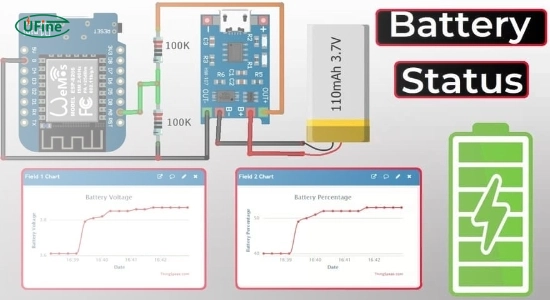
A lithium ion battery monitor works by connecting directly to the battery terminals. It uses sensors to continuously measure voltage, current, and temperature. These readings are processed by a microcontroller, which then calculates other important data like:
- State of Charge (SOC): How much energy is left in the battery
- State of Health (SOH): How well the battery is performing compared to when it was new
- Cycle count: How many charge and discharge cycles the battery has gone through
Many battery monitors come with Bluetooth or Wi-Fi connectivity, allowing you to view the data on your smartphone or computer in real time.
Part 4. Key features of a good lithium ion battery monitor
Not all battery monitors are created equal. The best ones offer features that make battery management easier and more accurate. Look for:
- High accuracy for current and voltage readings
- Real-time monitoring via mobile apps
- Alerts and notifications for low charge or high temperature
- Data logging for performance history
- Easy installation with clear wiring instructions
- Compatibility with different lithium battery chemistries (like LiFePO4)
These features help you get the most out of your battery while protecting your investment.
Part 5. Understanding State of Charge (SOC) and State of Health (SOH)
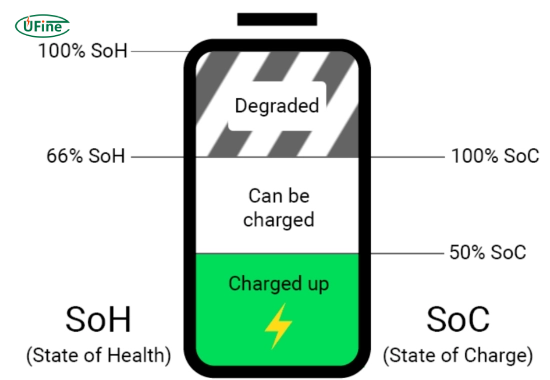
SOC and SOH are two of the most important metrics a battery monitor tracks.
State of Charge (SOC): This tells you how full or empty your battery is, usually as a percentage. A good monitor provides a very accurate SOC reading, which is better than just guessing from voltage alone.
State of Health (SOH): This compares your battery’s current capacity to its original capacity. For example, if a 100Ah battery now holds only 80Ah, the SOH is 80%.
Understanding both these values helps you plan your energy use and know when it’s time to replace a battery.
Part 6. Where are lithium ion battery monitors used?
Battery monitors are used in a wide range of applications, including:
- Off-grid solar power systems
- Recreational vehicles (RVs)
- Boats and yachts
- Home energy storage units
- Electric scooters and bikes
- Commercial battery banks
In any system where battery performance and reliability matter, a battery monitor is a must-have tool.
Part 7. How to install a lithium ion battery monitor
Installing a battery monitor is generally straightforward, but it requires attention to detail. Here’s a basic step-by-step guide:
- Disconnect the battery before starting.
- Install the shunt (a sensor that measures current) between the battery negative terminal and the system ground.
- Connect the monitor to the shunt and battery terminals.
- Power the monitor using the included cable or battery.
- Download the app, if available, to access real-time data.
Always follow the manufacturer’s manual for your specific model. Incorrect installation can lead to inaccurate data or even damage.
Part 8. Common problems battery monitors help avoid
A lithium-ion battery monitor can prevent many common issues, such as:
- Overcharging, which can reduce battery life or cause swelling
- Deep discharging, which can permanently damage a cell
- Thermal runaway, a dangerous condition caused by overheating
- Unexpected shutdowns, especially in critical applications
- False readings, often caused by relying only on voltage
By alerting you to these issues early, a monitor acts like a guardian for your battery system.
Part 9. Best practices for using a lithium ion battery monitor
To get the best results from your battery monitor:
- Regularly check the app or display for warnings
- Set up custom alerts for low charge, high temperature, or high current draw
- Log your data to see long-term trends and spot problems early
- Calibrate your monitor, if required, for better accuracy
- Keep the device firmware updated for new features and improvements
A well-maintained monitor will serve you reliably for years.
Part 10. Choosing the right lithium ion battery monitor
When shopping for a battery monitor, consider the following:
- Battery type compatibility (LiFePO4, NMC, etc.)
- Current and voltage range
- Display options (LCD screen vs app only)
- Installation complexity
- Brand reputation and reviews
Popular brands include Victron, Renogy, JBD, and Daly, but always match the product to your specific system needs.
Part 11. FAQs about lithium ion battery monitor
What does a lithium ion battery monitor measure?
It measures voltage, current, temperature, state of charge (SOC), and state of health (SOH). Some also track charge cycles and power usage.
Can I use a lithium ion battery monitor with solar systems?
Yes, many battery monitors are designed specifically for off-grid and solar battery setups. They help you manage solar charging and load usage.
Is a battery monitor the same as a battery management system (BMS)?
No, a BMS protects the battery from overvoltage, undervoltage, and overheating. A monitor shows performance data but doesn’t directly control battery protection.
How accurate are lithium ion battery monitors?
High-quality monitors are very accurate, often within 1% for current and voltage. However, accuracy depends on proper installation and calibration.
Do I need a monitor for every battery?
Not necessarily. In a single battery system, one monitor is enough. In multi-battery systems, you may need multiple monitors or a centralized monitoring system.
Related Tags:

More Articles
Capacitor vs Battery: What is the Difference?
Capacitor vs battery explained in detail. Learn the difference between capacitor and battery in energy storage, charging speed, lifespan, and real applications.
18650 Battery vs AA: Which Is Better for Your Device?
Compare 18650 vs AA batteries in capacity, voltage, rechargeability, and applications. Learn which battery type fits high-drain or everyday devices.
What is the Difference Between Battery Cell, Battery Control Module, and Battery Pack?
Compare battery cells, modules, and packs. Learn functions, design differences, control modules, and selection tips for EV, ESS, and industrial use.
How to Prevent LiPo Battery Explosion?
Can LiPo batteries explode or catch fire? Learn key causes of LiPo battery fires and proven charging, storage, and handling tips to reduce explosion risk.
Aluminium Ion Battery vs Lithium-Ion: A Detailed Comparison
Compare aluminium ion battery vs lithium-ion battery in energy density, charging speed, safety, cost, and uses. A practical guide for engineers and buyers.