- Key takeaways
- Part 1. What battery does a mouse use?
- Part 2. Mouse battery types compared
- Part 3. Alkaline batteries for wireless mice
- Part 4. Lithium batteries for wireless mice
- Part 5. NiMH rechargeable mouse batteries
- Part 6. Built-in lithium-ion mouse batteries
- Part 7. What affects mouse battery life?
- Part 8. Does a higher mah mouse battery last longer?
- Part 9. How to choose the best battery for a mouse
- Part 10. Battery selection for mouse designers
- Part 11. How to extend mouse battery life
- Part 12. FAQs about mouse battery types
For most wireless mice with replaceable AA or AAA cells, a primary lithium battery offers the longest runtime between replacements. Alkaline batteries cost less, while NiMH rechargeable batteries offer better long-term value.
The best battery for a wireless mouse must also match its required size, voltage, and chemistry. Always check the mouse manual before changing battery types.
Key takeaways
- Primary lithium AA or AAA batteries usually offer the longest single-use runtime.
- Alkaline batteries are affordable and suitable for basic office mice.
- NiMH batteries are rechargeable and cost less over repeated use.
- AA and AAA cells may have the same size but different voltages and chemistries.
- Never replace a 1.5V AA battery with a 3.6V or 3.7V 14500 cell unless the mouse supports it.
- Built-in rechargeable mice normally use a lithium-ion or lithium polymer battery pack.
- Sensor settings, lighting, wireless mode, sleep design, and operating temperature all affect mouse battery life.
Part 1. What battery does a mouse use?
A mouse battery supplies power to the sensor, wireless module, processor, buttons, indicator lights, and other internal circuits. The required mouse battery type depends on the product design.
Most wireless mice use one of these battery systems:
- One AA battery: Common in full-size office and productivity mice
- One or two AAA batteries: Common in compact and travel mice
- Built-in lithium-ion or lithium polymer battery: Common in rechargeable, gaming, and slim wireless mice
- Rechargeable NiMH pack: Used in some older or specialized rechargeable mice
AA and AAA describe battery dimensions. They do not confirm the chemistry or voltage. An alkaline AA cell, a primary lithium AA cell, and a NiMH AA cell fit the same holder but have different electrical characteristics.
The safest choice is the battery type listed in the mouse manual or inside the battery compartment. Some mouse models support several chemistries. Others are designed for only one type.
Part 2. Mouse battery types compared
| Mouse battery type | Nominal voltage | Rechargeable | Relative runtime | Best use | Main limitation |
|---|---|---|---|---|---|
| Alkaline AA or AAA | 1.5V | No | Moderate | Basic office and home mice | Lower performance in cold conditions and under higher loads |
| Primary lithium AA or AAA | 1.5V | No | Usually the longest | Long runtime, travel, cold environments | Higher purchase cost |
| NiMH AA or AAA | 1.2V | Yes | Moderate per charge | Frequent use and lower long-term cost | Lower voltage may affect some mice or battery indicators |
| Regulated rechargeable lithium AA or AAA | Usually regulated to 1.5V | Yes | Varies by design | Devices that support regulated rechargeable cells | Requires a compatible charger and may stop with little warning |
| Built-in Li-ion or LiPo battery | Usually 3.6V or 3.7V | Yes | Depends on battery capacity and mouse design | USB-rechargeable and slim mice | Usually not user-replaceable |
Quick answer: Choose primary lithium for the longest time between battery changes. Choose NiMH for frequent charging and lower lifetime cost. Choose alkaline when price and easy availability matter most.
Part 3. Alkaline batteries for wireless mice
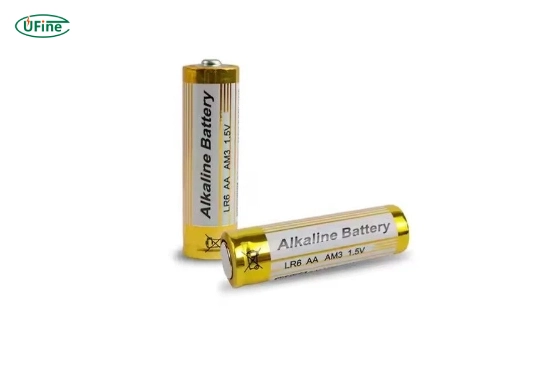
Alkaline AA and AAA cells are the most common batteries for wireless mice. They provide a nominal voltage of 1.5V and are easy to find.
Advantages of alkaline mouse batteries
- Low initial cost: Alkaline batteries are usually cheaper than lithium cells.
- Wide availability: AA and AAA alkaline batteries are sold in most stores.
- Good for low-drain devices: A basic office mouse often has a low average current.
- Simple replacement: No charger or charging cable is required.
Limitations of alkaline mouse batteries
- Voltage falls gradually as the battery discharges.
- Cold conditions can reduce available capacity.
- They are heavier than primary lithium batteries of the same size.
- Old or depleted cells may leak if left inside the mouse for a long time.
An alkaline battery is a practical battery for a mouse used at a desk. However, it may not be the best choice for travel, cold storage, or users who want the longest possible runtime.
The technical data for a typical AA alkaline battery lists a nominal voltage of 1.5V. Actual capacity depends on discharge current, temperature, cutoff voltage, and storage conditions.
Part 4. Lithium batteries for wireless mice
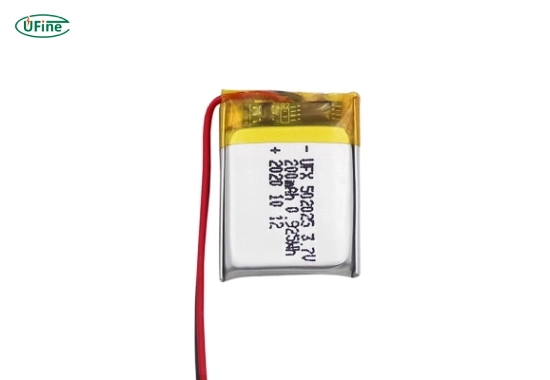
For a compatible wireless mouse, a 1.5V primary lithium AA or AAA battery often provides the longest single-use runtime. The common chemistry is lithium iron disulfide, also called Li-FeS₂.
Why lithium mouse batteries last longer
- High usable energy: More energy can be delivered from a lightweight cell.
- Stable voltage: The battery maintains useful output through more of its discharge period.
- Low internal resistance: Voltage drops less when the mouse needs short current pulses.
- Wide temperature range: Primary lithium works better than alkaline in cold environments.
- Low weight: A lithium AA cell can reduce the total weight of the mouse.
These features make primary lithium a strong option for professional travel, warehouse terminals, outdoor workstations, or mice that are difficult to access for battery replacement.
However, primary lithium AA and AAA batteries are not rechargeable. They also cost more than alkaline cells. Users should compare the higher purchase price with the longer replacement interval.
For more detail on voltage and chemistry, see our AA lithium battery guide. A standard primary lithium AA battery is normally 1.5V, while an AA-size 14500 lithium-ion cell is normally 3.6V or 3.7V.
Important: Do not install a 14500 lithium-ion cell in a mouse designed for a 1.5V AA battery. The higher voltage may damage the power circuit, sensor, or wireless module.
For an example of primary lithium specifications, the official Li-FeS₂ AA battery datasheet lists a 1.5V nominal voltage and a wider operating temperature range than the corresponding alkaline AA cell.
Part 5. NiMH rechargeable mouse batteries
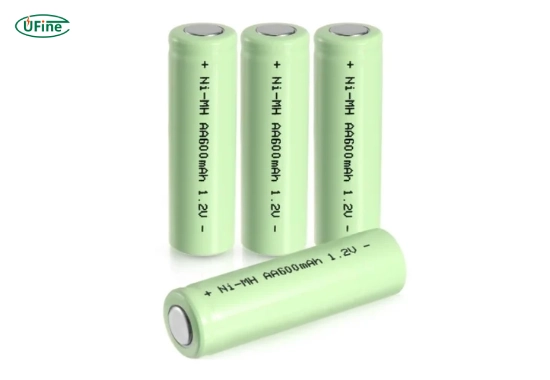
NiMH batteries are a common rechargeable option for wireless mice. Standard NiMH AA and AAA cells have a nominal voltage of about 1.2V.
Advantages of NiMH mouse batteries
- Reusable: A quality battery can support many charge and discharge cycles.
- Lower long-term cost: The same cells can be reused instead of replaced.
- Less disposable waste: Fewer single-use batteries are required.
- Stable discharge: NiMH voltage remains relatively stable through much of each charge.
Limitations of NiMH mouse batteries
- The nominal voltage is lower than that of a 1.5V alkaline battery.
- Some mice may show a low-battery warning earlier than expected.
- A charger designed for NiMH chemistry is required.
- Runtime per charge may be shorter than the runtime of a primary lithium battery.
The lower 1.2V rating does not automatically make NiMH unsuitable. Many mice work well with it. However, compatibility depends on the mouse’s minimum operating voltage and battery detection circuit.
Manufacturer instructions must take priority. For example, some mouse manuals specify alkaline batteries, while other rechargeable mouse models require NiMH cells. This is why a battery should not be selected by size alone.
Panasonic’s NiMH rechargeable battery information explains that NiMH cells provide a steady 1.2V output through much of their discharge period.
Part 6. Built-in lithium-ion mouse batteries
Many modern wireless and gaming mice do not use replaceable AA or AAA cells. They contain a built-in lithium-ion or lithium polymer battery that charges through USB.
A single rechargeable lithium battery normally has a nominal voltage of 3.6V or 3.7V. Its full-charge voltage is often 4.2V, depending on the exact chemistry.
Benefits of a built-in lithium battery
- Supports thin and lightweight mouse designs
- Allows charging through USB-C, Micro-USB, or a charging dock
- Removes the need to purchase disposable cells
- Can be shaped to fit the available internal space
- Supports battery level reporting through software
Engineering limits
- The battery loses capacity as it ages and completes more cycles.
- Replacement may require opening the mouse.
- The pack must match the charging voltage, connector, polarity, dimensions, and protection design.
- A higher-capacity pack may not fit the enclosure or charging system.
Never connect a bare lithium cell directly to a mouse designed for a protected battery pack. Rechargeable lithium systems need a suitable charging circuit and protection against overcharge, over-discharge, overcurrent, and short circuits.
To understand the difference between rated, full-charge, and cutoff voltage, read our lithium-ion battery voltage guide.
Part 7. What affects mouse battery life?
Battery chemistry is important, but it is not the only factor. Two mice using the same battery may have very different runtimes.
1. Sensor and polling settings
A mouse sensor consumes power while tracking movement. High polling rates, advanced optical processing, and frequent communication can increase average current.
Gaming mice may use more energy when high polling rates, onboard processing, or performance modes are enabled. A basic office mouse can run longer because it spends more time in a low-power state.
2. RGB and indicator lighting
RGB lighting can use a significant share of the available battery energy. Reducing brightness or disabling lighting often extends runtime.
3. Wireless connection mode
Bluetooth and proprietary 2.4GHz connections use different radios and communication patterns. Battery life depends on how the specific mouse implements each mode. One wireless mode is not always more efficient in every product.
4. Sleep and wake design
A well-designed mouse enters a low-power state when it is idle. Poor sleep control, frequent movement, or software that keeps the device active can increase battery drain.
5. Tracking surface
Glass, glossy, dark, or uneven surfaces may force some optical sensors to work harder. A suitable mouse pad can improve tracking and may reduce unnecessary power use.
6. Temperature
Low temperatures reduce the usable energy of many battery chemistries. Primary lithium batteries generally maintain better performance in cold conditions than alkaline cells.
7. Battery age and quality
Old cells may have lower usable capacity and higher internal resistance. Rechargeable batteries also lose capacity through aging, storage, and repeated cycling.
Part 8. Does a higher mah mouse battery last longer?
A higher mAh rating can provide longer runtime, but only when the batteries have compatible voltage, chemistry, test conditions, and physical size.
For a simple estimate:
Estimated runtime in hours = usable battery capacity in mAh ÷ average mouse current in mA
For example, the calculation must include both active and sleep current. A mouse does not draw one fixed current throughout the day.
Real runtime is also reduced by:
- Voltage conversion losses
- The mouse’s cutoff voltage
- Battery self-discharge
- Temperature
- Cell aging
- Wireless transmission and sensor activity
Do not compare the mAh rating of a 1.2V NiMH battery directly with that of a 3.7V lithium battery. For batteries with different voltages, energy in watt-hours gives a more useful comparison.
Battery energy in Wh = nominal voltage × capacity in Ah
Our guide on calculating battery runtime explains how to use mAh, Wh, load current, and efficiency in a more detailed estimate.
Part 9. How to choose the best battery for a mouse
Choose primary lithium when:
- You want the longest runtime between replacements.
- You travel often and want a lightweight battery.
- The mouse may operate or remain stored in cold conditions.
- Replacing the battery frequently would be inconvenient.
Choose alkaline when:
- The mouse manual specifies alkaline batteries.
- You use a basic office or home mouse.
- Low purchase cost is the main priority.
- You need a battery that is easy to find locally.
Choose NiMH when:
- The mouse supports 1.2V rechargeable cells.
- You use the mouse frequently.
- You want to reduce long-term battery cost.
- You already own a suitable NiMH charger.
Choose a built-in lithium mouse when:
- You prefer USB charging.
- You want a lightweight or slim mouse.
- You use gaming features that need regular charging.
- You do not want to purchase replacement AA or AAA cells.
Before buying batteries for a wireless mouse, check these five items:
- Battery size: AA, AAA, or a model-specific rechargeable pack
- Required voltage: 1.2V, 1.5V, 3.6V, or 3.7V
- Supported chemistry: Alkaline, primary lithium, NiMH, or Li-ion
- Charging method: External charger, USB charging, or non-rechargeable
- Operating environment: Indoor, travel, warehouse, or low-temperature use
Part 10. Battery selection for mouse designers
For mouse manufacturers and product development teams, battery selection begins with the power profile rather than the highest available capacity.
Important design inputs include:
- Active, idle, sleep, and peak current
- Required operating time between charges
- Available battery compartment dimensions
- Target mouse weight and balance
- USB charging current and charging time
- Protection circuit and connector requirements
- Expected operating and storage temperature
- Battery level measurement method
Replaceable AA designs simplify battery replacement and may offer very long shelf life. Built-in lithium polymer batteries support thinner enclosures and flexible capacity selection, but they require charging, protection, and battery lifecycle planning.
A custom pack should not be selected from capacity alone. Thickness, width, length, wire direction, connector position, PCM layout, and swelling allowance all affect integration.
Ufine provides custom lithium polymer batteries for compact electronics. Battery size, capacity, connector, wire length, PCM, and NTC can be matched to the device design.
Part 11. How to extend mouse battery life
- Enable automatic sleep: Use the manufacturer’s power-saving settings.
- Reduce RGB lighting: Lower the brightness or turn lighting off.
- Lower the polling rate when possible: High settings may not be needed for office work.
- Use a suitable surface: A mouse pad can improve sensor tracking.
- Turn the mouse off for storage or travel: This prevents accidental activation.
- Keep the battery contacts clean: Remove dust or corrosion with a dry, suitable cleaning method.
- Do not mix batteries: Avoid combining old and new cells or different brands and chemistries.
- Remove depleted batteries: Do not leave dead alkaline batteries inside the mouse.
- Use the correct charger: NiMH and lithium-ion batteries require different charging systems.
- Avoid extreme heat: High storage temperatures increase battery aging and self-discharge.
Used batteries should follow local collection and recycling rules. The U.S. EPA household battery guidance explains disposal options for alkaline, lithium, and rechargeable batteries. Lithium-ion batteries should be taken to a suitable collection or recycling point rather than placed in household trash.
Part 12. FAQs about mouse battery types
Which mouse battery lasts the longest?
A 1.5V primary lithium AA or AAA battery usually lasts the longest between replacements. Actual runtime still depends on the mouse design, settings, temperature, and daily use.
How often should I replace my mouse battery?
Replace it when the mouse shows a low-battery warning, loses connection, or stops working. The interval may range from weeks to many months, depending on the mouse and battery type.
Can I use rechargeable batteries in my wireless mouse?
Yes, if the mouse supports them. NiMH cells provide about 1.2V, so check the manual before replacing a 1.5V alkaline battery.
Are there risks when using lithium batteries in a mouse?
A compatible 1.5V primary lithium battery is generally safe when used correctly. Never use a 3.6V or 3.7V 14500 cell in a mouse designed for a 1.5V AA battery.
How can I maximize mouse battery performance?
Use the correct battery type, reduce RGB and polling settings, enable sleep mode, keep the contacts clean, and avoid extreme temperatures.
Related Tags:

More Articles
Buck vs. Boost vs. Buck-Boost Converter: Which Is Best for Battery?
Not sure which converter your battery-powered device needs? Compare Buck, Boost, and Buck-Boost designs and discover what affects voltage stability and runtime.
How to Match 18650 Cells for a Reliable Battery Pack?
Building an 18650 battery pack? Learn how to compare cell capacity, voltage, and internal resistance to avoid mismatches and improve reliability.
Why Do 18650 Battery Packs Get Hot During Discharge?
Is your 18650 battery pack overheating under load? Learn what causes excess heat, how to spot dangerous symptoms, and what to do next.
18650 Battery BMS: How to Get the Specs Right
Learn how to choose a BMS for an 18650 battery pack. Compare voltage, current ratings, protection features, and balancing before you buy.
Why Does My Ring Camera Battery Drain So Fast or Stop Charging?
Is your Ring camera battery draining fast or not charging? Discover common causes, practical fixes, and when to replace the battery.