- Key Takeaways
- Part 1. Can a dead lithium battery be revived?
- Part 2. 5 Ways to revive a lithium-ion battery
- Part 3. Revival success rates by device type
- Part 4. Why lithium batteries enter “deep sleep” mode
- Part 5. Revive or replace? A practical cost–risk comparison
- Part 6. Popular “Fixes” online that you should avoid
- Part 7. When revival becomes more dangerous than disposal
- Part 8. Why 18650 batteries are easier to revive than pouch cells
- Part 9. Revival is a temporary fix—not a reset button
- Part 10. Maintenance and care for longevity
- Part 11. Proper disposal of dead batteries
- Part 12. FAQs
If you’re reading this, there’s a good chance you’re frustrated with a lithium-ion battery that just won’t work like it used to. Maybe it powers down too quickly, or perhaps it won’t charge at all. Whether it’s your phone, laptop, or a power tool, a dead battery can disrupt our days in the worst way. Fortunately, some lithium-ion batteries can be brought back to life with a few targeted techniques—and a little bit of patience.
In this article, we’ll cover five methods to revive a lithium-ion battery, when these techniques are worth trying, and a few tips on maintaining and properly disposing of your batteries. Let’s dive into the details.
Key Takeaways
- Some “dead” lithium-ion batteries are only over-discharged, not permanently damaged
- Reviving a battery is about controlled recovery, not forcing it back to life
- Deeply damaged or swollen batteries should never be revived
- Even a successful revival usually restores partial, not full, capacity
- Safety matters more than squeezing out one last charge
Part 1. Can a dead lithium battery be revived?
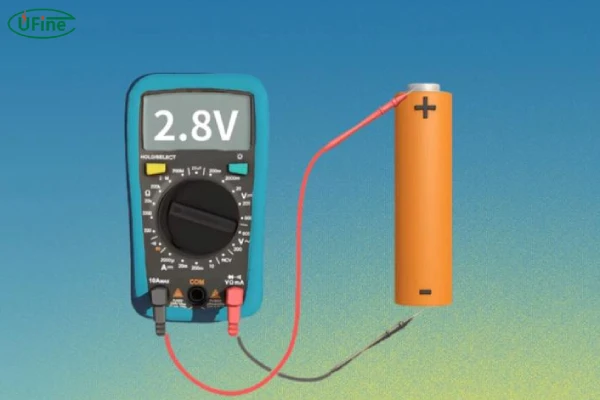
The first question you might have is, “Is my battery actually dead, or can it be revived?” A truly dead lithium-ion battery—one that is old or physically damaged—won’t likely come back to life, no matter what you do. But there’s hope for some batteries, especially if they’ve just fallen into a deep discharge state or are showing signs of age rather than true failure.
How to Tell if a Lithium Battery Can Be Revived
Before investing time and effort, check if your battery is salvageable:
- Physical Inspection: If your battery is bloated, cracked, or leaking, don’t try to revive it. These batteries pose serious safety risks, including the potential to catch fire.
- Voltage Testing: Using a multimeter, measure the voltage of the battery. A healthy lithium-ion battery should read about 3.7V or slightly higher. If it reads below 2.5V, reviving it might be difficult, and trying to charge a deeply discharged battery can be risky.
- Age and Usage: If your battery is several years old or has gone through hundreds of charge cycles, it may be naturally degraded. Lithium-ion batteries are designed to last around 300-500 charge cycles, so if it’s been used extensively, revival might only bring limited results.
With these checks, if you’re confident that the battery might have a second chance, move on to the methods below.
Part 2. 5 Ways to revive a lithium-ion battery
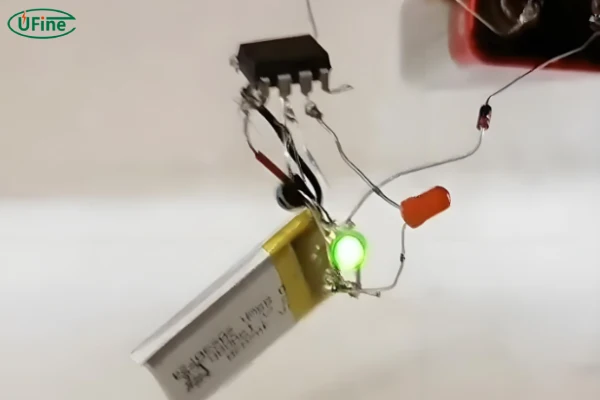
Once you’re ready to try, here are five methods that can often bring a battery back to life. Just be sure to take precautions—use gloves and safety goggles and keep an eye on the battery for any signs of heating or swelling.
1 Method 1: Use a Slow Charge to “Wake Up” the Battery
When lithium-ion batteries sit discharged for too long, they can enter a “sleep” mode to protect themselves from damage. Charging them very slowly is a way to bring them out of this state.
Tools Needed: A low-output charger, such as a USB charger
Steps:
- Connect the battery to a slow charger. This could be a USB port or a charger with an output of 0.5 amps or less.
- Leave it connected for at least 6-8 hours. This slow trickle of current can help the battery rise gently to a functional voltage.
- Check the battery’s voltage with a multimeter after a few hours. If it reads around 3.0V or higher, switch to a regular charger to bring it up to a full charge.
This approach is gradual and safer for the battery than a fast charge, especially in the early stages.
2 Method 2: Boost Charging Using Another Battery
This method is similar to jump-starting a car battery. Using a healthy battery of the same voltage, you can “jump” the dead battery to give it an initial charge boost.
Tools Needed: A working lithium-ion battery (with the same voltage), wires for connecting the two batteries
Steps:
- Place the two batteries side by side, aligning their positive and negative terminals.
- Use wires to connect the positive terminal of the charged battery to the positive terminal of the dead one. Do the same for the negative terminals.
- Let the two batteries sit connected for 1-2 minutes, allowing a charge transfer.
- Check the dead battery’s voltage. If it has risen above 2.5V, try charging it fully with a standard charger.
This method can “wake up” a battery that’s deeply discharged. However, it’s essential to avoid leaving the batteries connected for too long, as this could cause overheating or an unstable charge transfer.
3 Method 3: Controlled Charging Using a DC Power Supply
For those with some technical experience, a variable DC power supply can allow you to control the current and voltage precisely, which can be effective for reviving batteries.
Tools Needed: DC power supply, multimeter
Steps:
- Set the power supply to 4.2V and a very low current—around 100mA.
- Connect the battery to the power supply, ensuring correct polarity.
- Gradually increase the current as the battery’s voltage begins to rise, but never exceed 4.2V.
- Once the battery reaches around 3.7V, switch to a standard charger to complete the charging cycle.
This method is useful but should only be attempted by those with experience in electronics, as an incorrect setup can damage the battery or be unsafe.
4 Method 4: The Freezing Method
Although unconventional, some users report that freezing a dead battery temporarily revives it, likely due to how cold temperatures affect battery chemistry.
Tools Needed: Resealable plastic bag, freezer
Steps:
- Place the battery in a sealed plastic bag, ensuring no moisture can enter.
- Leave it in the freezer for 24 hours.
- Allow the battery to warm up to room temperature naturally.
- Charge it slowly, as per Method 1.
Freezing a battery can sometimes lead to a brief recovery, although it’s typically short-lived. This method is more of a last resort and can be helpful if you just need the battery to function temporarily.
5 Method 5: Software Recalibration
Certain batteries in laptops or high-tech devices have software that can recalibrate the battery’s power reading, effectively resetting the charge level.
Tools Needed: Computer with battery management software
Steps:
- Open the battery management or power options software on your device.
- Select “calibrate” or “reset battery.” The software may guide you to drain the battery fully and then recharge it.
- Allow the calibration process to finish. This process takes time but may help if the battery appears to be functioning poorly due to a misreading of its capacity.
This technique works best on batteries that are healthy but seem to have a miscalibrated charge level.
Rather than treating every technique equally, it helps to understand which methods are safer and more predictable.
| Method | Best For | Risk Level | Expected Result |
|---|---|---|---|
| Slow trickle charging | Mild over-discharge | Low | Often effective |
| Controlled DC power supply | 18650 & loose cells | Medium | Precise but technical |
| Battery jump-start | Same-voltage cells | Medium–High | Short-term recovery |
| Freezing method | Temporary use only | High | Unreliable, brief |
| Software recalibration | Laptops & devices | Low | Fixes false readings |
Slow charging works best because it respects the battery’s chemistry instead of shocking it. If you’re dealing with an 18650 lithium-ion battery, controlled charging with a lab power supply is often the most stable option—but only if you know what you’re doing.
Part 3. Revival success rates by device type
Not all lithium-ion batteries are worth reviving—and your device matters more than you might think.
In real-world use, loose cells and simple battery packs are far more forgiving than tightly integrated consumer electronics. A removable 18650 cell that dropped below voltage due to long storage often has a decent chance of recovery. On the other hand, smartphone and laptop batteries are managed by complex protection circuits that may permanently lock the pack once abnormal behavior is detected.
Here’s a realistic comparison based on practical repair outcomes:
| Device Type | Revival Success | Why |
|---|---|---|
| Loose 18650 cells | High | Direct access, easier voltage control |
| Power tool batteries | Medium | BMS may block deep recovery |
| Laptops & phones | Low | Firmware-level protection |
| Swollen packs | Near zero | Chemical damage already occurred |
If your battery is sealed inside a consumer device, revival attempts are usually short-lived—and often not worth the risk.
Part 4. Why lithium batteries enter “deep sleep” mode
A battery that shows zero response isn’t always chemically dead. In many cases, it’s electronically blocked.
When a lithium-ion cell is discharged too deeply, its protection circuit may cut off output entirely to prevent internal damage. This creates the illusion of a dead battery, even though the cell still holds recoverable material inside.
However, the longer a battery stays in this state, the more its internal resistance rises. That’s why early intervention matters. A cell left at extremely low voltage for months is far less likely to recover than one discovered quickly.
Understanding this distinction helps you decide whether revival is a calculated attempt—or just false hope.
Cold storage and low-temperature operation can also push lithium batteries into deep discharge states, especially if the chemistry isn’t designed for cold environments.
Part 5. Revive or replace? A practical cost–risk comparison
Reviving a lithium-ion battery sounds economical, but it isn’t always cheaper in the long run.
Time investment, safety risk, and reduced capacity all add hidden costs. In contrast, a new battery delivers predictable performance and lower failure risk—especially for daily-use devices.
| Factor | Reviving | Replacing |
|---|---|---|
| Upfront cost | Low | Medium |
| Safety risk | Moderate to high | Low |
| Long-term reliability | Unstable | Consistent |
| Suitable for daily use | Rarely | Yes |
Revival makes the most sense for testing, backup power, or non-critical equipment—not for devices you rely on every day.
Part 6. Popular “Fixes” online that you should avoid
Some revival tricks spread quickly online—but speed doesn’t equal safety.
High-voltage shock methods, forced fast charging, or shorting terminals may temporarily raise voltage, but they also damage internal structure. These techniques often increase fire risk rather than restore usable capacity.
If a method skips voltage monitoring or bypasses protection mechanisms entirely, that’s a red flag—not a shortcut.
Part 7. When revival becomes more dangerous than disposal
There’s a point where “trying one more time” is no longer responsible.
If a battery heats up unusually during low-current charging, refuses to hold voltage after recovery, or shows visible deformation, continuing revival attempts can trigger thermal runaway. At that stage, proper recycling is the safer and smarter choice.
A revived battery should feel boring—not unpredictable.
In some cases, internal electrolyte leakage may not be visible at first glance, and knowing the early detection signs can help you avoid reviving a battery that’s already unsafe.
Part 8. Why 18650 batteries are easier to revive than pouch cells
18650 lithium-ion cells are structurally more stable than soft pouch batteries. Their metal casing provides mechanical protection and more consistent internal pressure, which helps during controlled recovery attempts.
You can also measure and manage each 18650 cell individually, making voltage correction safer and more precise. That’s why most professional battery technicians prefer reviving cylindrical cells over compact LiPo packs.
This is also why many DIY revival guides focus on 18650s—they offer the highest margin for controlled experimentation.
If you’re comparing cylindrical 18650 cells with softer pouch designs, this detailed guide on pouch cell batteries helps explain why recovery behavior and safety risks differ so much between the two.
Part 9. Revival is a temporary fix—not a reset button
Even when revival works, it doesn’t reverse aging.
Recovered lithium-ion batteries typically suffer from reduced capacity, higher internal resistance, and faster voltage drop under load. They may function, but they won’t behave like new.
Think of revival as a way to extract remaining value—not to restore original performance. When used with that mindset, it can be useful. When treated as a permanent solution, it often leads to disappointment or safety issues.
Part 10. Maintenance and care for longevity
Reviving a battery is a good temporary fix, but to keep lithium-ion batteries healthy in the long run, regular maintenance is key.
- Charge Moderately: Lithium-ion batteries prefer to stay within 20-80% charge. Avoid fully discharging or overcharging.
- Avoid Extreme Temperatures: Store and use batteries in moderate conditions. High temperatures degrade lithium-ion cells, while low temperatures temporarily reduce capacity.
- Use the Right Charger: Stick to a charger designed for your battery’s voltage and amperage to avoid overcharging or damaging the cells.
- Store at Partial Charge: If you won’t be using a battery for an extended period, store it at around 50% charge, ideally in a cool, dry place.
Following these habits can extend the life of your lithium-ion batteries and reduce the need for revival.
Part 11. Proper disposal of dead batteries
When it’s time to retire a lithium-ion battery, make sure you dispose of it safely. Batteries contain chemicals that can harm the environment if not disposed of correctly.
- Avoid Regular Trash: Never throw lithium-ion batteries in regular trash. They can cause fires and release toxic chemicals.
- Take to a Recycling Facility: Many electronics stores and community recycling centers accept old batteries and ensure they’re processed safely.
- Store Safely Until Disposal: If you’re storing batteries before recycling, keep them in a cool, dry place, ideally in a fireproof container.
Proper disposal isn’t just a responsible choice; it’s essential for environmental health and safety.
Part 12. FAQs
Why does a revived battery lose charge faster than before?
Because internal resistance increases after deep discharge. Even if voltage recovers, chemical degradation limits how efficiently energy can be stored and released.
Is it safer to revive loose 18650 cells than built-in batteries?
In most cases, yes. Loose 18650 batteries allow direct voltage monitoring and controlled charging, while built-in batteries hide internal conditions behind protection circuits.
Can a lithium-ion battery recover on its own if left unused?
No. Lithium-ion batteries do not self-recover. In fact, leaving a deeply discharged battery unattended usually makes recovery harder or impossible.
Is reviving lithium batteries worth it for daily-use devices?
Usually no. Revival is best for temporary or backup use. For daily devices, replacing the battery is safer and more reliable long term.
Related Tags:

More Articles

JST vs Molex: The Right Battery Connector Choice
JST or Molex for your battery? Learn how connector selection affects current, voltage drop, reliability, and device performance.
Custom Battery Pricing: Costs Manufacturers Don’t Mention
A low battery quote may not be the final cost. Discover common hidden expenses that affect custom lithium battery projects.
Battery Wire Length: Hidden Cause of Power Loss
A longer battery wire can cause voltage drop, power loss, and unstable operation. Learn how wire length affects battery performance.
How Device Sleep Modes Affect Battery Life
Think sleep mode extends battery life? Learn why devices still drain power and how firmware, hardware, and batteries affect runtime.
LiPo Battery and PCB Design: Clearance, Insulation, and Placement
Learn how to optimize LiPo battery PCB clearance, insulation, placement, wiring, and thermal design—and avoid common integration mistakes.