- Key takeaways
- Part 1. What is the lithium battery protection board (PCB)?
- Part 2. How does a lithium battery PCB work?
- Part 3. Key functions of a lithium battery PCB
- Part 4. Types of lithium battery PCB
- Part 5. What is a lithium battery BMS (battery Management System)?
- Part 6. Lithium battery BMS principle
- Part 7. Functions of a lithium battery BMS
- Part 8. Types of BMS PCB boards
- Part 9. Lithium battery PCB vs. BMS: key differences
- Part 10. How to choose BMS for li-ion battery
- Part 11. FAQs
In the evolving world of lithium battery technology, two crucial components often come into focus: the lithium battery PCB (Printed Circuit Board) and the lithium battery BMS (Battery Management System). Both of these elements are essential for ensuring the safety, performance, and longevity of lithium-ion batteries. Understanding the distinctions between them is vital for those designing or selecting battery systems. In this article, we will explore the differences between lithium battery PCBs and BMSs, highlighting their functions, principles, and applications.
Key takeaways
- A lithium battery PCB provides electrical connections, while a BMS adds protection and intelligence
- Most lithium battery packs require both a PCB and a BMS for safety and performance
- A BMS PCB board helps prevent overcharging, overheating, and short circuits
- Smart lithium battery BMS designs improve battery lifespan and performance
Part 1. What is the lithium battery protection board (PCB)?
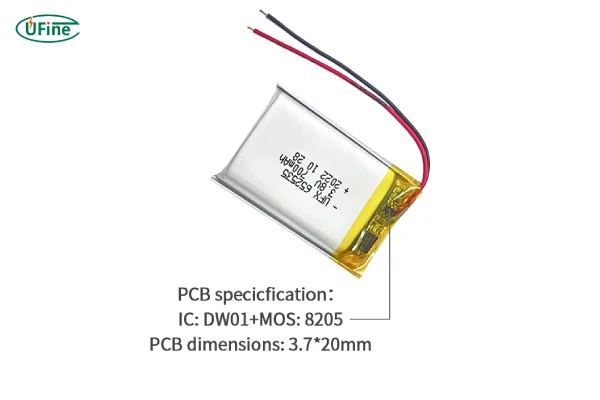
Lithium-ion batteries are sensitive to conditions like overcharging and over-discharging, which can compromise their performance or even lead to catastrophic failure. Overcharging occurs when the charging voltage exceeds the battery’s maximum limit, potentially causing the internal pressure to rise, leading to leaks, ruptures, or explosions. Over-discharging happens when the discharge voltage drops too low, resulting in diminished capacity and shortening the battery’s lifespan.
A lithium battery protection board (PCB) serves as a critical safeguard by protecting against both overcharge and over-discharge scenarios. It is an integral part of the battery management system, designed to protect the battery from these harmful conditions and ensure safe operation.
Part 2. How does a lithium battery PCB work?
A lithium battery PCB typically contains components such as microcontrollers, MOSFETs (Metal-Oxide-Semiconductor Field-Effect Transistors), resistors, and capacitors.
The basic working principle involves real-time monitoring of the battery’s voltage, current, and temperature. If the battery exceeds preset thresholds, the microcontroller sends signals to the MOSFETs, turning them on or off to regulate the charge and discharge processes.
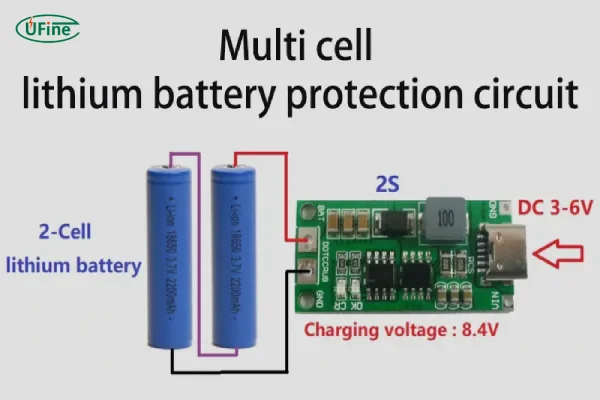
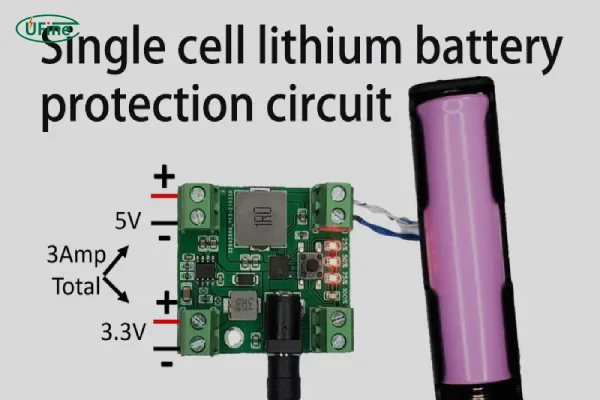
The primary goal of a lithium battery PCB is to ensure the safe operation of the battery by preventing conditions that could lead to damage or failure.
Part 3. Key functions of a lithium battery PCB
A well-designed lithium battery PCB includes various safety features to protect the battery from potential hazards. These functions can be classified as basic, enhanced, and extended protections:
1 Basic Protection:
- Overcharge Protection
- Over-discharge Protection
2 Enhanced Protection:
- Overcurrent Protection
- Over-temperature Protection
- Low-temperature Protection
- Short Circuit Protection
- Reverse Connection Protection
Temperature plays a major role in battery safety and performance — you can also read more about how temperature affects battery performance for a deeper explanation.
3 Extended Protection:
- Good Consistency
- Minimal Pressure Difference
- Minimal Temperature Difference
These protections are not always required for every battery, but they are essential for ensuring the longevity and safe operation of lithium-ion batteries, especially in more demanding applications.
Part 4. Types of lithium battery PCB
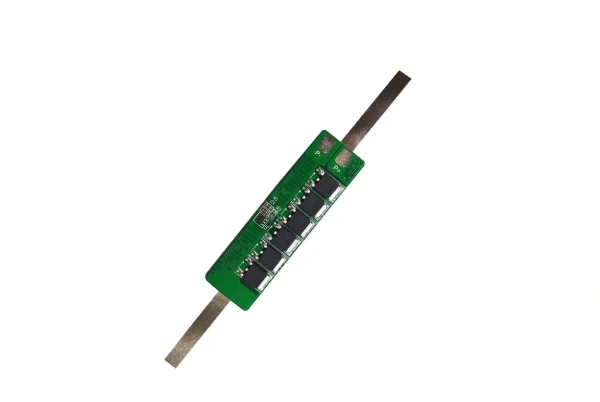
Hardware-type lithium battery PCB can be divided into an independent port protection circuit board and a common port (same port) protection circuit board.
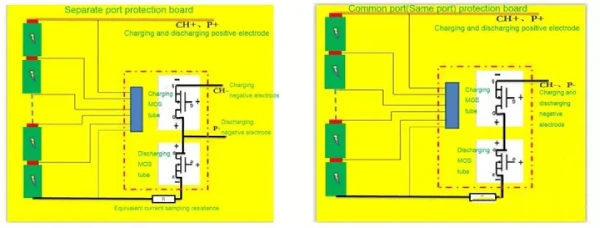
1 Independent port protection circuit board:
There are three ports in total (charging port, discharge port, common terminal); that is, the charging and discharging ports are separate. (Refer to the picture on the left) There are two ports, CH+ and CH-, for charging and two ports, P+ and P-, for discharging.
2 Public port (same port) protection circuit board:
There are two ports (positive and negative ports), one for charging and discharging. (Refer to the picture on the right) There are two ports for charging, CH+ (P+) and CH- (P-), and two ports for discharging, CH+ (P+) and CH- (P-).
Part 5. What is a lithium battery BMS (battery Management System)?
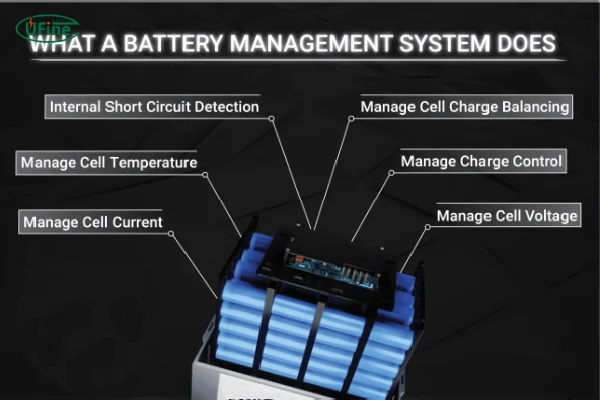
The lithium battery BMS is an advanced system designed to manage and optimize the performance of an entire battery pack. It prevents overcharging and over-discharging, extends the battery’s lifespan, and ensures that the battery operates within safe parameters.
While a PCB protects individual cells, the BMS has broader functionality, including monitoring, data collection, and fault detection. Additionally, the BMS plays a vital role in managing communication between the battery and external devices, providing real-time data and alerts.
Part 6. Lithium battery BMS principle
Lithium battery BMS includes control IC, MOS switch, fuse Fuse, NTC thermistor, TVS transient voltage suppressor, capacitor and memory, etc.
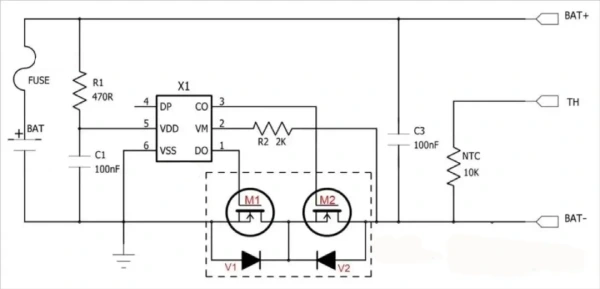
In the picture above, the control IC turns the circuit on and off by controlling the MOS switch to protect it. FUSE implements secondary protection on this basis. TH is temperature detection, and there is a 10K NTC inside. NTC mainly implements temperature detection. TVS mainly suppresses surges.
Part 7. Functions of a lithium battery BMS
The BMS performs several essential functions to ensure that the battery operates optimally:
Sensing and Measuring:
The BMS continuously monitors parameters like voltage, current, temperature, and the state of charge (SOC). This data helps ensure the battery stays within safe operating limits.
Alarm and Protection:
If an anomaly is detected—such as overcharge, over-discharge, or temperature extremes—the BMS triggers an alarm and takes protective measures, such as disconnecting the battery or adjusting the charge/discharge rates.
Balanced Management:
Battery cells often have slight differences in voltage, resistance, and capacity. The BMS ensures these variations are minimized through active and passive balancing, ensuring uniform charging and discharging across all cells in the pack.
Battery efficiency is also closely related to resistance, and understanding lithium battery internal resistance can help you design more reliable battery systems.
Communication and Positioning:
The BMS can transmit data to external platforms, enabling real-time monitoring of the battery’s health and performance. This data is crucial for applications where battery reliability is critical, such as in electric vehicles or renewable energy systems.
Part 8. Types of BMS PCB boards
Different applications require different battery BMS board designs. Some focus on basic protection, while others emphasize advanced monitoring.
| Type | Features | Typical applications |
|---|---|---|
| Protection BMS | Basic safety protection | Small electronics |
| Smart BMS | Monitoring and communication | Power tools, robotics |
| High current BMS | Heavy-duty components | EV and energy storage |
| Balanced BMS | Cell balancing | Multi-cell battery packs |
Choosing the right BMS PCB board ensures safety, performance, and battery longevity.
Part 9. Lithium battery PCB vs. BMS: key differences
Although the terms pcb battery and bms pcb board are sometimes used interchangeably, they actually serve different roles. A lithium battery PCB mainly handles electrical routing and connections, while a BMS circuit board focuses on protection and monitoring.
In many battery designs, the BMS is mounted directly onto a PCB. That’s why the terminology can be confusing. But understanding the difference helps you choose the right solution.
Here’s a clear comparison:
| Feature | Lithium battery PCB | BMS PCB board |
|---|---|---|
| Main function | Electrical routing | Battery protection and monitoring |
| Intelligence level | Low | High |
| Safety protection | Limited | Comprehensive |
| Cell balancing | No | Yes |
| Communication | Rare | Common |
| Application | Basic battery packs | Smart battery systems |
In practice, a simple consumer device may only need a basic circuit board battery. However, more advanced applications like robotics, power tools, or energy storage systems usually require a full lithium battery BMS.
Increasingly, manufacturers combine both into a BMS PCB board, integrating structure and intelligence into a compact solution.
Part 10. How to choose BMS for li-ion battery
Choosing the right BMS for Li-ion battery systems requires careful consideration. It’s not just about voltage. Current, battery configuration, and operating environment all matter.
First, consider the battery configuration. A 3S lithium battery needs a different BMS compared to a 12S system. Then, evaluate current requirements. High-power applications need BMS circuit boards capable of handling peak loads.
You should also think about temperature conditions. If your battery operates in extreme environments, temperature protection becomes essential.
Finally, consider communication features. Smart lithium battery BMS designs allow remote monitoring and predictive maintenance. This is particularly useful in industrial equipment and IoT devices
Part 11. FAQs
1. Can a lithium battery work without a BMS?
Technically, yes — but it’s not recommended. Without a BMS, lithium batteries lack protection against overcharge, over-discharge, and short circuits. This increases the risk of battery damage and safety issues, especially in multi-cell battery packs.
2. Is a protection board the same as a BMS?
Not exactly. A protection board usually offers basic safety features like overcharge and over-discharge protection. A full battery BMS, however, includes advanced functions such as cell balancing, temperature monitoring, and communication.
3. Do single-cell lithium batteries need a BMS?
Single-cell lithium batteries may only need a basic protection PCB rather than a full BMS. However, for safety and longevity, even single-cell designs often include protection circuits.
4. What happens if a lithium battery PCB is poorly designed?
A poorly designed PCB can lead to uneven current flow, overheating, voltage instability, and reduced battery lifespan. In severe cases, it may also create safety hazards or cause device failure.
5. How do I know if my battery needs a smart BMS?
If your application requires monitoring, remote communication, or long battery lifespan, a smart BMS is recommended. These systems are common in energy storage, robotics, and electric mobility devices.
6. Can I customize a BMS PCB board for my battery pack?
Yes. Many manufacturers offer custom BMS PCB solutions based on voltage, current, battery configuration, and application requirements. Custom designs are common for industrial and OEM battery projects.
7. Where is the BMS located in a lithium battery pack?
The BMS is usually mounted inside the battery pack, connected to each cell. In many designs, the BMS is integrated directly onto the battery PCB board for compact size and better performance.
Related Tags:

More Articles
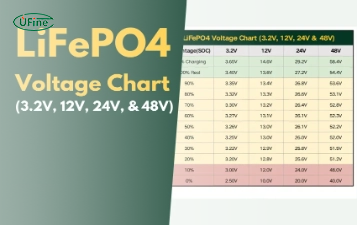
LiFePO4 Voltage Chart Guide: Everything You Need to Know
Check the LiFePO4 voltage chart for 3.2V, 12V, 24V and 51.2V batteries. Compare SOC, charging voltage, cutoff limits and internal resistance.
Lithium Ion Cell Sizes: A Comprehensive Guide
Compare lithium ion cell sizes with a chart of dimensions, capacity ranges, cell types, applications, and key factors for selecting the right battery.
6 Volt Tractor Battery vs 12 Volt: Which One Fits Your Farm Equipment Best?
Compare 6V and 12V tractor batteries. Learn which voltage fits vintage or modern tractors, which specifications matter, and how to convert safely.
The Ultimate Guide to a Molten Salt Battery
Learn how a molten salt battery works, its main types, advantages, disadvantages, operating temperature, safety, and grid energy storage uses.
2000mAh Battery Runtime: How Long Will It Last in Real Devices?
Learn how to calculate 2000mAh battery runtime and backup time. See real device examples, power-loss factors, and battery replacement checks.