What is the white stuff on battery terminals, and how do you clean it? The white stuff on battery terminals is corrosion, and it can be cleaned using a baking soda solution, a brush, and a few simple tools. Regular cleaning and maintenance can prevent battery failure and extend its life.
You’re not alone if you’ve ever opened your car hood, checked your RV or boat battery, and noticed a strange white, powdery substance. This “white stuff on battery terminals” is a common problem many vehicle and equipment owners face. While it may seem harmless, this buildup can lead to poor electrical connections, reduced battery efficiency, and complete battery failure.
In this comprehensive guide, we’ll break down everything you need to know about this issue, from what causes the white stuff to how to clean it and prevent it from coming back. Whether you’re a DIY enthusiast or want to avoid expensive repairs, this guide will walk you through every step.
Part 1. What is the white stuff on battery terminals?
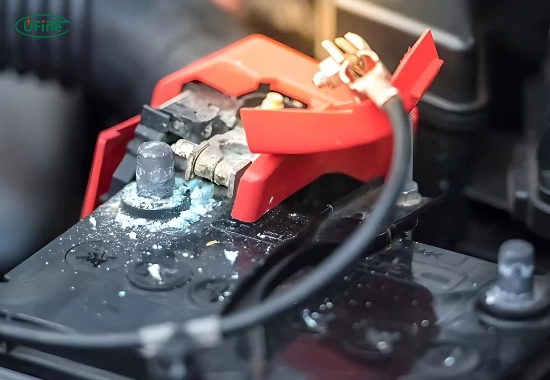
The white stuff you see on battery terminals is typically caused by corrosion due to a chemical reaction between battery acid (electrolyte) and the metal terminals. Depending on the terminal material, the result is a white, ashy substance, most commonly lead or zinc sulfate.
Sometimes, it may appear bluish-green, especially if your battery terminals are made of copper. This substance is toxic and corrosive and should be handled with care.
Part 2. Why does battery terminal corrosion happen?
Several factors contribute to the formation of the white stuff on battery terminals:
- Electrolyte leakage: Small leaks from the battery cause acid to react with air and metal.
- Overcharging: Excess charging causes the battery to heat up and expel gases, leading to acid deposits.
- Undercharging: Low voltage leads to sulfation, which appears as a white crust.
- Age: Older batteries are more prone to leaks and corrosion.
- Humidity and temperature: Extreme weather accelerates chemical reactions.
- Poor maintenance: Dirt and moisture around the battery terminals encourage corrosion.
Understanding these causes is crucial for prevention.
Part 3. Is the white stuff dangerous to touch or breathe?
Yes, it can be hazardous. The white corrosion is acidic and can cause skin irritation, eye damage, and respiratory problems if inhaled. Always take proper precautions when handling it:
- Wear rubber gloves
- Use safety goggles
- Avoid breathing in dust
- Keep it out of the reach of children and pets
If any powder gets on your skin, wash immediately with soap and water.
Artikel Terkait: Is Battery Acid Dangerous? Safety Information and Risks
Part 4. How does corrosion affect battery performance?
Even a small amount of white stuff on battery terminals can significantly impact performance. Here’s how:
- Interrupts electrical flow: Corrosion increases resistance in the connection, making it harder for electricity to flow.
- Harder starts: Your car or boat may hesitate or fail to start.
- Drains battery faster: The battery works harder to compensate for the increased load.
- Shortens lifespan: Corrosion eats away at the metal, damaging the terminals and reducing their lifespan.
- Can cause alternator failure: Your vehicle’s charging system may overwork and wear out.
So, while it may seem minor, corrosion is a significant threat to battery health.
Part 5. Tools and materials needed for cleaning
Before you begin cleaning, gather the following items:
- Rubber gloves
- Safety glasses
- An old toothbrush or a wire terminal brush
- Baking soda
- Water
- Small container or cup
- Clean rag or cloth
- Wrench (to loosen battery cables)
- Petroleum jelly or battery terminal protector spray
- Optional: White vinegar or battery cleaner spray
These simple tools are all you need to clean your battery like a pro.
Part 6. Step-by-step guide to cleaning battery terminals
Here’s how to clean the white stuff off your battery terminals effectively and safely:
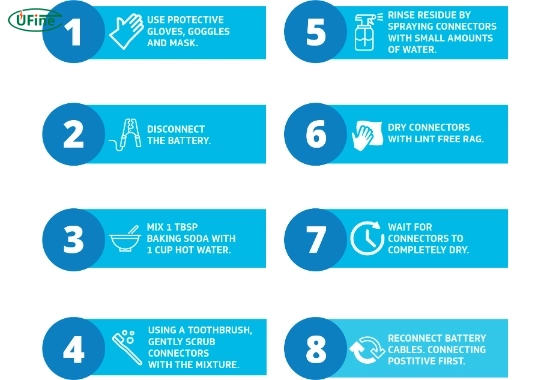
Step 1: Turn off the power
Ensure the engine is off and remove the keys. For solar systems or RVs, disconnect from the primary power source.
Step 2: Disconnect the battery terminals
Always disconnect the negative terminal (black) first, then the positive (red). This prevents electrical shorts.
Step 3: Mix a cleaning solution
Combine one tablespoon of baking soda with 1 cup of warm water. Stir until fully dissolved.
Step 4: Scrub the terminals
Dip your brush into the solution and scrub the corroded terminals and cable ends. Don’t forget the battery posts.
Step 5: Rinse and dry
Wipe off the residue with a damp cloth. Then, dry everything completely to prevent further corrosion.
Step 6: Apply protective coating
Coat the terminals with petroleum jelly or use a battery terminal protector spray. This seals the metal and prevents future buildup.
Step 7: Reconnect the battery
Attach the positive cable first, followed by the negative. Make sure the connections are tight and secure.
Part 7. Can you use alternatives like Coca-Cola or vinegar?
Yes, but with caution.
- Coca-Cola contains phosphoric acid, which can break down corrosion. However, it leaves a sticky residue that can attract dirt.
- White vinegar is effective, but should be rinsed thoroughly to avoid lingering acid.
Baking soda and water remain the safest, cleanest, and most effective method for most users.
Part 8. Preventing white stuff on battery terminals
Prevention is key to reducing future issues. Here are some pro tips:
- Check terminals monthly for signs of buildup
- Apply petroleum jelly or anti-corrosion gel
- Install felt battery washers
- Keep the battery top clean and dry
- Avoid overcharging or deep discharging
- Inspect for cracks or leaks
- Use smart chargers that shut off automatically
By being proactive, you can extend the life of your battery and avoid costly repairs.
Part 9. When should you replace your battery?
Sometimes, cleaning isn’t enough. Replace your battery if:
- It’s older than 4–5 years
- It won’t hold a charge
- There’s visible damage or leakage
- Corrosion reappears too frequently
- The battery smells like rotten eggs (a sign of a sulfur gas leak)
A failing battery affects your whole electrical system. Don’t wait until you’re stranded.
Part 10. How to choose the correct replacement battery
If it’s time for a new battery, consider the following:
- Size and type (Group number, terminal location)
- Cold Cranking Amps (CCA) for your climate
- Reserve Capacity (RC) for back-up power
- Maintenance-free vs. refillable
- Brand reputation and warranty
- Compatibility with your vehicle or system
Consult a professional or refer to your owner’s manual to determine the correct match.
Part 11. FAQs about white stuff on the battery
What is the white stuff on battery terminals?
It’s battery corrosion, often caused by acid leakage or chemical reactions between metal and electrolyte.
Is it safe to touch the white stuff on a battery?
No. It’s mildly toxic and can irritate the skin or eyes. Always wear protective gear.
Can I clean battery terminals without disconnecting them?
It’s not recommended. You risk short circuits. Always disconnect before cleaning.
How can I prevent corrosion from recurring?
Keep terminals clean, use anti-corrosion products, and check for leaks or loose connections.
Can a corroded battery damage my car?
Yes. It can cause starting problems, alternator strain, and electrical failures.
Related Tags:

More Articles
LiPo Battery Discharge Rate Guide & Calculation Tips
Understand LiPo battery discharge rates, C-ratings, and how to calculate max current. Essential guide for RC, drones, and electronics users.
High‑Capacity 3S LiPo Batteries: 5000 mAh vs. 10000 mAh
Compare 3S LiPo 5000mAh vs 10000mAh batteries by weight, power, and use. Find the best fit for your drone, RC car, or boat setup.
Top 5 Applications for Small 3S LiPo Batteries
Small 3S LiPo batteries power drones, RC gear, wearables, and robotics with high energy and low weight. Making them ideal for compact electronics projects.
Building and Charging Your Own 3S LiPo Pack: A Step‑by‑Step Guide
Learn how to build, balance, and charge a 3S LiPo battery pack safely at home with this complete DIY guide for hobbyists and beginners.
How to Choose the Right LiPo Battery Plug Type?
Discover the best LiPo battery plug types, how to choose them, and expert tips for safe usage, soldering, and maintenance.
Custom Lithium-ion Battery Manufacturer